
Webapps
Historical Data App
Get rock-solid historical forex data from DukasCopy for bulletproof backtesting in MetaTrader, EA Studio, and FSB Pro.
 Webapps
- Bars Per Symbol
- 200,000
- Years of historical data for comprehensive strategy testing across market cycles
Why Your Backtests Keep Failing You
Most traders struggle with unreliable backtests because they're using low-quality data with gaps, missing bars, and wrong timezones. The Forex Historical Data App solves this by delivering tick-perfect data from DukasCopy - the same institutional-grade source that banks use. Whether you're running strategies in MetaTrader, generating new ones in EA Studio, or testing in FSB Pro, our data gives you the foundation for backtests you can actually trust. No more wondering if your strategy failed because of bad data or bad logic.
Everything You Need for Rock-Solid Backtesting
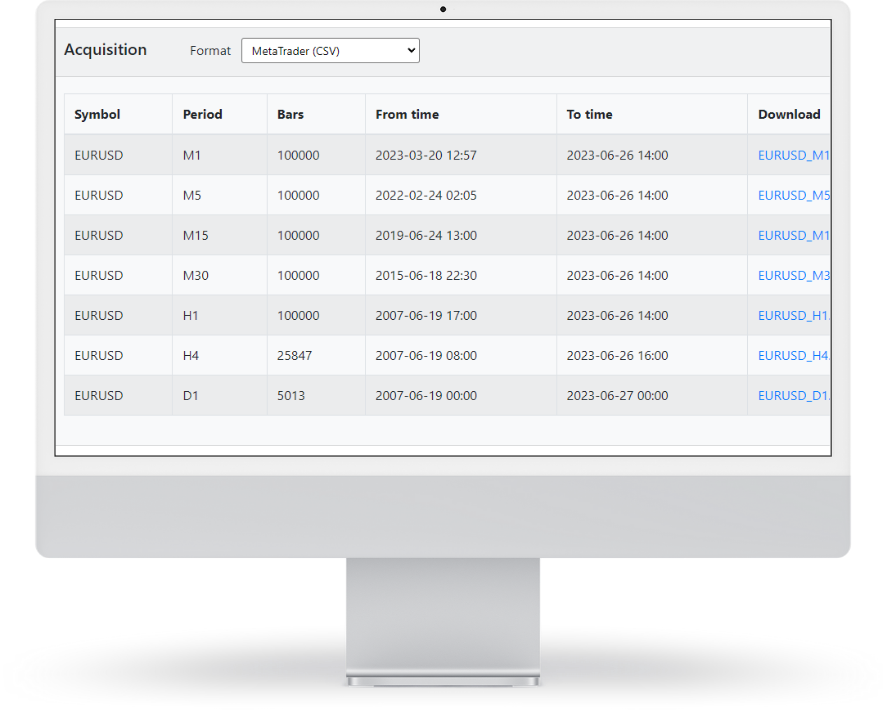
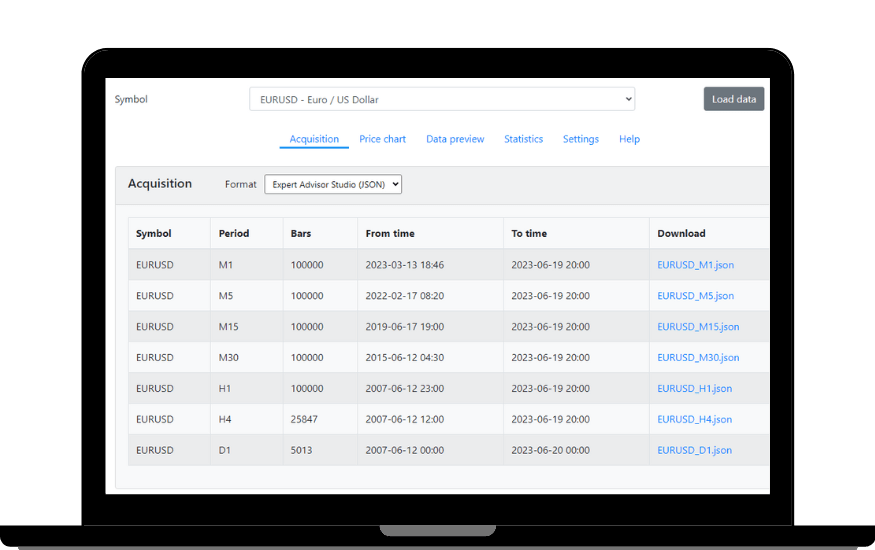
Fast downloads, multiple formats, and up to 200,000 bars of clean data ready for your platform.
Multiple Markets and Timeframes
The Forex Historical Data App covers major forex pairs, commodities including XAUUSD (Gold), cryptocurrencies, and indices.
Read more
The Forex Historical Data App covers major forex pairs, commodities including XAUUSD (Gold), cryptocurrencies, and indices. Data is available across all standard timeframes from M1 through W1, giving you the flexibility to test strategies at whatever resolution your approach requires. Whether you need five years of H1 bars for a swing strategy or granular M5 data for scalping logic, the app delivers up to 200,000 bars per symbol. This breadth of coverage makes it practical for both single-pair and multi-market portfolio testing.
Seamless Platform Integration
Data exports in multiple formats compatible with MetaTrader 4, MetaTrader 5, EA Studio, FSB Pro, and Excel.
Read more
Data exports in multiple formats compatible with MetaTrader 4, MetaTrader 5, EA Studio, FSB Pro, and Excel. The app produces clean, properly formatted files ready for direct import without additional conversion steps. For MT4 users, the import process is straightforward through the History Center. EA Studio and FSB Pro accept the exported files natively, so there is no gap between downloading your data and running your first backtest. This cross-platform compatibility means you are not locked into a single testing environment.
Symbol Settings Configuration
Each symbol can be configured individually with custom spread values, commission settings, and naming conventions that match your specific broker's format.
Read more
Each symbol can be configured individually with custom spread values, commission settings, and naming conventions that match your specific broker's format. This matters because broker symbol names and trading conditions vary; EURUSD on one broker may appear as EURUSDm or EURUSDpro on another. The settings panel lets you adjust these details so that your exported data files integrate cleanly without manual renaming or post-processing. Getting this right before downloading saves considerable time during the import step.
One-Click Data Downloads
Each symbol can be configured individually with custom spread values, commission settings, and naming conventions that match your specific broker's format.
Read more
Each symbol can be configured individually with custom spread values, commission settings, and naming conventions that match your specific broker's format. This matters because broker symbol names and trading conditions vary; EURUSD on one broker may appear as EURUSDm or EURUSDpro on another. The settings panel lets you adjust these details so that your exported data files integrate cleanly without manual renaming or post-processing. Getting this right before downloading saves considerable time during the import step.
DukasCopy Tick-Perfect Quality
Each symbol can be configured individually with custom spread values, commission settings, and naming conventions that match your specific broker's format.
Read more
Each symbol can be configured individually with custom spread values, commission settings, and naming conventions that match your specific broker's format. This matters because broker symbol names and trading conditions vary; EURUSD on one broker may appear as EURUSDm or EURUSDpro on another. The settings panel lets you adjust these details so that your exported data files integrate cleanly without manual renaming or post-processing. Getting this right before downloading saves considerable time during the import step.
Timezone Synchronization
The app allows you to set the exact UTC offset that matches your broker's server time.
Read more
The app allows you to set the exact UTC offset that matches your broker's server time. This ensures that candle boundaries in your exported data correspond precisely to what your MetaTrader installation shows. Timezone mismatches are one of the most common and least visible causes of backtest discrepancies; a strategy that looks profitable when tested with UTC+2 data may produce entirely different results when the same logic runs against UTC+0 bars. The synchronization feature removes this variable from your testing workflow.
Performance Characteristics and Data Quality Details
Built for traders who need their backtests to match live trading results.
Up to 200,000 Bars Per Symbol
Years of historical data for comprehensive strategy testing across market cycles
Daily Updates
Fresh data every day so your backtests reflect current market conditions
Multiple Export Formats
CSV, JSON, and platform-specific formats for MetaTrader, EA Studio, FSB Pro, and Excel
Institutional-Grade Source
DukasCopy tick data compiled into clean bars with minimal gaps
Cross-Platform Compatibility
Works seamlessly with MT4, MT5, EA Studio, FSB Pro, and custom analysis tools
Timezone Flexibility
Match your broker's exact timezone settings for accurate backtest results
How the Data Selection Process Works
Simple steps to get the exact historical data you need for your trading platform.
Symbol Selection
Begin by choosing your desired currency pair, commodity, crypto, or index from the available instruments.
Read more
Begin by choosing your desired currency pair, commodity, crypto, or index from the available instruments. The selection process allows you to focus on the specific markets you want to analyze or backtest.
Format Configuration
Next, select the export format that matches your trading platform requirements.
Read more
Next, select the export format that matches your trading platform requirements. Whether you're using MetaTrader, Expert Advisor Studio, Forex Strategy Builder, or Excel, the system prepares the data in the correct format for seamless integration.
Data Processing
The system fetches precompiled historical data from our servers.
Read more
The system fetches precompiled historical data from our servers. This data has already been processed from institutional-grade tick data and organized into clean bar data across multiple timeframes, ensuring accuracy and completeness.
File Download
Once processing is complete, you download the prepared files directly to your local system.
Read more
Once processing is complete, you download the prepared files directly to your local system. The files are ready for immediate use in your chosen trading platform without additional formatting requirements.
Platform Integration
Import the downloaded files into your trading platform using standard import functions.
Read more
Import the downloaded files into your trading platform using standard import functions. After importing, you can customize symbol settings such as spreads, swaps, and commissions to match your specific broker's trading conditions.
Who Is This Software For?
The Historical Data App solves a specific problem: unreliable backtesting caused by poor-quality historical price data. If you have never questioned the accuracy of your MetaTrader history or noticed gaps in your backtest charts, you may not realize you need this. But for traders who take testing seriously, data quality is the foundation everything else depends on. Here is who benefits most:
EA Studio and FSB Pro users who need clean data for strategy generation
Both platforms produce better results when fed accurate historical information.
Read more
Both platforms produce better results when fed accurate historical information. The built-in data sources are adequate for casual testing, but serious strategy development requires institutional-grade bars without gaps or interpolation artifacts. The Historical Data App provides exactly that, formatted for direct import into either platform.
MetaTrader backtesting users frustrated by inconsistent results
If you have ever run the same EA on the same pair and gotten meaningfully different backtest outcomes depending on which broker's data you used, the problem is almost certainly data quality.
Read more
If you have ever run the same EA on the same pair and gotten meaningfully different backtest outcomes depending on which broker's data you used, the problem is almost certainly data quality. Free MT4 history data is notoriously inconsistent. Replacing it with DukasCopy tick-compiled bars produces repeatable, trustworthy results. The import process for MT4 takes just a few minutes.
Strategy developers who test across multiple timeframes and pairs
Building a diversified portfolio requires testing strategies on various instruments and chart periods.
Read more
Building a diversified portfolio requires testing strategies on various instruments and chart periods. Downloading clean data for 20 or 30 symbols across multiple timeframes is tedious when done manually. The one-click bulk download and consistent formatting across all exports removes that friction entirely.
Traders whose broker uses a non-standard timezone or symbol naming
The timezone synchronization and symbol configuration features exist for this exact situation.
Read more
The timezone synchronization and symbol configuration features exist for this exact situation. If your broker runs on UTC+3 while your data source defaults to UTC+0, every candle boundary is wrong. The app lets you match the exact offset and naming convention, so your backtests reflect real conditions on your specific broker.
Those who want to compare strategy performance across data sources
Some traders run the same strategy against multiple data feeds to test robustness.
Read more
Some traders run the same strategy against multiple data feeds to test robustness. Having access to clean DukasCopy data alongside your broker's native history gives you two independent references. Strategies that perform consistently across both have a better chance of holding up in live conditions.
Common Questions
Everything you need to know about getting started with quality historical data.
Where does the historical data come from, and why is DukasCopy considered institutional-grade?
The Historical Data App sources all price data from DukasCopy, a Swiss-based financial data provider that aggregates tick-level pricing from multiple liquidity sources. DukasCopy is considered institutional-grade because its data represents actual market transactions rather than indicative quotes from a single broker. Banks, hedge funds, and professional trading desks rely on this type of aggregated feed for their own analysis. The tick data is compiled into clean OHLC bars with minimal gaps, producing historical records that closely match what actually occurred in the market at each moment.
How does DukasCopy tick data differ from the free historical data available inside MetaTrader?
MetaTrader's built-in History Center provides data from your broker's own feed, which often contains missing bars, interpolated prices during low-liquidity periods, and inconsistent timezone handling. DukasCopy data is sourced independently from multiple liquidity providers and compiled at the tick level before being converted to bars. This produces fewer gaps, more accurate OHLC values, and consistent quality across all instruments. The practical difference shows up in backtest reliability; strategies tested on DukasCopy data tend to produce results that more closely match live execution because the underlying price history is cleaner and more complete.
How does DukasCopy data compare to other data providers like TrueFX or HistData?
TrueFX and HistData both offer free forex tick data, but coverage, consistency, and format differ. TrueFX provides raw interbank quotes for a limited set of pairs with no built-in bar compilation or timezone adjustment. HistData offers pre-formatted bars but has discontinued updates for some instruments and timeframes. DukasCopy provides broader instrument coverage, ongoing daily updates, and tick-perfect compilation into all standard bar formats. The Historical Data App adds timezone synchronization and platform-specific export formatting on top of the DukasCopy feed, which saves considerable manual processing time compared to working with raw files from free providers.
Which forex pairs are available in the Historical Data App?
The app covers all major forex pairs (EURUSD, GBPUSD, USDJPY, USDCHF, AUDUSD, USDCAD, NZDUSD) plus a wide range of crosses and minor pairs. Commodity instruments, cryptocurrencies, and indices are also available. The exact instrument list depends on DukasCopy's coverage and is updated as new symbols are added. For most retail traders focused on the main forex market, all commonly traded pairs are included.
How far back does the historical data go for each instrument?
Coverage depth varies by instrument. Major forex pairs typically offer 15 or more years of history, extending back to 2003 or earlier for the most liquid pairs. Minor crosses and commodities may have shorter histories depending on when DukasCopy began collecting data for that specific instrument. Cryptocurrencies naturally have shorter records given their more recent market development. The app supports up to 200,000 bars per symbol, which on H1 translates to roughly 8 to 10 years of continuous data.
Is XAUUSD (Gold) data included?
Yes. XAUUSD is available across all supported timeframes from M1 through W1. Gold is one of the more frequently requested instruments, particularly among traders testing scalping or breakout strategies on the H1 chart. The DukasCopy feed for Gold provides the same tick-compiled quality as the forex pairs, with daily updates and configurable timezone settings.
What timeframes are available; M1, M5, M15, M30, H1, H4, D1, W1?
All standard timeframes are supported: M1, M5, M15, M30, H1, H4, D1, and W1. The app compiles DukasCopy tick data into your selected bar format during the download process. You can download the same symbol across multiple timeframes simultaneously for multi-timeframe strategy testing. Each timeframe produces a separate file formatted for your chosen export target.
How do I import the data into MetaTrader 4; is it a simple drag-and-drop or does it require a script?
The import process for MT4 uses the built-in History Center, accessed through Tools > History Center in the platform menu. You select the symbol, choose the timeframe, and use the Import button to load the CSV file produced by the Historical Data App. No scripts or external tools are required. The process takes a few minutes per symbol and timeframe. The app formats the exported file specifically for MT4's import requirements, so column ordering, date formatting, and delimiter settings are already correct. A step-by-step guide is included with the software.
How does the timezone synchronization work; can I match any broker's server time?
The app includes a configurable UTC offset field where you enter your broker's server time relative to UTC. Common offsets include UTC+0, UTC+2, and UTC+3, though any offset is supported. When you download data, the app adjusts all candle open and close timestamps to match your specified offset before compiling the bars. This means your exported M15 or H1 candles will have identical boundaries to what your MetaTrader installation shows, which is essential for accurate backtesting. If you are unsure of your broker's offset, checking the server time displayed in MT4's Market Watch window against UTC provides the answer.
What operating systems does it run on; Windows only, or also Mac and Linux?
The Historical Data App runs natively on Windows. Mac and Linux are not natively supported, though running the application through a Windows virtual machine or VPS is a common workaround. The software is lightweight and does not require significant system resources, so it operates comfortably within most virtualization environments. For traders already running MetaTrader on a Windows VPS, adding the Historical Data App to the same server is practical.
How often should I update my historical data to keep strategies relevant?
For active strategy development and testing, updating data weekly is a reasonable practice. The app provides daily updates, so you can refresh as frequently as needed. If you are running strategies live and periodically re-testing them against current data, weekly or bi-weekly updates keep your backtests current without excessive effort. Before any significant strategy decision, such as deploying a new EA or adjusting risk parameters, running a fresh backtest on updated data is recommended.
How does the Historical Data App compare to downloading free data from MetaTrader's History Center?
MetaTrader's History Center pulls data from your broker's server, which varies in quality, depth, and consistency between providers. Gaps, missing bars, and timezone discrepancies are common, particularly on lower timeframes. The Historical Data App provides DukasCopy tick-compiled bars with consistent quality across all instruments, configurable timezone matching, and platform-specific formatting. The result is backtests that produce more reliable, repeatable outcomes. The tradeoff is cost; MetaTrader's data is free, while the Historical Data App requires a subscription. For casual testing, free data may be adequate. For serious strategy development where backtest accuracy directly affects trading decisions, the quality difference justifies the investment.
Ready to Stop Guessing About Your Backtests?
Get the same institutional-grade historical data that professional traders use. Clean bars, proper timezones, and formats that work with every major trading platform. Your strategies deserve data you can trust.
Backtest, demo, then a small live account.
That is the order we test our own robots in, and the Account Tracker records every trade along the way. Historical Data App is one step of it; the other tools cover the rest.