

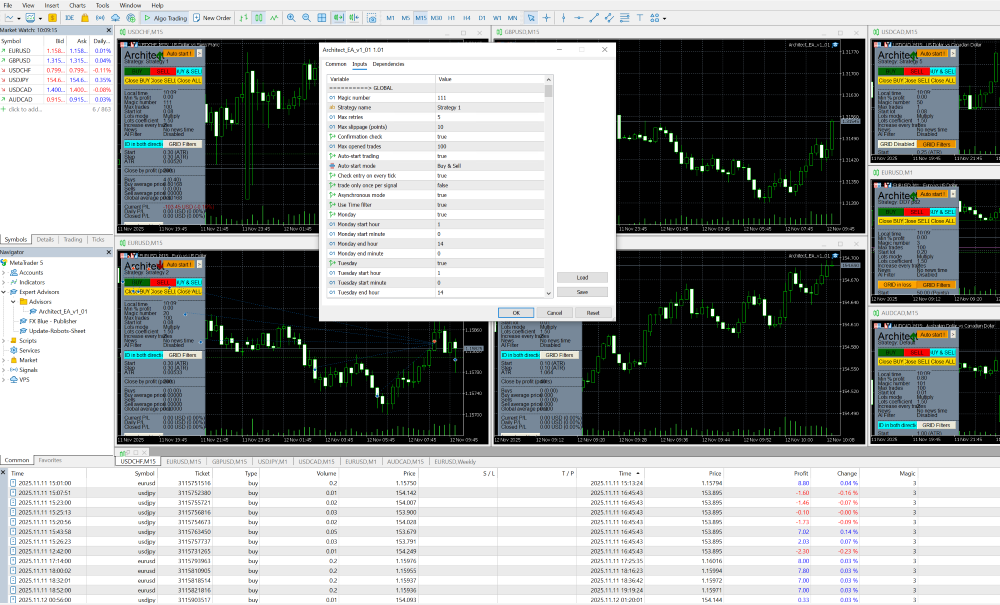
cTrader vs MetaTrader comes down to a genuine trade-off rather than one platform simply beating the other. cTrader offers a more modern interface, deeper native charting, and Level II market depth that gives manual traders a clearer view of real liquidity. MetaTrader platforms, MT4 and MT5, offer a far larger ecosystem of brokers, expert advisors, and community-built tools built up over two decades. Neither wins outright. The right trading platform depends on whether you’re trading manually, running algorithms, and how much you value ecosystem size versus execution transparency.
That’s the short answer. I’ve traded on both over the years, and honestly, I still keep accounts on each for different reasons. The rest of this piece walks through interface, charting, execution, algorithmic trading, asset coverage, and a few other factors that actually matter once you’re past the marketing pages.
Why This Isn’t About a Universal “Best”
Before comparing features one by one, it’s worth being upfront that this comparison won’t end with a single winner, because that’s not really how these two platforms work.
Both cTrader and MetaTrader are genuinely capable, professional-grade trading software. The differences that matter aren’t about which one is objectively superior, they’re about which one’s design philosophy matches your own trading style. A scalper who cares deeply about execution transparency and a developer with a library of existing MQL4 expert advisors are going to reach different, equally reasonable conclusions from the same comparison.
A little history helps explain why these two platforms feel so different today. MetaTrader is a product of MetaQuotes Software. MetaTrader 4 launched in 2005 and became the dominant retail forex trading platform for years, largely on the strength of its simplicity and its expert advisor ecosystem. MetaTrader 5 followed in 2010, expanding into a genuinely multi-asset platform with more timeframes and additional order types. cTrader, developed by Spotware Systems, launched a year later in 2011, built from the outset around a more modern interface and stronger execution transparency for ECN and STP-style brokers. That timeline matters because it explains the ecosystem gap you’ll notice throughout this article. MetaTrader simply had a longer head start to accumulate brokers, developers, and third-party tools.
User Interface and Customization
This is usually the first thing traders notice, and the difference is real rather than cosmetic.
MetaTrader’s Familiar but Rigid Layout
MetaTrader provides a straightforward interface that’s quick to learn, with most brokers offering tutorials and fairly simple onboarding for both MT4 and MT5. That familiarity is a genuine strength. The trade-off is a layout that feels somewhat fixed by comparison to newer platforms, docking panels and resizable windows exist, but the overall structure feels locked into a design pattern that hasn’t changed dramatically in years.
cTrader’s Modern, Flexible Workspace
cTrader takes a noticeably different approach, offering fuller workspace customization, including the ability to detach charts into separate windows across multiple monitors and arrange panels more freely. Traders coming from MetaTrader often comment that cTrader simply feels more current, cleaner fonts, smoother charting, less visual clutter. Whether that’s worth switching platforms for depends entirely on how much interface polish matters to your actual trading, which is a genuinely personal call.
I’ll admit a small bias here. The first time I opened cTrader after years on MT4, the difference was almost jarring, in a good way. Everything felt lighter, the fonts were easier on the eyes during a long session, and detaching a chart to a second monitor just worked without fighting the layout. That said, I still catch myself instinctively reaching for MT4 shortcuts out of pure muscle memory, which says something about how much familiarity counts for on its own, separate from which interface is objectively cleaner.
Charting and Technical Analysis Tools
Here’s an area where cTrader has built a real, measurable advantage, at least on paper.
Timeframes, Chart Types, and Built-In Indicators
cTrader ships with roughly 70 built-in technical indicators, compared to MT4’s collection in the 30s and MT5’s collection in the high 30s. cTrader also offers considerably more timeframes out of the box, commonly cited around 26 standard options versus MT4’s 9 and MT5’s 21, with additional tick, pip, and Renko-style chart variations pushing that range even further for traders who want it. On raw numbers alone, cTrader’s charting toolkit is the more generous one.
Where MetaTrader Closes the Gap
Numbers only tell part of the story, though. MetaTrader’s real strength here is its third-party ecosystem, a huge library of custom indicators built by an enormous community over two decades, which often closes the gap MetaTrader’s smaller native indicator count might otherwise suggest. If you’re the type of trader who wants extremely specific, purpose-built indicators someone else has already coded, MetaTrader’s ecosystem depth can outweigh cTrader’s larger built-in library.
There’s a practical angle worth mentioning too. cTrader’s extended timeframe options, including tick, pip, and Renko-style charts, tend to appeal specifically to traders who care about price action independent of clock time, since a Renko or tick chart filters out time entirely and focuses purely on movement. That’s a fairly specialized use case, but for the traders who rely on it, cTrader’s native support is a genuine convenience MetaTrader doesn’t offer quite as cleanly out of the box, even with third-party plugins layered in.
Order Types and Execution Model
This is where the two platforms diverge most in terms of underlying philosophy, not just feature count.
cTrader’s Level II Depth of Market
cTrader’s Level II Depth of Market, often called DOM, is arguably its most distinguishing technical feature. It shows available liquidity at multiple price levels in real time, rather than just a single best bid and ask. MT4 offers no native equivalent, and MT5’s depth of market view is comparatively limited. For scalpers and traders who plan entries and exits against actual visible liquidity, that transparency is a meaningful edge, and it’s a big reason cTrader has built a loyal following among active manual traders specifically.
Picture the practical difference. On a platform without DOM visibility, you place an order knowing only the current best bid and ask, essentially trusting that liquidity exists behind that price without seeing it. With cTrader’s DOM open, you can see how much size sits at each nearby price level before you commit, which lets you judge whether a large order might move through several levels rather than filling cleanly at one. For a scalper trading in and out repeatedly, that visibility genuinely changes how confidently you can size and time an entry.
cTrader also generally operates on an ECN or STP model designed to route orders directly to the market rather than through a dealing desk, which appeals to traders who want to minimize any perceived conflict of interest in how their orders get filled. Worth noting, though, that actual execution quality still depends heavily on your specific broker’s setup, on either platform.
Order Types and Placement Flexibility
cTrader tends to offer a somewhat richer set of order placement tools day to day, including the ability to place waiting orders over the weekend while markets are closed, drag-and-drop pending order placement directly on the chart, and specialized stop-out behaviors that give traders more granular control during margin events. MetaTrader’s order placement is more standardized across brokers, which some traders actually prefer for its predictability, even if it offers fewer bells and whistles.
Algorithmic Trading: MQL vs cAlgo
For anyone building or running trading robots, this is probably the single most consequential difference between the two platforms.
MQL4/MQL5 vs C# Through cTrader Automate
MetaTrader’s expert advisors are built in MQL4 or MQL5, proprietary languages with a strong C-like structure that have become the de facto standard for retail algorithmic trading, backed by an enormous existing library of pre-built EAs and a huge, established developer community. cTrader’s automation environment, cTrader Automate, formerly branded cAlgo, uses C#, a modern, widely used, professionally maintained language built on the .NET framework. For developers who already know C#, or who want automation skills that transfer to programming work outside trading entirely, that’s a genuine advantage cTrader offers over MetaTrader’s more proprietary approach.
The catch is ecosystem size. cTrader’s cBot community is considerably smaller than MetaTrader’s EA marketplace, so finding a ready-made cBot that matches your exact strategy is harder, and you’ll more often end up building from scratch. There’s also no direct conversion path between MQL and C#, an EA has to be genuinely rewritten, not just ported, to move from one platform to the other.
If you’re weighing which language to learn from scratch, it’s worth thinking beyond trading entirely. C# skills transfer directly to a huge range of software development work outside finance, while MQL’s usefulness is largely confined to the MetaTrader ecosystem itself. That’s not a knock on MQL, which does its specific job well, but it’s a real consideration if you’re investing serious time into learning to code your own strategies and want that time to pay off in more than one context.
Backtesting and Hosting Differences
Both platforms offer capable backtesting. MetaTrader’s Strategy Tester has been the long-standing retail standard, with most brokers supplying years of historical tick data for testing. cTrader Automate integrates backtesting directly into the same environment used for development, and includes a market replay feature that lets you visually step through historical data rather than just reading a report afterward. One genuinely distinctive feature: cTrader has offered free cloud hosting for a limited number of cBot instances directly through Spotware’s own infrastructure, something MetaTrader doesn’t provide natively, where running an EA continuously generally requires your own VPS or a machine that never sleeps.
Asset Coverage and Broker Availability
Beyond forex, the two platforms take somewhat different approaches to what you can actually trade.
Multi-Asset Range
MT4 remains primarily focused on forex and CFDs. MT5 expanded considerably beyond that, adding support for stocks, futures, options, and other instruments traded on centralized exchanges, alongside the usual forex and CFD offering. cTrader is also a genuinely multi-asset platform, covering forex, indices, commodities, and, depending on the broker, cryptocurrency instruments, typically as CFDs rather than direct crypto ownership. Broadly, both cTrader and MT5 cover a comparably wide range of markets, while MT4 stays narrower and more forex-focused by design.
Which Brokers Actually Offer Each Platform
Here’s where MetaTrader’s head start really shows. The sheer number of brokers offering MetaTrader, in either version, is considerably larger than the number offering cTrader, simply because MetaTrader has been the retail default for longer. cTrader tends to be favored specifically by ECN and STP-focused brokers who want to highlight execution transparency as a selling point, so its broker list is smaller but often skews toward that particular type of broker. If a specific instrument or a specific broker’s liquidity matters to you, checking platform availability before committing to a broker is worth doing either way.
This is actually one of the more overlooked steps in picking a platform, in my experience. Traders sometimes fall in love with cTrader’s interface, then discover their preferred broker, or the broker offering the tightest spreads on a pair they trade heavily, only supports MetaTrader. Working backward from your broker requirements to your platform choice, rather than the other way around, often saves a frustrating detour.
Copy Trading and Social Features
Both platforms have leaned into copy trading as retail interest in it has grown, though the mechanics differ.
cTrader’s Copy Trading Options
cTrader offers native copy trading through cTrader Copy, alongside integration with third-party services like DupliTrade, letting traders automatically replicate another trader’s strategy directly through the platform. The setup tends to feel tightly integrated with cTrader’s broader interface, since it was built with the platform’s modern design philosophy in mind rather than bolted on as an afterthought.
MetaTrader’s Established Signal Marketplace
MetaTrader has its own long-established copy trading and signal marketplace through the MQL5 community, with a correspondingly larger pool of signal providers simply due to the platform’s bigger overall user base. More providers means more choice, but it also means more variance in quality, so due diligence matters just as much here as anywhere else in trading. Neither platform’s copy trading feature removes the underlying risk of the arrangement itself, since you’re still exposed to whatever the strategy you’re copying actually does, good or bad, regardless of which platform delivers the trades.
Mobile Trading
Both platforms take mobile access seriously, which matters more than it used to now that so much trading happens away from a desktop.
What Each App Actually Offers
cTrader offers dedicated iOS and Android apps that generally mirror the desktop platform’s cleaner interface and charting strengths, including a reasonable subset of the Depth of Market visibility that defines the desktop experience. MetaTrader’s mobile apps are similarly capable and, thanks to the platform’s broader reach, tend to be the more familiar option for traders switching between brokers that all support the same MetaTrader app, so you’re rarely relearning a new mobile interface just because you changed brokers. Neither platform’s mobile experience fully replaces a desktop setup for serious chart analysis, but both are genuinely usable for monitoring positions, managing risk, and placing simple orders on the go, which is really all most traders need from a phone anyway.
Which Platform Fits Which Trader
Pulling everything together, a few patterns are worth naming honestly rather than dancing around.
If You Trade Manually and Value Execution Transparency
cTrader is often better for manual, discretionary trading, particularly scalping and active day trading, thanks to its Level II depth of market, cleaner order placement tools, and generally more modern feel during an active session. If you’re the kind of trader who watches liquidity closely and wants a clean, uncluttered workspace, cTrader’s design philosophy tends to fit that instinct well.
If You’re Building or Running Algorithms at Scale
MetaTrader still holds a clear edge for algorithmic traders who want access to an enormous existing library of expert advisors, or who already have working MQL4 or MQL5 code they don’t want to rewrite. The size of MetaTrader’s community alone makes troubleshooting, finding pre-built tools, and hiring outside developers considerably easier than doing the same on cTrader’s smaller ecosystem. If you’re building something genuinely custom in C# from the ground up, though, cTrader’s cleaner, more modern automation environment has real appeal.
Neither camp is fixed forever, either. Plenty of traders start on MetaTrader simply because it’s what their first broker offered, then migrate toward cTrader once they develop stronger opinions about execution and interface. Others go the opposite direction, drawn to MetaTrader specifically once they want access to a strategy or indicator that only exists in its ecosystem. Your needs at month one aren’t necessarily your needs at year three, so treat this as a decision worth revisiting periodically rather than a one-time, permanent choice.
Here’s a quick summary pulling the comparison together:
| Factor | cTrader | MetaTrader (MT4/MT5) |
| Interface | Modern, highly customizable | Familiar, more fixed layout |
| Built-in indicators | Roughly 70 | Around 30 (MT4) to high 30s (MT5) |
| Timeframes | Roughly 26 standard, more with variations | 9 (MT4), 21 (MT5) |
| Market depth | Native Level II DOM | None (MT4), limited (MT5) |
| Algo language | C# via cTrader Automate | MQL4 / MQL5 |
| EA/cBot ecosystem | Smaller, growing | Very large, established |
| Asset range | Forex, indices, commodities, crypto CFDs | Forex/CFDs (MT4); multi-asset (MT5) |
| Broker availability | Narrower, ECN/STP-focused | Very broad |
| Best suited for | Manual trading, scalping, execution transparency | Algo trading at scale, broad broker choice |
Frequently Asked Questions
Is cTrader better than MetaTrader for beginners?
Not necessarily, and it depends on what “better” means to a new trader. MetaTrader’s simplicity and enormous tutorial base make onboarding fairly gentle, while cTrader’s modern interface can feel more intuitive visually but offers fewer beginner-specific resources due to its smaller community. Beginners leaning toward manual, discretionary trading might appreciate cTrader’s cleaner charts, while those wanting to explore ready-made expert advisors and a huge support community may find MetaTrader’s ecosystem easier to lean on early.
Can I use the same trading robot on both cTrader and MetaTrader?
No, not directly. MetaTrader expert advisors are written in MQL4 or MQL5, while cTrader’s automation runs on C# through cTrader Automate. These are genuinely different languages, so a robot built for one platform needs to be rewritten, not simply converted, to run on the other. If you already have a working MQL-based EA, that’s a real factor worth weighing before switching platforms purely for cTrader’s charting or execution transparency.
Does cTrader support algorithmic trading as well as MetaTrader?
It supports algorithmic trading capably, though the ecosystem is smaller. cTrader Automate offers a modern, C#-based development environment with integrated backtesting and, on some account types, free cloud hosting for a limited number of bot instances. What it lacks compared to MetaTrader is the sheer volume of existing, ready-made trading robots and indicators built up over MetaTrader’s much longer history. Developers comfortable writing custom code from scratch often find cTrader’s environment genuinely pleasant to work in.
Which platform has better execution, cTrader or MetaTrader?
Execution quality depends more on your specific broker’s infrastructure than on the platform itself, on either side. That said, cTrader’s Level II Depth of Market gives manual traders more visibility into real liquidity at the moment of execution, which many active traders associate with better-informed order placement. MT5’s architecture is generally faster and more efficient than MT4’s older, single-threaded design. Ultimately, comparing execution quality without naming a specific broker on each platform isn’t a fully fair comparison either way.
Do I have to choose only one platform, or can I use both?
Plenty of traders use both, running different strategies or accounts across each platform rather than picking one exclusively. Some brokers offer both cTrader and MetaTrader, which makes this straightforward, letting you trade manually on cTrader for its charting and execution transparency while running established expert advisors on MetaTrader. The main cost of running both is added complexity, separate logins, separate learning curves, and potentially separate infrastructure if you’re running automated strategies continuously on each.
To sum up, cTrader and MetaTrader are solving a similar problem from genuinely different starting points. cTrader is often better for traders who prioritize manual execution, transparency, and a modern interface, while MetaTrader remains the stronger choice for algorithmic traders who want the largest possible ecosystem of tools, brokers, and existing code to build on. Try both on a demo account before committing, honestly, since a feature comparison table can only tell you so much about how a platform actually feels once you’re watching a real chart move.

Comments
No comments yet. Be the first to comment!
Leave a Comment
Your email address will not be published. Required fields are marked with *