 Petko Aleksandrov
The Trading 212 app has a wide range of tools. Trading 212 is known for its commission-free trading, their range of stocks and ETFs. They also facilitate trading via their mobile app.
The Trading 212 app is regarded as one of the best worldwide. It’s easy to use,, making them very popular among European traders. In this article, you’ll learn how to use the Trading 212 app in 2022.
Trade Stocks Quickly with Your Mobile Devices
Trading from mobile devices has become very popular. To become an Apple shareholder, you can buy Apple stocks from your phone. The Trading 212 app makes it simple and provides a little information.
The internet has made investing simpler for everyone. Whether you want to buy ETFs, CFDs, and other assets or invest in stocks, you can do so in minutes.
Since you can buy stocks directly, it’s less likely that you’ll encounter scammers, as you would in the old days. Trading 212 is a fully regulated company, so they protect your capital.
They are licensed by the Financial Conduct Authority (FCA) in the United Kingdom. You can learn more about the Trading 212 app in the video below.
They also have a CySEC license. CySEC is the Cyprus Securities and Exchange Commission. They’re Cyprus’ financial regulatory agency.
You can grab up to €100 worth of free stocks from Trading212 if you sign up for a new account using the code PetkoA. You can grab that opportunity at any moment, but ensure you verify your account within seven days to get your free stock.
Accessing Your Account on the Trading 212 App
You can sign up for an Invest account or a CFD account with Trading 212. The Trading 212 app makes it easy to access either account. You’ll find the Invest option in the upper left corner. You can also select the contract for differences (CFD) option there.
Several Forex traders like CFDs. If they buy an asset and the price goes in their favor, they can close the position, and benefit from that difference.
With CFDs, you don’t physically own the asset. It’s a contract that you make with the broker. The agreement says they will have to pay you the profit if the price goes in your favor.
CFDs are helpful if you are short-selling. For example, you can profit from selling an asset even if you don’t own it.
How to Use the Trading 212 App to Deposit Funds
You can deposit funds in several ways on the Trading 212 app. Your option will depend on how quickly you want the funds to reach your account and whether you’re willing to pay any fees.

For example, you could pay with Apple Pay right from your phone. You could also use a credit or debit card. Many traders use bank transfers since they won’t pay any fees or commissions.
Trading 212 also accepts bank wire transfers. If you’re in Europe, you can use SEPA. Single Euro Payments Area (SEPA) transfers are free right now. SEPA transfers are also quick.
Using Your WatchList
The Trading 212 app lets you create a watch list. So you can monitor specific stocks. You can add and remove caches from this list with the pencil tool provided.
Finding Popular Stocks on the Trading 212 App
You can check the popular stocks list if you want to learn which stocks are doing well on the app. This list includes stores like Google, Tesla, Amazon, and Netflix. Coinbase and Apple are also included on this list.
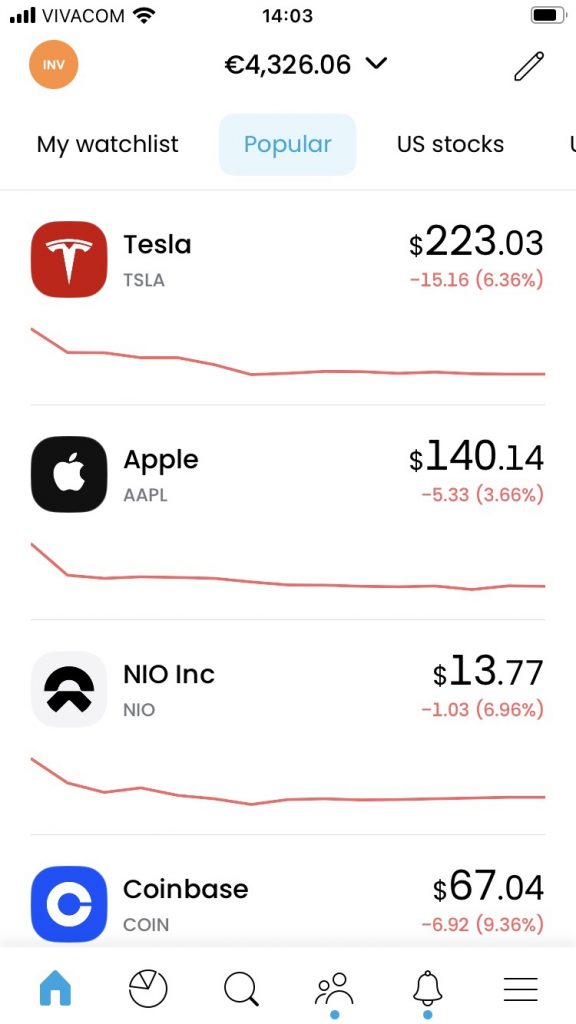
The popular stocks list gives you an idea of which stocks are volatile. However, it doesn’t tell you whether the price of a stock is likely to increase or decrease.
You have to do further external research to make your own decision about buying shares. Always do your due diligence when buying or selling stocks on the Trading 212 app.
Find US Stocks Fast
The US stock list contains all the United States stocks that you can purchase through the app. So, you’ll find companies such as Coca-Cola and McDonald’s.
Identify UK Stocks for Trading
To quickly find UK stocks on the Trading 212 app, you can check the list of UK stocks. You’ll find stores like Barclays and HSBC Holdings.
Finding New Stocks on the Trading 212 App
Several traders like to invest in new stocks. You can find all of the recently added stocks by checking the app’s new stocks category.
For example, right now, you’ll find Udemy by clicking there. Traders like these new stocks because some increase in value shortly after they’re added.
ETFs, Dividends, and Passive Income
Traders can select ETFs by using the app. They can also invest in stocks that pay good dividends.
Some investors use stock dividends as a source of passive income. Your dividends will be paid to your account automatically. You don’t really need to have any trading experience or skills if you wish to receive dividends as passive income.
To earn passive income via dividends, all you need to do is to purchase the stock. However, you should always look for stocks that pay dividends at a good rate. So, you should receive between 4% and 6% in dividends.
For example, if you have $100 invested in the stock, your dividend payment should be between $4 and $6. If you’re investing in order to earn passive income in this way, calculate your expected dividend based on historical data.
For example, with Apple we’ll have a very low dividend. They pay around 0.51% in dividends. So, although Apple is a viral stock, it’s not a good investment if you want passive income. If you have $100 in Apple stocks, you only get around 50 cents as your dividend payment.
How to Use the Trading 212 App to Invest in Stocks
You can use the Trading 212 app to invest in stocks while on the go. When you select a company, you’ll have the option to buy or sell its stock. This option will only be available to you whenever the markets are open.
For example, you won’t be able to trade on Sundays when the market is closed. You can click on a chart while using the app and zoom in. It’s essential to do this and check the stock’s performance before you buy or sell it.
You can check the stock’s historical price over several periods. For example, you can check it over a month by clicking on m. You can also check it over a week or three months.
You can also check the price performance over a day. That will show you what happened during the last trading session or the last day of trading.
You don’t need to Google extensively about the company all the time because the app provides useful information when you’re busy. For example, you can check how many employees it has and where it is located. You can also get information on the sector that it’s in and some key ratios.
Traders can get other fundamental information. You can check the financial summary, income statement, balance sheet, and cash flow. It’s essential to learn as much as you can about trading stocks by using this information.
Social Trading with Trading 212
Trading 212 has a large number of clients. So, they have many social communities interested in particular companies such as Apple. Some of their social communities are interested in dividends from companies in specific sectors.
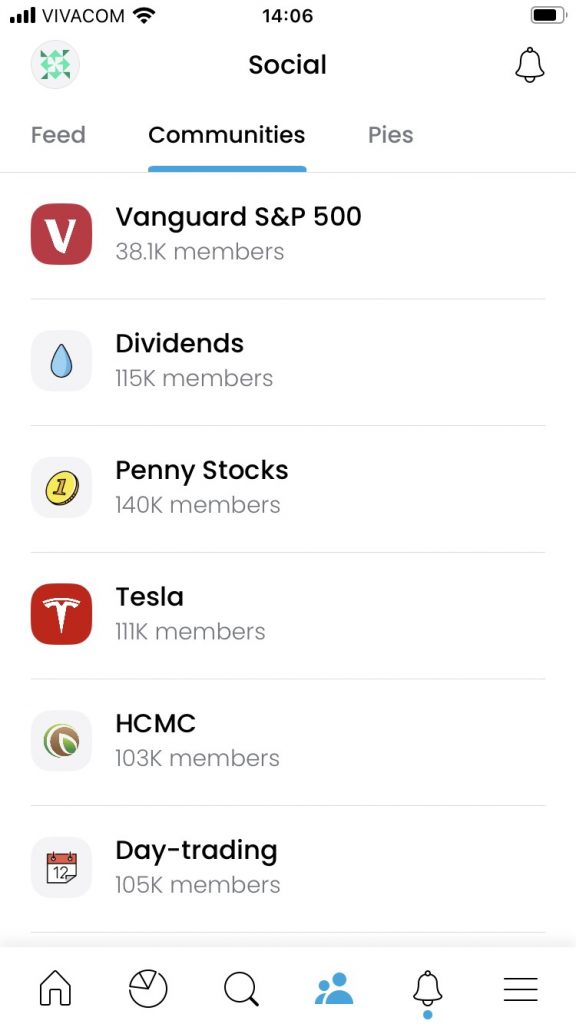
You can join these groups and benefit from several aspects of social trading. For example, you can join Reddit and Discord groups and learn what most people are looking at.
We all know what happened with GameStop and how the community turned out to be stronger than a huge hedge fund. So it’s important to know what’s happening in the community while trading. You’ll have a chance of grabbing a stock that will do well.
Check Your Profit or Loss Quickly
You can check your profit or loss over time by looking at the average price line. Even if you’ve been making purchases using multiple currencies, such as the Euro and US dollar, the middle price line will quickly show you whether you’ve made an overall profit or loss.
Sometimes when you sell your stocks, you need to convert the cash from one currency to another. For example, if you hold Apple stock and sell it you may get dollars but your account might be in Euro so your dollars from the sale will be converted to Euro.
Trading 212 doesn’t charge commissions on trades. So, you’ll keep more of your profit. Trading 212 makes money from the difference between the local currency and foreign currencies. They profit from the spread or the difference between the bid and the ask price in the asset pair that you are converting.
Earn with Referrals on the Trading 212 App
If you know other traders who like to buy stocks on the go, you can recommend the Trading 212 app to them. You would probably do that naturally because you want them to do well.
The app makes it easy to recommend it to your friends. Each client gets a referral link that they can share on social media and elsewhere. When friends sign up through this link, they’ll receive a free stock bonus worth up to €100 and you will too. It’s a win-win. You can find your referral link on the bottom right corner of the app.
If you don’t already have an account, you can sign up for one today. If you sign up for a new account with the code PetkoA, you will get a free stock worth up to €100.
Trading 212 App Hot List and Other Helpful Features
The Trading 212 app has a hot list that shows you how many users currently own shares like Tesla and Apple. The app also lets you check:
- Which stocks are most wanted
- The economic calendar
- Other economic news that impacts the Forex market or the stock market
Always Check Before You Invest
The Trading 212 app provides you with a lot of information. You can use this information to check the balance sheet of the company, the price history of the stock, and many other details that will help you to make a good decision.
Do your due diligence and also check additional sources of information before you invest in stocks or ETFs. Trading 212 also has great socials, and they have large communities that you can join. If you’re interested in a particular stock such as Tesla or you like to trade penny stocks, you can learn what other people are doing.
So, as you can see, the Trading 212 app has a lot of features that are beneficial to you. If you don’t already have an account, consider getting one for free today.
Remember to use the code PetkoA while you’re signing up and you’ll get up to €100 worth of free stocks. Thanks for reading!