


When I came across MultiPair EA from ProRobot EA, I’ll admit my first thought was: “Here we go again, another multi-currency system promising consistent profits.” The forex robot market is saturated with EAs claiming to trade multiple currency pairs simultaneously with minimal drawdown and impressive monthly returns.
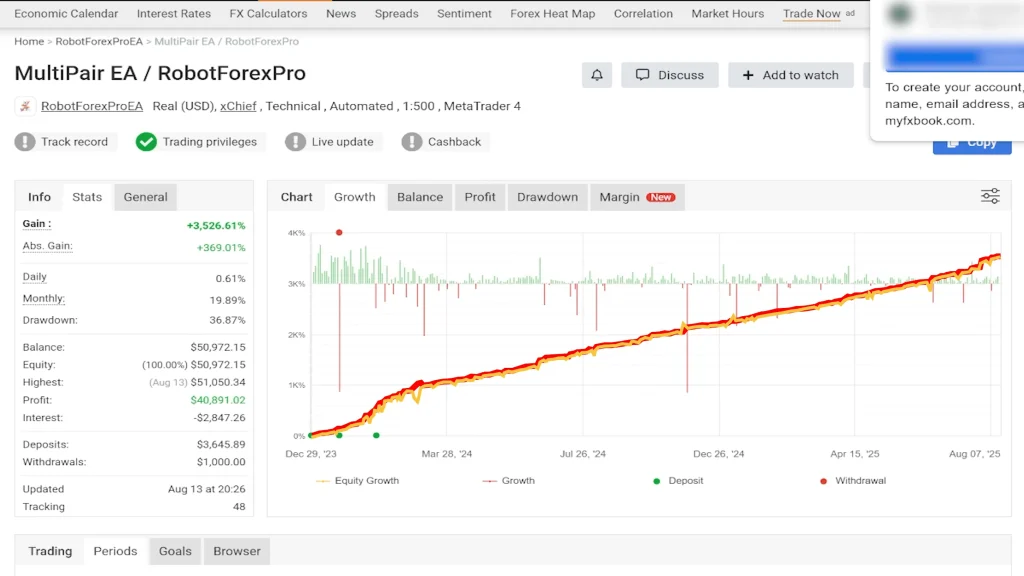
But something about this one caught my attention. The vendor’s track record showed they’d been running a live account since late 2023, turning a $3,645 deposit into over $50,000. That’s substantial growth, and more importantly, it wasn’t just a backtest; it was a verified live account with regular updates.
So I did what I always do: I bought it, put it on a live account with real money, and let it run for over two months to see if the performance matched the marketing. This MultiPair EA review is based on those results, along with a detailed examination of the vendor’s claims, the system’s strategy, and some critical warnings you should know before purchasing.
The bottom line upfront? The EA has been profitable on my live account, generating approximately 10% monthly returns with a 77% win rate across 3,400+ trades. That said, there are significant limitations and concerns, particularly around the refund policy and backtesting reliability, that deserve your attention.
MultiPair EA Quick Reference
| Feature | Details |
| Price | $199 (2 licenses) |
| Platform | MT4 only (no MT5 support) |
| Recommended Pairs | EUR/USD, GBP/USD, USD/JPY, AUD/USD, NZD/USD |
| Strategy Type | Grid system (martingale disabled) |
| Money Management | Percentage-based automatic scaling |
| Backtesting | Unreliable (uses live data) |
| Refund Policy | No refunds (digital product) |
| Updates | Lifetime (vendor claims) |
| Best For | Live accounts, instant funding programs |
| Avoid For | Traditional prop firms |
| VPS Required | Yes (24/7 operation needed) |
| Trade Frequency | ~8 trades per day across 5 pairs |
What is MultiPair EA?
MultiPair EA is a forex trading robot available through ProRobot EA’s website, where they sell seven different expert advisors, all priced at $199. This particular EA is designed to trade five recommended currency pairs using a combination of price action analysis, support and resistance levels, and various filters to identify entry opportunities.
Platform and Licensing
One important detail right away: this system only works on MetaTrader 4. If you’re running MT5, you’re out of luck. For $199, you get two licenses, which means you can run the EA on two separate accounts or VPS instances simultaneously. That’s actually a reasonable value if you’re planning to test on demo while running live, or if you want to split between different brokers.
The vendor describes it as a “lifetime license,” but I’d take that term with a grain of salt. In the EA world, “lifetime” often means “as long as we continue supporting it,” which could be years or could be until market conditions change and they decide to stop updates. Just manage your expectations there.
The Five Recommended Currency Pairs
The vendor recommends trading these five forex pairs:
- EUR/USD
- GBP/USD
- USD/JPY
- AUD/USD
- NZD/USD
Interestingly, when you examine the vendor’s live account history, you’ll see they actually traded nine different pairs. My guess? They tested multiple pairs, saw which ones performed best, and now recommend those top five to customers. That’s a sensible approach, better to give traders the highest-probability pairs than to push everything they tested.
Strategy Overview
From the vendor’s description, MultiPair EA uses:
- Price action analysis
- Support and resistance levels
- Multiple technical filters
- Money management based on account percentage
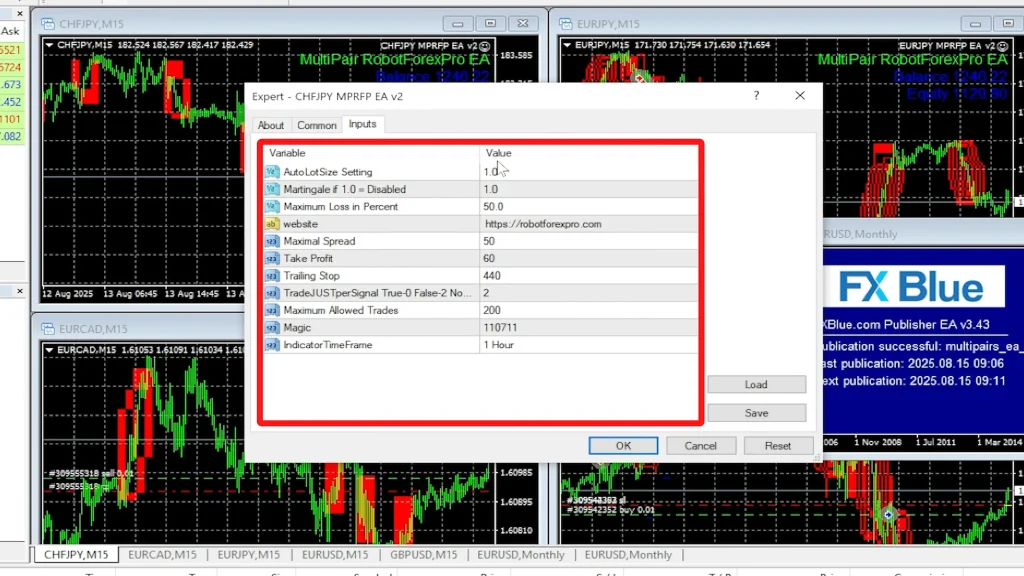
Looking at the equity curve and trade patterns, it appears to use some sort of grid system. However, and this surprised me, the martingale feature is disabled by default (set to 1 in the settings). This means it’s not doubling down on losing positions the way classic martingale systems do.
That’s actually a positive. Grid systems without aggressive martingale recovery tend to have more controlled drawdowns, though you’ll see more equity dips as positions work through temporary losses.
Vendor Track Record: What They’re Showing
Before putting real money into any EA, I always examine the vendor’s track record carefully. In this case, ProRobot EA maintains a live account that’s been running since the end of 2023.
The Numbers
The performance metrics from their verified account are impressive:
- Starting deposit: $3,645
- Current balance: Over $50,000
- Average monthly return: 20%
- Maximum drawdown: 37%
- Total trades: Over 4,000
- Win rate: Approximately 70%
Those are strong numbers. A 20% average monthly return over two and a half years is excellent, particularly if it’s genuinely sustainable. The 37% maximum drawdown is substantial; you need to be prepared for equity swings of that magnitude, but it’s not extreme for a grid-based system trading multiple pairs.
Drawdown Pattern Analysis
What’s particularly interesting is how the drawdown pattern evolved. If you examine their equity curve closely, the largest drawdowns by far occurred in the first few months of trading. From March 2024 onward, the drawdowns have been much smaller, more like 6% rather than the 37% maximum.
Did they improve the algorithm? Did market conditions just become more favorable for the strategy? I don’t know. But the recent drawdown-to-return ratio has been excellent compared to those early months. This could be a positive sign of system refinement, or it could just be a favorable market period. Time will tell.
Live Updates and Verification
The account shows regular updates, which I appreciate. I always prefer when track records display “live updates,” meaning they’re automatically synced rather than manually uploaded. This particular account doesn’t show that badge, but I’ve seen it being updated regularly, so I’m not overly concerned. The trading activity is clearly ongoing and transparent.
Nine Pairs vs. Five Recommended
The vendor’s account actually traded nine currency pairs, and all of them were profitable. That’s encouraging; it suggests the underlying strategy has some robustness across different market conditions. By recommending only the top five performers, they’re presumably trying to give customers the best risk-adjusted returns rather than pushing maximum diversification.
My Live Testing Results
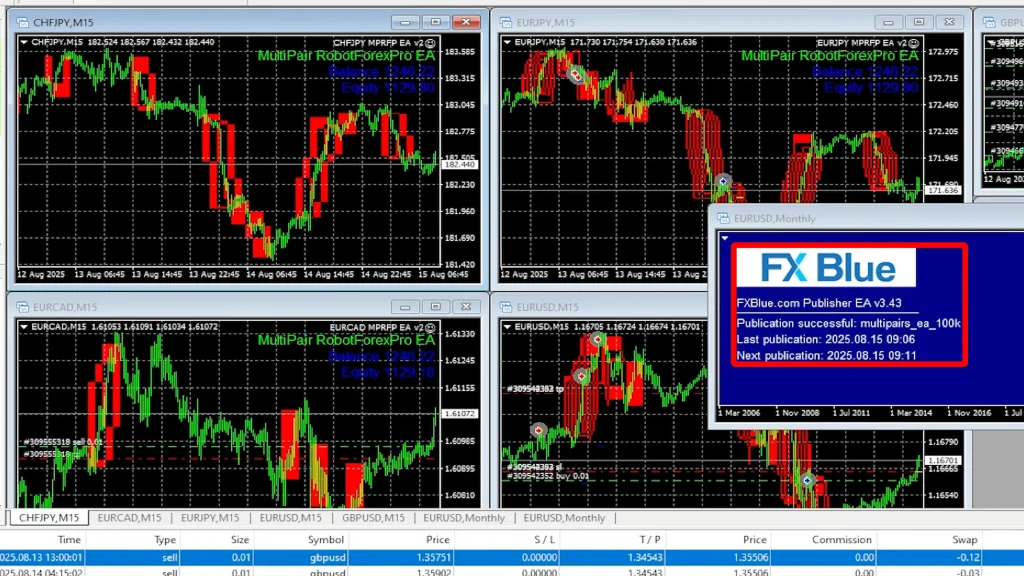
Vendor track records are one thing. Independent verification is another. That’s why I set up a $1,000 live account with BlackBull Markets and ran MultiPair EA with the recommended settings on the five recommended pairs for over two months.
Testing Configuration
Here’s how I set up the test:
- Broker: BlackBull Markets
- Account size: $1,000 starting capital
- Platform: MT4 on VPS for 24/7 operation
- Settings: Default recommended settings
- Pairs: The five recommended pairs only
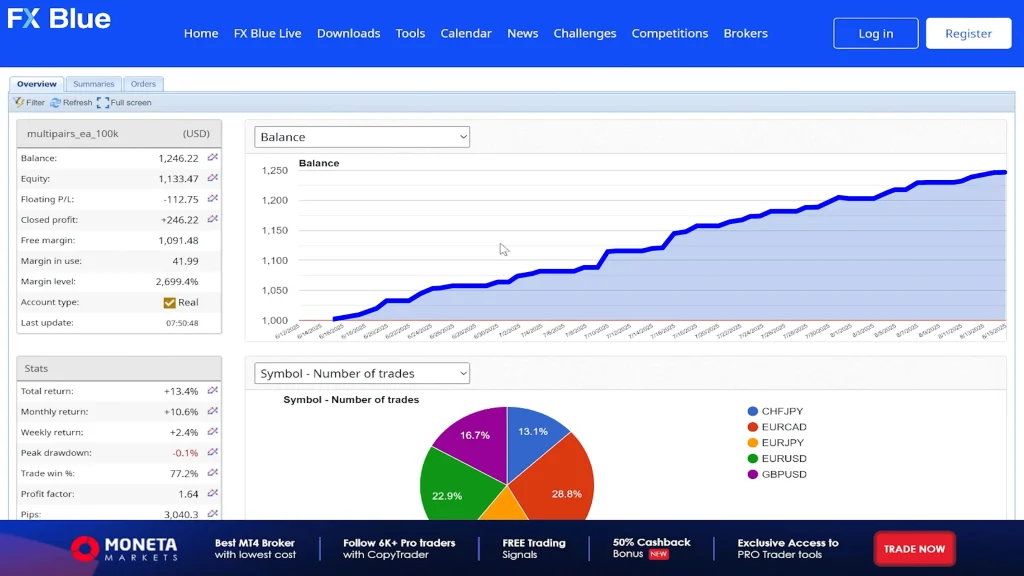
- Tracking: FX Blue for transparent performance monitoring
I chose BlackBull Markets because they’re regulated, offer tight spreads, and have excellent execution speeds, all crucial factors for algorithmic trading. Their institutional account options provide even better trading conditions, which I’ll discuss later.
Performance Metrics After 2+ Months
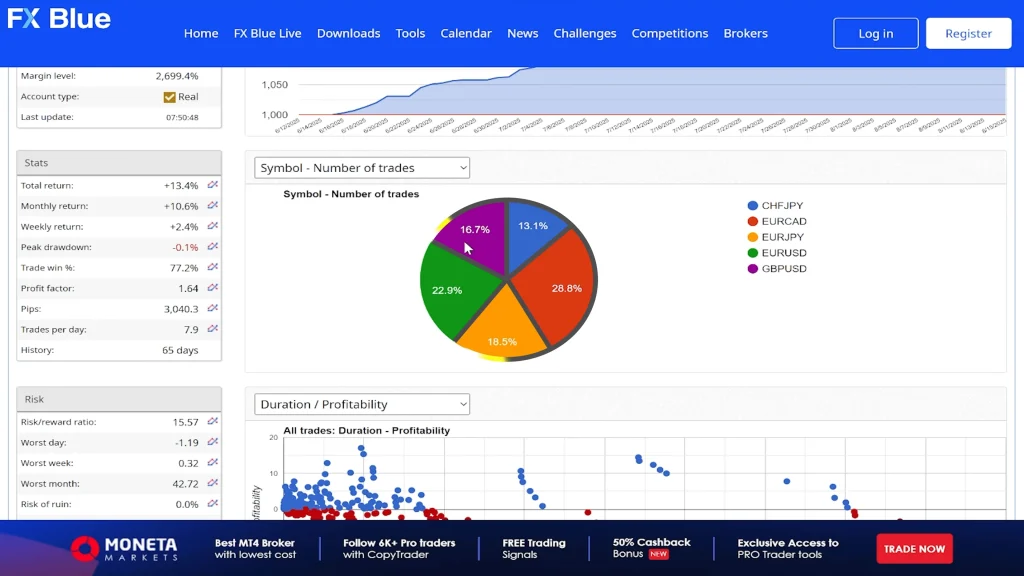
The results have been positive:
- Balance gain: 25%
- Equity: 13% (accounting for open positions)
- Monthly return: Approximately 10% according to FX Blue
- Total trades: 3,400 across the five pairs
- Win rate: 77%
- Average trades per day: Nearly 8
The 10% monthly return is roughly half of what the vendor achieves (20%), but I’m perfectly fine with that. The difference likely comes down to risk settings; I’m probably trading more conservatively, which also means I should see smaller drawdowns. A 10% monthly return that compounds over time is nothing to complain about.
Trade Distribution
All five currency pairs are generating trades reasonably evenly. Some trade more frequently than others depending on market conditions, but it’s not like one pair is doing 80% of the work while others sit idle. The 3,400 trades provide a statistically significant sample size, which means the 77% win rate is probably reliable rather than just short-term luck.
Equity Curve Analysis
The balance line has been very smooth and linear, which is exactly what you want to see. It looks remarkably similar to the vendor’s equity curve, which gives me confidence the system is performing as advertised.
Currently, there’s a slight equity drawdown, meaning some open positions are temporarily negative, which is typical for these types of grid systems. The EA holds positions through minor pullbacks and closes them when the price returns to profitable levels. As long as the drawdowns stay within acceptable limits, this is just part of how the system operates.
Profit Factors Across Pairs
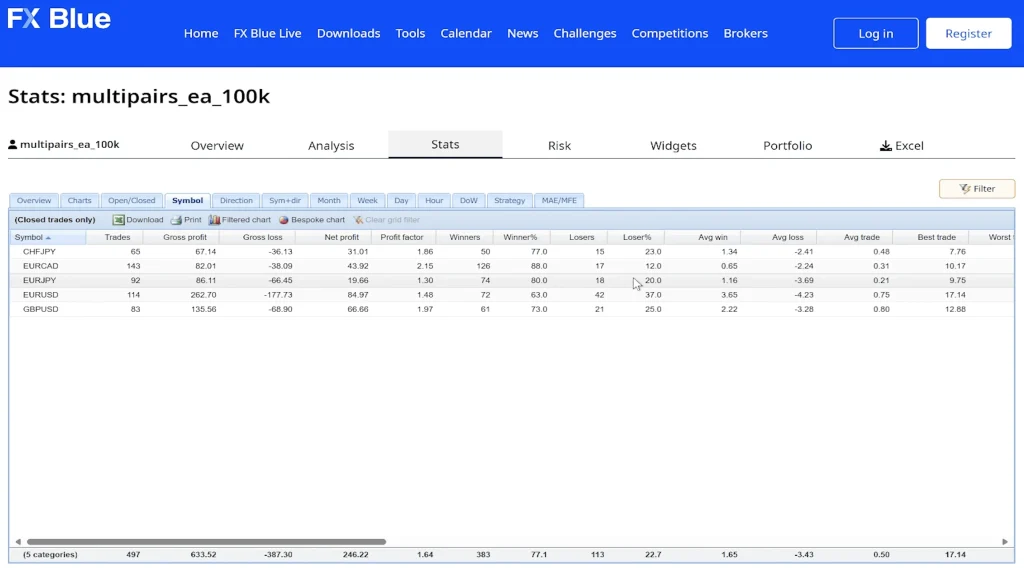
Each of the five pairs is showing good profit factors and win rates. I won’t list each individual pair’s metrics here, but the key point is that no single pair is dramatically underperforming. The risk is truly spread across multiple markets rather than concentrated in one or two pairs that happen to be having a good run.
Strategy Deep Dive: How It Actually Works
Let me address what I’ve learned about how MultiPair EA actually operates, based on observing the trades and examining the settings.
Grid System Without Aggressive Martingale
Looking at the chart patterns and open positions, this is definitely a grid-based system. As price moves, the EA places additional positions at set intervals. However, unlike many grid systems, the martingale multiplier is set to 1 by default, meaning it’s essentially disabled.
What does that mean in practice? When the EA opens a second position after the first moves against it, the position size stays the same rather than doubling. This is actually safer than aggressive martingale approaches, though it means you’ll see more floating drawdown since you’re not accelerating recovery through position sizing.
Money Management Features
The system includes percentage-based money management, automatically adjusting lot sizes based on account balance. This is good for capital preservation, as your account grows, position sizes scale up proportionally. If you hit a losing period, position sizes scale down, reducing risk during vulnerable times.
Technical Components
From the settings I can see, the EA uses:
- Custom indicator (exact indicator not disclosed)
- Timeframe settings for entry analysis
- Take profit levels
- Stop loss parameters (though grid systems may override these)
- Various filters for trade validation
The exact entry logic isn’t fully transparent, which is typical for commercial EAs. Vendors understandably protect their proprietary strategies. What matters is whether it works consistently over time, which the track records suggest it does.
Optimization Considerations
The settings appear relatively simple to adjust if you wanted to optimize for different pairs. You’ve got the indicator parameters, timeframe, take profit, and stop loss variables to work with. However, and this is critical, I wouldn’t recommend optimizing this system yourself.
Why? Because of something the vendor explicitly states in their FAQ.
The Backtesting Problem
Here’s where things get concerning. When you go to the vendor’s FAQ section, they address backtesting directly:
“Can you backtest the EA?” “Yes, you can, but keep in mind it’s an advanced system that uses live data, and you will not get accurate results.”
That’s a red flag for many traders, and I understand why. We generally prefer EAs that backtest reliably because it allows you to validate the strategy across different market conditions and time periods before risking real capital.
Why Some EAs Don’t Backtest Well
I’ve encountered this situation before with other expert advisors. Some systems incorporate live market data feeds, broker-specific information, or other dynamic elements that simply don’t exist in historical data. When you backtest them, you get results that don’t match forward testing.
Is that ideal? No. I’d much prefer systems that backtest similarly to how they trade live. But I’ve also seen EAs that backtest poorly yet perform excellently on demo and live accounts for extended periods. It happens. It’s not my favorite scenario, but it’s not necessarily a dealbreaker.
The Optimization Problem
The bigger issue is what this means for optimization. If backtests aren’t reliable, how do you optimize settings for different pairs or market conditions? The short answer: you probably can’t, at least not with any confidence.
This is why I strongly recommend sticking with the vendor’s recommended settings and the five recommended pairs. They’ve presumably done extensive forward testing to arrive at these configurations. Trying to optimize yourself without reliable backtest data is just guessing, and guessing with real money rarely ends well.
Testing Alternative: Extended Demo
If you want to test modifications or different pairs, your only reliable option is forward testing on a demo account for several months. That’s time-consuming and not as satisfying as running quick backtests, but it’s the only way to get meaningful data with this particular system.
Broker Selection: Why I Chose BlackBull Markets
When testing any EA, broker selection matters significantly. Spreads, execution speed, slippage, and server stability all impact performance, sometimes dramatically.
Why BlackBull Markets?
I selected BlackBull Markets for several reasons:
- Fully regulated: They hold multiple regulatory licenses, which provide client protection and operational oversight
- Excellent trading costs: Tight spreads and competitive commissions
- Fast execution speeds: Critical for EAs that need precise entry prices
- Algo-friendly: No restrictions on automated trading
- Institutional account options: Premium trading conditions for qualifying deposits
The Institutional Account Advantage
BlackBull Markets offers institutional accounts that provide:
- Tighter spreads than standard accounts
- 50% reduction in commissions
- Better overall trading costs
Normally, institutional accounts require a $20,000 deposit. However, through specific promotional links (like the one on Algo Trading Space), that minimum drops to just $2,000, a 90% reduction.
For traders running multiple EAs or trading frequently, those reduced costs compound significantly over time. Even small improvements in spreads and commissions can mean the difference between a profitable EA and a break-even one when you’re executing thousands of trades.
Regulation Matters
I always prioritize regulated brokers when testing with real money. BlackBull Markets is regulated by multiple authorities, providing legal recourse and security for client funds. With unregulated brokers, you’re taking unnecessary risk regardless of how good their trading conditions appear.
Prop Firm Compatibility: My Strong Warning
The vendor’s website mentions that MultiPair EA “can be used for prop firms.” I’m going to respectfully but strongly disagree with that recommendation.
Why Prop Firms Won’t Work
Most reputable prop firms have rules specifically designed to detect and prevent traders from using commercial EAs. Here’s why MultiPair EA won’t work:
- Lack of unique trades: Everyone using this EA with recommended settings will have nearly identical trade entries and exits. Prop firms monitor for this pattern because it indicates EA usage rather than discretionary trading.
- Quick detection: Within weeks, sometimes days, prop firms will notice the pattern and close your account. You’ll lose your evaluation fee or funding access.
- Violation of terms: Many prop firms explicitly prohibit commercial EA usage in their terms of service.
Alternative: Instant Funding Programs
Instead of traditional prop firms, consider instant funding programs like iFunds that:
- Don’t have the same third-party EA detection rules
- Provide immediate capital access
- Focus more on drawdown limits than on how you generate returns
- Are more EA-friendly overall
For live accounts using your own capital, obviously, there are no restrictions. That’s where I’d primarily recommend running this system.
The Refund Policy Problem
Before purchasing any EA, always check the refund policy. This is where MultiPair EA has a significant issue.
No Refunds Offered
The vendor states clearly: “It’s a digital product and these items are non-refundable.”
I really don’t like this policy. Industry best practice is offering a 30-day money-back guarantee, no questions asked. If you buy the EA, test it on demo for a few weeks, and don’t like the results or find it doesn’t suit your trading style, you should be able to get a refund.
With no refund policy, you’re taking the full risk. If the EA stops working next month due to changed market conditions, you’re stuck with a $199 loss and no recourse.
What This Means for You
Given the no-refund policy, you need to be extra cautious:
- Review track records thoroughly before purchasing
- Accept that you’re committing $199 with no safety net
- Consider waiting to see additional third-party testing results
- Start with demo testing before committing to live if you do purchase
The vendor’s track record and my own results are both positive, which reduces the risk somewhat. But the lack of refund protection means you need higher confidence before pulling the trigger.
Pricing and Value Assessment
At $199 for two licenses, MultiPair EA sits in the mid-range pricing category for forex robots. It’s not cheap, but it’s not outrageously expensive either.
What You Get
- Two MT4 licenses (can run on two accounts)
- Lifetime updates (theoretically)
- Access to five optimized currency pairs
- Support from the vendor
- Regular algorithm updates
Comparing Cost to Returns
If the EA generates 10% monthly returns consistently (my results) or 20% (vendor’s results), the $199 cost becomes negligible quickly:
- At 10% monthly on a $1,000 account: $100/month profit
- At 20% monthly on a $1,000 account: $200/month profit
The EA pays for itself in 1-2 months if performance continues. The bigger question is whether it maintains those returns over time, which only longer testing periods will answer.
The ProRobot EA Bundle
ProRobot EA sells seven different expert advisors, all priced at $199. If you’re interested in building a diversified portfolio of EAs, you might consider testing multiple systems from their lineup. However, each comes with the same no-refund policy, so the risk multiplies if you purchase several.
Recommended Usage Strategy
Based on my testing and analysis, here’s how I’d recommend approaching MultiPair EA if you decide to purchase it.
Start with Demo Testing
Even though I’ve shown positive live results, start with your own demo testing:
- Run the EA on a demo account for at least one month
- Use the five recommended pairs
- Monitor drawdowns, win rates, and monthly returns
- Compare your results to mine and the vendor’s
If your demo results align with established track records after 30-60 days, that’s a good sign for moving to live.
Use Appropriate Account Types
Best account types for MultiPair EA:
- Live accounts: Your own capital, full control, no restrictions
- Instant funding accounts: Programs like iFunds without third-party EA restrictions
- Demo accounts: For ongoing testing and optimization attempts
Avoid:
- Traditional prop firms: High risk of detection and account closure
- Accounts with very strict drawdown limits: The 37% historical maximum might exceed some thresholds
Risk Management Settings
Stick with the recommended settings initially. The percentage-based money management is already built in, so the EA will scale positions appropriately. Don’t get aggressive trying to boost returns; that’s how you turn a 37% maximum drawdown into a 60%+ account killer.
Monitor Regularly
Even though it’s automated, check your account regularly:
- Daily quick checks for obvious problems
- Weekly detailed review of trades and drawdowns
- Monthly assessment of returns versus expectations
If performance degrades significantly or drawdowns exceed historical norms, be ready to pause or shut down the EA.
Technical Requirements and Setup
Platform Specifications
- Required: MetaTrader 4 (MT4)
- Not compatible: MetaTrader 5 (MT5)
- Licenses included: 2
VPS Hosting
Running MultiPair EA requires a VPS for 24/7 operation. The EA trades five pairs simultaneously and needs consistent connectivity to:
- Monitor multiple markets continuously
- Execute entries at optimal moments
- Manage open positions across all pairs
- Close profitable trades when targets are hit
VPS costs typically run $20-30 monthly from providers like ForexVPS, BeeksFX, or your broker’s VPS service.
Broker Requirements
Choose a broker that offers:
- Tight spreads (crucial for profitability)
- Fast execution (prevents slippage on entries)
- MT4 platform support
- No EA restrictions
- Proper regulation
BlackBull Markets meets all these criteria, which is why I selected them for live testing.
Tracking Your Results
One advantage of MultiPair EA is the high trade frequency, nearly eight trades per day across five pairs. This means you accumulate statistically significant data quickly rather than waiting months to see if the EA performs as expected.
I upload my results to FX Blue for transparent tracking. You can monitor:
- Balance and equity curves
- Win rates by currency pair
- Profit factors
- Drawdown depths
- Monthly return percentages
This transparency helps you assess whether my results align with yours if you’re testing the same system.
Long-Term Outlook and Sustainability
The critical question with any EA: will it continue performing over the long term?
Positive Indicators
Several factors suggest potential sustainability:
- A multi-currency approach spreads risk
- Grid without aggressive martingale reduces blowout risk
- Vendor’s 2.5-year track record through different market conditions
- Multiple profitable pairs (not relying on one)
- Reasonable drawdown recovery pattern
Concerns and Unknowns
However, there are unknowns:
- Market conditions can change
- What worked in 2023-2026 might not work in 2026-2029
- The unreliable backtesting limits historical validation
- No refund policy means you’re committed even if it stops working
My approach is cautious optimism: the results are encouraging, but I’m not betting the farm on it. It’s one EA among several in a diversified automated trading strategy.
Performance Comparison Table
| Metric | Vendor’s Account | My Live Testing | Comparison |
| Testing Duration | 2.5 years | 2+ months | The vendor has a longer history |
| Starting Capital | $3,645 | $1,000 | Different scales |
| Current Balance | $50,000+ | $1,250 | Proportionally similar growth |
| Monthly Return | ~20% | ~10% | My testing is more conservative |
| Maximum Drawdown | 37% | Not yet tested | Vendor shows worst-case |
| Win Rate | ~70% | 77% | My testing is slightly higher |
| Total Trades | 4,000+ | 3,400+ | High frequency both |
| Currency Pairs | 9 tested, 5 recommended | 5 recommended only | Following recommendations |
| Martingale | Disabled (set to 1) | Disabled (set to 1) | Same configuration |
Frequently Asked Questions
Does MultiPair EA really trade five currency pairs simultaneously, or is it optimized for just one or two?
Yes, MultiPair EA genuinely trades all five recommended pairs (EUR/USD, GBP/USD, USD/JPY, AUD/USD, NZD/USD) with a reasonable balance across them. In my live testing, all five pairs generated trades consistently, totaling 3,400+ trades over two months. Trade distribution varies by market conditions; some pairs trade more frequently during certain periods, but no single pair dominates completely.
The vendor’s account actually tested nine pairs, and all were profitable, then recommended the top five performers. This multi-currency approach provides legitimate diversification rather than being a marketing gimmick with one dominant pair doing all the work.
Why doesn’t MultiPair EA backtest accurately, and should that concern me?
The vendor states the EA uses “advanced systems that use live data,” which don’t exist in historical data, causing backtest inaccuracy. While I’d prefer reliable backtesting, I’ve seen other EAs with this limitation perform well in forward testing. The real concern is that unreliable backtests prevent meaningful optimization; you can’t test different settings confidently without accurate historical validation.
This means you must stick with recommended settings rather than customizing for your preferences. For some traders, this limitation is unacceptable. Personally, I accept it because forward testing (vendor’s 2.5 years and my 2+ months) shows consistent profitability, but it’s definitely less than ideal.
Can I use MultiPair EA on prop firm accounts without getting detected?
No, and I strongly recommend against trying. Despite the vendor mentioning prop firm compatibility, traditional prop firms actively detect commercial EA usage by identifying identical trade patterns across multiple accounts. Since everyone using MultiPair EA with recommended settings generates nearly identical entries and exits, detection happens quickly, often within weeks.
Your account will be closed, and you’ll lose your evaluation fees or funding. Instead, consider instant funding programs like iFunds that don’t have the same EA detection rules, or simply trade the EA on your own live account, where there are no restrictions on automation.
What’s the typical drawdown I should expect with MultiPair EA?
Based on the vendor’s 2.5-year track record, the maximum drawdown reached 37%, though most drawdowns since March 2024 have been much smaller (around 6%). My own testing over 2+ months shows equity drawdowns are temporary and recover as grid positions close profitably.
You should mentally prepare for drawdowns in the 15-30% range, particularly during trending markets that move against open positions.
The EA uses a grid system without aggressive martingale, so drawdowns are controlled compared to systems that double position sizes. However, 30% equity swings will test your psychological tolerance, so ensure you’re comfortable with that magnitude before committing real capital.
Is the $199 price reasonable given the no-refund policy?
The price itself is mid-range for forex robots, not cheap but not outrageously expensive. You get two licenses and lifetime updates, which adds value. However, the no-refund policy significantly changes the risk-reward equation.
Without a 30-day money-back guarantee (industry standard), you’re committing $199 with no safety net. If the EA performs as advertised (10-20% monthly returns), it pays for itself in 1-2 months, making the cost negligible long-term.
But if market conditions change and performance degrades, you’re stuck with the loss. Given this risk, I recommend extended demo testing before purchase, reviewing all available track records carefully, and only buying if you’re confident you can accept the $199 as a sunk cost.
How much starting capital do I need to run MultiPair EA safely?
I tested MultiPair EA on a $1,000 live account and found it adequate for the five recommended pairs with conservative risk settings. The EA includes percentage-based money management that automatically scales position sizes to your balance. However, given the potential for 30%+ drawdowns, I’d recommend at least $1,000 minimum, preferably $2,000-3,000 for a more comfortable cushion.
If you’re running on an instant funding account or have tighter drawdown restrictions, you might need more conservative lot sizing, which effectively requires larger starting capital for meaningful returns. Avoid running this on micro accounts ($100-500) as one significant drawdown period could breach your psychological or hard stop limits.
Final Verdict
MultiPair EA has delivered solid results both on the vendor’s account (20% monthly over 2.5 years) and my own live testing (10% monthly over 2+ months). The 77% win rate across 3,400+ trades provides statistically meaningful data, and the equity curve has been smooth and consistent.
The system appears to be exactly what it claims: a multi-currency grid system without aggressive martingale recovery, capable of generating consistent monthly profits with controlled drawdowns when markets cooperate.
However, the no-refund policy is a significant negative. Combined with unreliable backtesting, you’re taking more risk upfront than with EAs that offer money-back guarantees and solid historical validation.
I’d recommend this EA for:
- Traders are comfortable with 20-30% drawdowns
- Those running live accounts or instant funding programs
- People willing to accept the $199 risk without refund protection
- Traders seeking automated multi-currency strategies
- Those who can commit to extended demo testing first
I’d avoid this EA if:
- You need traditional prop firm compatibility
- You can’t handle significant equity swings
- You require money-back guarantees
- You want to heavily optimize and customize settings
- You’re using MT5 instead of MT4
For me, it’s earned a place in my trading portfolio based on two months of positive results. But I’m monitoring it closely and ready to adjust if performance degrades.
Where to Learn More
If you want to explore MultiPair EA further or see current pricing and promotions, I’ve put together a dedicated resource page on Algo Trading Space.
You can find it here: algotradingspace.com/robots/forex/multipair-ea
The page includes links to ProRobot EA’s website, where the system is available, access to my ongoing FX Blue tracking so you can monitor real-time performance, and any updates to testing results as they develop.
Full disclosure: purchases through our page provide a commission that supports continued testing and transparent reporting across multiple EAs. But regardless of where you purchase, please do your own thorough demo testing first; the no-refund policy means you need high confidence before committing your $199.
I’ll continue running MultiPair EA on my live account and updating results publicly. You can follow along on our live trading results page to see exactly how it performs over the coming months, including any drawdown periods or performance changes.
For traders interested in deeper insights, Algo Trading Space offers a VIP Club that provides exclusive access to our complete trading results dashboard, priority support, and early intelligence on high-performing EAs before they become public knowledge. Members also get downloadable set files, access to our private Discord community, and our full course library.
Testing Transparency Note: This review reflects 2+ months of live account testing with real money on BlackBull Markets, along with analysis of the vendor’s 2.5-year track record. All performance figures are based on actual trading results. However, past performance does not guarantee future results, and all forex trading carries substantial risk of loss. The no-refund policy means purchases carry additional risk. Always test thoroughly on demo accounts before risking real capital.


Comments
No comments yet. Be the first to comment!
Leave a Comment
Your email address will not be published. Required fields are marked with *