 Petko Aleksandrov
Are you interested in high performance trading robots to improve your trading strategy? In this guide, we’ll show you how to easily manage the top 10 trading robots (EAs) available on our website, eatradingacademy.com. Whether you’re a beginner or an experienced trader, these steps will help you get started.
Top 10 Trading Robots: Step 1: Downloading the EAs
To begin, visit our website and download the top 10 Forex, crypto, and gold expert advisors (EAs). These EAs are powerful tools that can automate your trading decisions.
Step 2: Unpacking the EAs
After downloading the EAs, you’ll need to extract or unzip them. This step is essential to access the necessary files for installation.
Top 10 Trading Robots: Step 3: Choosing a Broker
Select a regulated broker to open a demo or virtual account. If you’re unsure where to start, visit our Academy’s broker page, designed to assist beginners in finding reliable brokers and prop firms.
Step 4: Setting Up the EAs on MT4
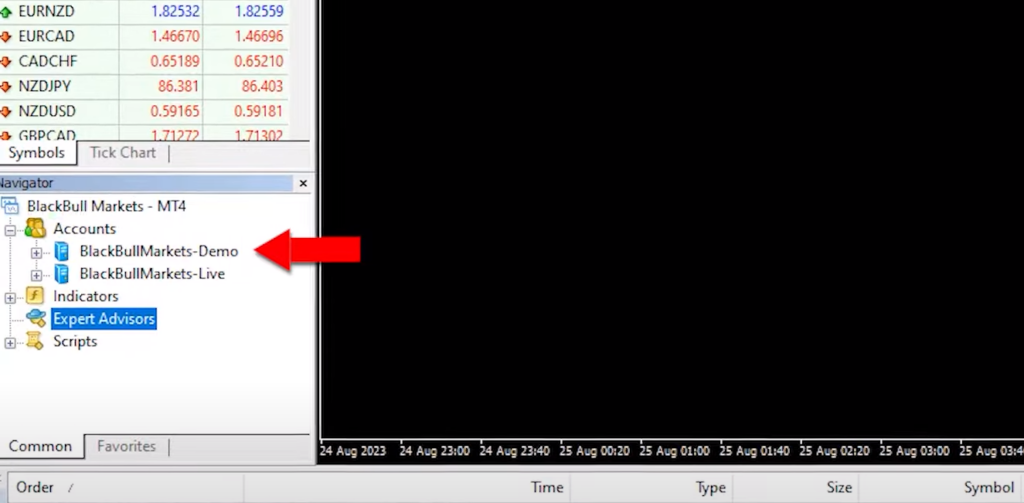
For MetaTrader 4 (MT4) users, follow these simple steps:
- Open your demo account with your chosen broker.
- Go to ‘File’ and select ‘Open Data Folder.’
- Click on ‘MQL4’ and then ‘Experts.’
- Paste the downloaded expert advisors into this folder.
- Navigate to ‘Expert Advisors’ and click on ‘Refresh.’ This action compiles the EAs into EX4 files for use.
Top 10 Trading Robots: Step 5: Setting Up the EAs on MT5
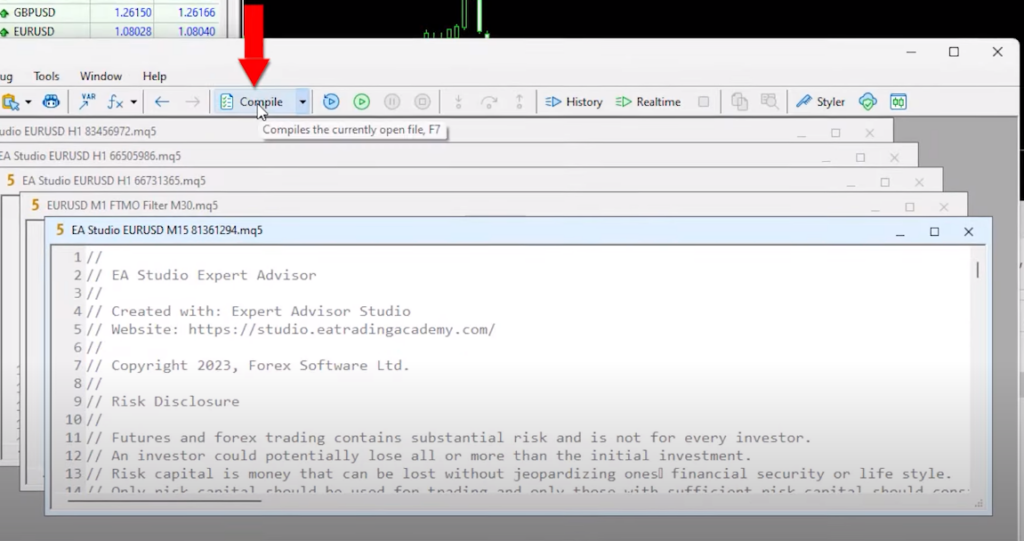
For MetaTrader 5 (MT5) users, you have two options:
- Close and reopen the platform to make the EAs available.
- Alternatively, compile the expert advisors from the MetaEditor by clicking the ‘Compile’ button.
Step 6: Enabling Auto Trading
Before placing an expert advisor on your chart, ensure that Auto / Algo Trading is enabled in your platform settings. This feature allows the EAs to execute trades automatically.
Step 7: Adding EAs to Your Charts
Now, attach the EAs to your charts with these straightforward steps:
- Drag and drop the desired expert advisor onto your chart.
- Customize your trading parameters, such as trade size and indicator settings.
- Click ‘OK,’ and you’ll see a smiley face in the upper right corner, confirming that the expert advisor is successfully attached.
Top 10 Trading Robots: Step 8: Replicating for Multiple EAs
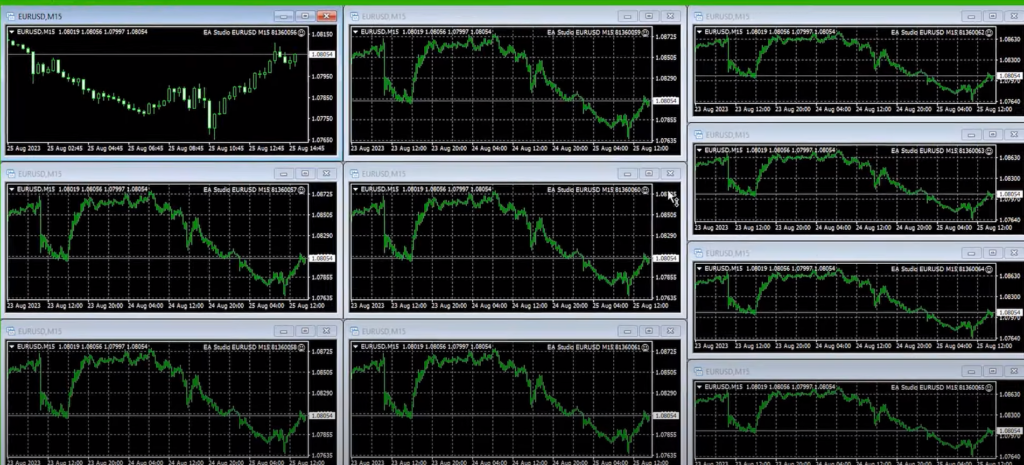
If you wish to use multiple EAs simultaneously, open additional charts on your trading platform and repeat the same process for each expert advisor. Remember to select the appropriate time frame (M15) for these EAs.
Step 9: Monitoring and Evaluation
With your EAs running, closely monitor their performance. Utilize statistical websites like FXBlue or MyFXBook to track their progress. Each EA is assigned a magic number to help you identify which one performs the best.
Top 10 Trading Robots: Managing Multiple Expert Advisors
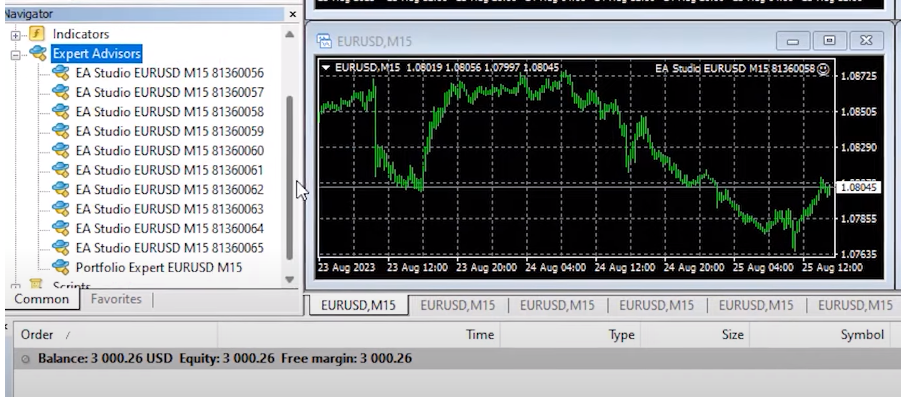
Now that you have all 10 different robots trading on 10 separate charts, let’s take it a step further. You might have noticed the “portfolio expert advisor” in the folder. This special robot contains all 10 expert advisors in one. In this section, we’ll explore how to manage both individual EAs and portfolio EAs.
Utilizing the Portfolio Expert Advisor
If you want to simplify things and manage all 10 EAs as a single entity, you can use the portfolio expert advisor. To get started, copy the portfolio EA and paste it into the ‘mql4/experts’ folder. Then, double-click on it and compile it. Once compiled, click ‘Refresh,’ and you’ll find the portfolio expert advisor ready for action.
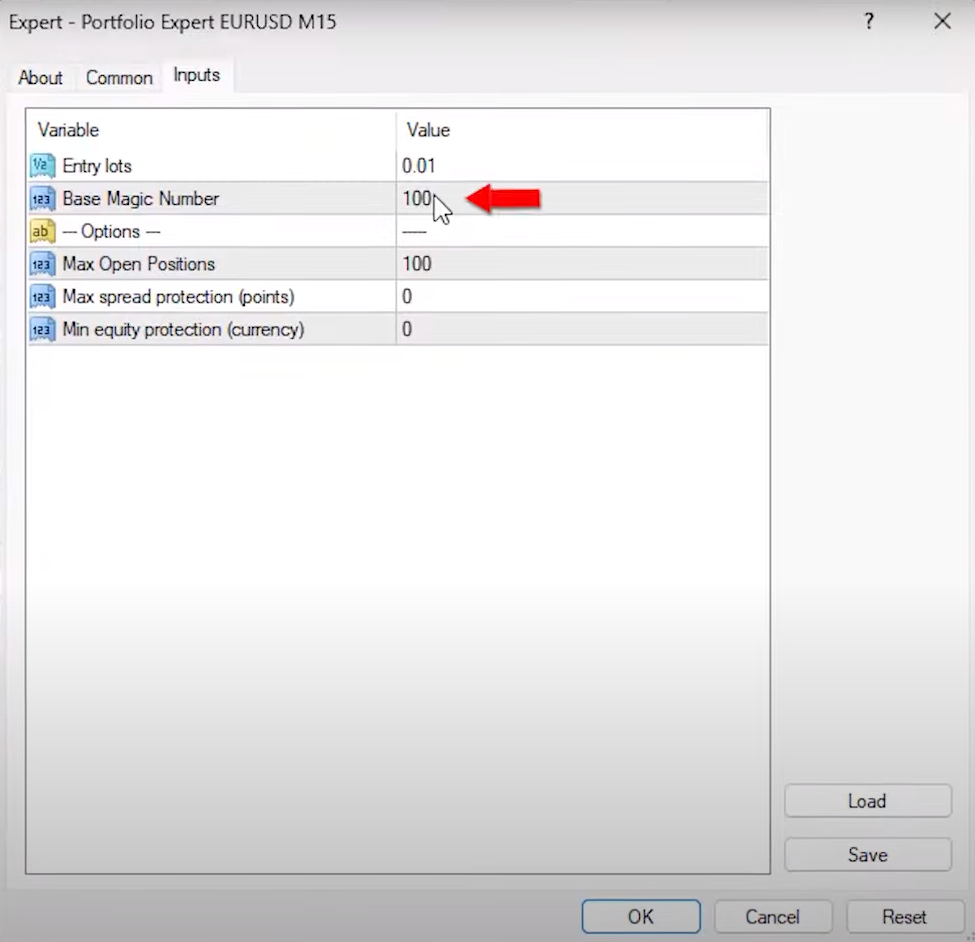
Attach the portfolio EA to a separate chart, just like you did with the individual EAs. Adjust the trading volume (0.01 is a common choice) and note that the base magic number is 100. The portfolio EA will automatically assign unique magic numbers for each of the 10 EAs it contains.
With the portfolio EA on a chart, you now have the option to let it trade alongside the individual EAs. This way, you can compare their performance and determine which approach suits your trading style best.
Top 10 Trading Robots: Monitoring and Gathering Data
The next step is crucial: let these EAs trade on your demo account for some time. Allow them to execute trades, gather data, and record their performance. The duration of this phase depends on your preferences, but it’s advisable to give it enough time to generate meaningful results.
Once you have a substantial dataset, you’ll be equipped to assess the performance of these expert advisors. You can analyze which one outperformed the others or decide on the top-performing three or five EAs, depending on your goals and risk tolerance.
Understanding the Difference
By now, you might be wondering about the difference between trading separate EAs and using a portfolio EA. This experimentation will provide you with valuable insights. You’ll observe how each approach behaves under various market conditions and trading scenarios.
Leaving the EAs to trade is the next step in your journey. It’s essential to be patient and let the data accumulate.
Analyzing the Results
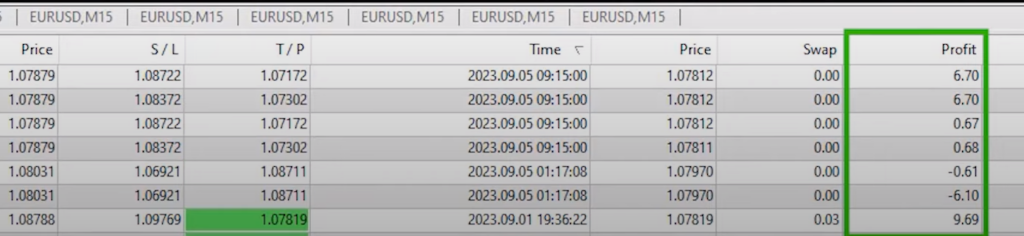
After a few days of letting the expert advisors trade on your demo account, it’s time to examine the results. If you take a look at your screen, you’ll likely see a multitude of trades that have been opened and closed across different charts. While this data is valuable, it can be challenging to determine which EA is the top performer for the current market conditions.
Top 10 Trading Robots: Using Tracking Websites
To make this evaluation easier, I rely on external tracking websites like MyFXbook or FXBlue, especially when trading with multiple robots in a single account. I’ve connected my account to FXBlue, and it provides a clear overview of the performance of each expert advisor.
Understanding Magic Numbers
When examining the trade history on FXBlue, you’ll notice that each trade has a “magic number” associated with it. The magic number is a unique identifier assigned to each EA and trade. By default, it starts with 100 and adds additional digits at the end to distinguish which EA opened a particular trade.
Evaluating Individual Expert Advisors
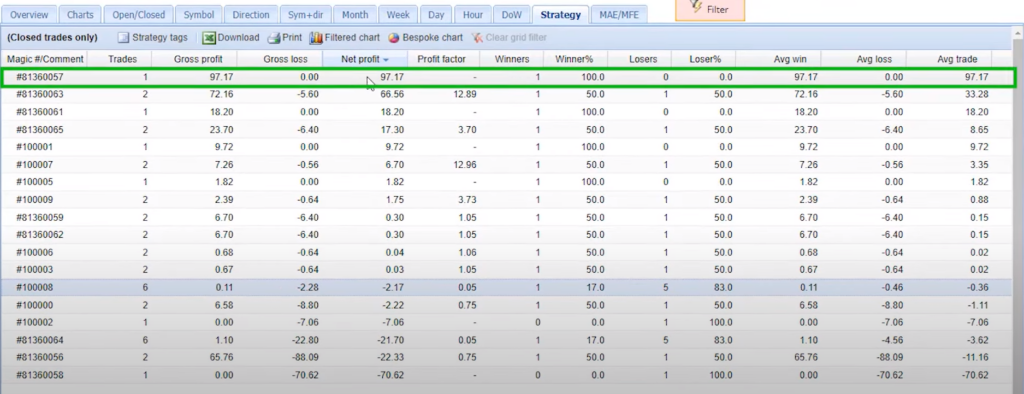
Below the portfolio expert advisor trades, you’ll find the individual expert advisors with their magic numbers ranging from 056 to 065. Analyzing these individual EAs can provide insights into their performance.
For instance, if an expert advisor has a negative profit, like -$21.70, it indicates that this specific strategy hasn’t been performing well during the trading period. Similarly, an EA with a profit of $97.17, as seen with the magic number ending in 0057, has shown strong performance.
Top 10 Trading Robots: Comparing Strategies
You can further analyze the results by arranging them according to net profit. This allows you to identify the expert advisors that have generated the most profit during the trading period. In this case, the robot with the magic number ending in 0057 is the top performer, bringing in $97.17 in profit.
It’s worth noting that some expert advisors may not have opened any trades during the period, indicating that there were no signals from their respective strategies.
Fine-Tuning Your Approach
The data you’ve gathered so far provides valuable insights into the performance of each expert advisor. This information can guide your decision-making process as you move forward with your trading strategy. You can choose to focus on the top-performing EAs, adjust their parameters, or even explore new strategies based on these results.
Optimizing Your Trading Strategy
Now that you have collected data and identified the top-performing expert advisors, it’s time to optimize your trading strategy. In this section, we’ll explore how to make the most of your trading robots based on their performance.
Top 10 Trading Robots: Choosing Your Top EAs
By arranging your expert advisors according to net profit, you can easily pinpoint the ones that stand out from the rest. In your case, you’ve found four highly profitable EAs. Now, the question is, how do you proceed?
Option 1: Separate Live Account
One option is to place the top-performing expert advisors on a separate live trading account. This approach gives you the flexibility to trade just the top performer, the top two, three, or all four, depending on your preference and risk tolerance.
For instance, if you decide to trade the top two EAs on a live account, you can leave the remaining 10 EAs trading on a demo account. Periodically, monitor their performance to see if any of them outperform the existing top EAs.
Option 2: Portfolio Expert Advisor
Another option is to utilize the portfolio expert advisor, which allows you to trade multiple strategies in one robot. However, you may want to fine-tune this approach by eliminating the underperforming strategies within the portfolio.
Top 10 Trading Robots: Customizing the Portfolio EA
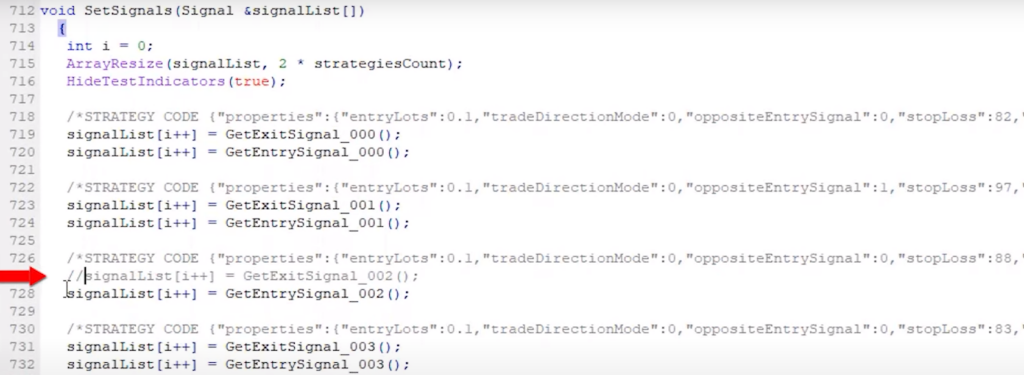
To customize the portfolio expert advisor, you’ll need to modify it using the MetaEditor. Look for the individual strategies within the code, and it’s straightforward to identify them. To remove a specific strategy from the portfolio, simply place two forward slashes (‘//’) in front of the ‘get entry signal’ and ‘get exit signal’ for that particular strategy. Once you compile the EA, it will disable that strategy from opening or closing trades.
Tailoring Your Portfolio
In this way, you can eliminate strategies that are not performing well in the portfolio. For example, if you want to remove the strategy with the most losses (ending in 002), follow the same process to disable it. This allows you to focus on the top-performing strategies within the portfolio expert advisor.
Top 10 Trading Robots: Exploring Your Options
Ultimately, you have two approaches at your disposal:
- Individual EAs: Create separate demo accounts for each of the expert advisors, track their performance with FXBlue or MyFXBook, and choose which ones to trade on a live account. This method provides flexibility and precision in selecting your trading strategies.
- Portfolio EA: Utilize the portfolio expert advisor to manage multiple strategies within one robot. Customize it by removing underperforming strategies to concentrate on the top performers. This approach simplifies trading but requires careful performance monitoring.
The choice between these options depends on your trading preferences and goals. Remember, most regulated brokers offer both demo and live accounts, allowing you to experiment and fine-tune your strategy.
Setting a Statistic Threshold
Before we conclude, there’s one important piece of advice I’d like to share. When evaluating the performance of your expert advisors, I recommend waiting for at least two or three trades to be executed. It’s not about the time frame, whether it’s a week or a month; it’s about having sufficient statistical data to make informed decisions.
Top 10 Trading Robots: Profit Factor Matters
Pay close attention to the profit factor of your expert advisors. Ideally, it should be above 1, with 1.2 or higher being even better. This metric reflects the profitability and risk-reward ratio of your trading strategies. A profit factor above 1 indicates that your strategy is profitable.
Regular Updates for Ongoing Success
Remember, I regularly update these 10 expert advisors every month, ensuring you have access to the latest versions. By placing them on a demo account, you can continually identify the ones that perform the best. This ongoing process empowers you to make informed decisions about which EAs to trade in your live or separate demo account.
Top 10 Trading Robots: Conclusion
In this blog post, I’ve shared my approach to managing multiple expert advisors. You have the freedom to decide how to manage them, whether by trading all of them or selecting the top-performing ones. The key is to have a clear strategy, continuously monitor their performance, and adapt as needed.
I hope this guide has provided valuable insights into expert advisor management. If you have any questions or need further assistance, don’t hesitate to reach out in our Forum. Trading with expert advisors requires a deep understanding of every aspect, and I’m here to help you navigate this exciting journey. Happy trading!