 Petko Aleksandrov
Backtesting in MetaTrader 4
In this lecture, I will show you how to perform a backtest on MetaTrader 4 and what’s the difference with backtesting in EA Studio.
In another lecture, I showed you how to backtest a trading strategy with the EA Studio where we have a lot of tools and statistics for each of the strategies. From there, we can change the strategy in many ways if we want to.
But in MetaTrader 4 we have the option to make a backtest or to see how the strategy performs until the current moment.
And especially if you’re just starting with a new broker and you have just installed MetaTrader 4 platform, it’s not a bad idea to make a backtest for the strategy. So you will know if you have the right trading environment or if your broker is suitable for the strategies that you will be trading with.
So no matter for which instrument I will do it and for which strategy. Let’s start with the first strategy for the Bitcoin on M15 from our Top 5 Strategies (+EAs) for Cryptocurrency Algorithmic Trading course.
And before I do the MetaTrader 4 backtest, I will show you something important. If you have just installed the MetaTrader 4 for first time, you need to load more bars from your broker. For this purpose, you will need to zoom out the chart and then press the Home key on your keyboard.

I see it moved a little bit the chart and I have the data now starting from the 8th of May 2020, which is not a lot of data, but that’s the maximum that Pepperstone offers.
The data for MetaTrader 4 backtesting on the broker’s server
And I have more data, but it’s on the other server because they had a few servers on Pepperstone, and they changed now to a new one for the Demo Accounts and I had more data previously, but now it’s not in there.
For example, if I go to H1, zoom out and press the Home key again, let me see where it will go. Just press and hold it so it will go to the beginning, on the 24th of April 2020.
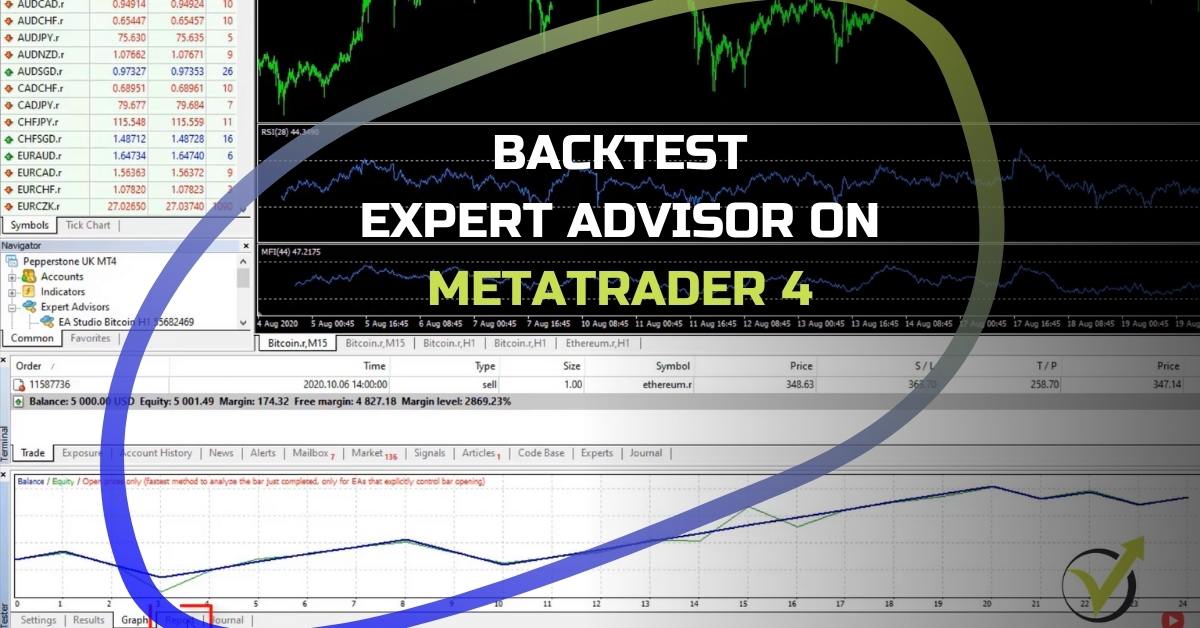
So on that server, they don’t have a lot of data, but I’m just taking the maximum possible. So if I go back to the M15 chart and I will start with the RSI strategy, what I can do is right-click over the chart and I go to Expert Advisors Strategy Tester or you can simply press F6 on your keyboard.

And you will notice a new window showing below your Terminal.

What happens when you uncheck Use date?
Now from here, you have a few options to select the symbol, the Expert Advisor that you will be using. Usually, these load automatically if you do it from the chart because the Expert Advisor is attached to the chart. And then we have a Model where we have 3 options: Every tick, Control points, and Open prices only.

For the strategies that we exported with EA Studio and for the strategies that open new trades on the opening of the new bar, you need to select Open prices only, which is, by the way, the most reliable method to backtest Expert Advisors on MetaTrader 4.
I click on it and then on the right side we have the period which is set automatically to M15 and then we have Spread. We can test it with the current spread or you can enter any value if you want to. Now, before I click on START, we have the option to use date so you can select the time period.
For example, you can perform a MetaTrader 4 backtest for the last 1 year or for the last 2 years up to date. It depends on the period you want to test the Expert Advisors.
And if you uncheck use date, then you will be using the whole period that you have on the chart.
And I click on START and you will see the MetaTrader 4 backtest is very quick. I go to results. Here are the results from the backtest of the Expert Advisor on MetaTrader 4.

And then we have the graph.

As you see, it goes up on profit, but we have just 24 trades that happen, which is not really a lot. Not enough to see the performance of the Expert Advisor.
Importance of Historical Data for MetaTrader 4 Backtest
And then we have the report where we see some more statistics that are available.

Now, if I open the very same strategy on EA Studio, you will see that I have 418 Count of trades. There’s the balance chart for the last 3 years and 6-7 months, which is more data. And this is because I have the data, as I’ve said from the previous server.

And if you want to collect more data from your broker, all you need to do is to keep your MetaTrader 4 platform open and with time, it will collect more bars for you.
Basically, this is the only reliable way you can collect bars from the MetaTrader 4 and perform a good backtest. Now, there is historical data. If you go to Tools and you go to History Center. From here, you can download more data.

For example, let me go to Bitcoin and I click on M1 minute and I click on download. You will see what the message says: “You are going to download data from the MetaQuotes Software Corporation History Center”. But your account is opened on the Pepperstone Limited trade server.

So it’s warning you that the data you will be downloading, it’s not from Pepperstone, but it’s actually from MetaQuotes. So to make the backtest, it’s important to do it over your server from your broker with the historical data of your broker.
The historical data is all the bars that we have in the past. If I zoom in, this is the data that we have from each candlestick. If I put the mouse on the closing of any of the bars, you will see that we have the Open, the High, the Low, and then Close.

The Report From The Backtest
These 4 values, they give us the data and as well, we have the Volume. So this forms the historical data which the backtest uses in the MetaTrader 4. And even when you have such a small period that’s still fine. The strategy shows a profit. It’s not dramatically losing. That wouldn’t bothering me.
If I make backtesting on MetaTrader 4 and I see a dramatic loss on the backtest, then, well, something is wrong.
Either the spread is too big for the broker or there is something wrong with the broker. You better look for another broker.
One more time, in Report we can see some statistics from the MetaTrader 4 backtest. For example, how many profitable trades we have, how many losing trades, consecutive losses, and consecutive wins. And we have the drawdown, the net profit. In this case, it is $1243.20. But one more time, that is just from 24 trades.
While in EA Studio if I go to Report, you will see a lot of statistics.

There’s the backtest output, which shows a lot of statistics for the strategy. We have return to drawdown, maximum stagnation, win-loss ratio, and the R-squared which is very important. Basically, it shows how good the equity line is. And then we have the drawdown, backtest quality a lot, a lot of things.
The Equity Line
On the side, we have some graphs for a count of entries by weekdays, and profit and loss in currency by weekdays. In this case, it is for Bitcoin. And then below, we see some more statistics. Monthly performance is very important. So here we can see which months were profitable and which months were losing.
As we always say in our courses, every strategy has losing periods.
This strategy has a great equity line. But if we look at the monthly performance, we see that there were actually months where the strategy was losing. But overall, the strategy is profitable because most of the time it is profitable. In this case, we have the total in years.

So, in 2017 it was profitable, 2018, 2019, 2020 so far. So don’t panic. If you place the Expert Advisors on MetaTrader and you see losses, just wait a little bit longer.
First, put the EAs on Demo Account so you will see how it works and you will see some profits as well. One more time, if you want to do a reliable backtest or if you want to see more statistics, you better use the editor and import back the Expert Advisor in EA Studio.

If you don’t have enough bars from MetaTrader 4 for your broker to perform backtesting, you can use premium data that is available in EA Studio.
Backtesting on MetaTrader 4 Demo Account
It comes by default where we have a lot of bars for many trading assets. So that’s how we do backtesting on MetaTrader 4. You saw that when we use more professional tools and software like EA Studio, we can have a more detailed backtest. But I would suggest you just place the Expert Advisors on a Demo Account. This way, you will have a real simulation on the market and you will see how these strategies perform. Give it some time. Test it for a week or 2, a month, 3 months, 6 months, it’s up to you.
Everyone prefers different periods for backtesting. And this is quite understandable. So go ahead and test the Expert Advisors. There is nothing to lose. Open a Demo Account so you won’t be risking any real money.
Backtest MetaTrader 4 vs. Strategy Builder EA Studio is a free lecture from our Top 5 Strategies (+EAs) for Cryptocurrency Algorithmic Trading course. If you haven’t enrolled for the course, you can do it here.
Thank you for reading. And if you found this article useful, don’t forget to leave a comment below or subscribe to our YouTube channel where we share valuable tips, trading strategies and our trading insights.