 Petko Aleksandrov
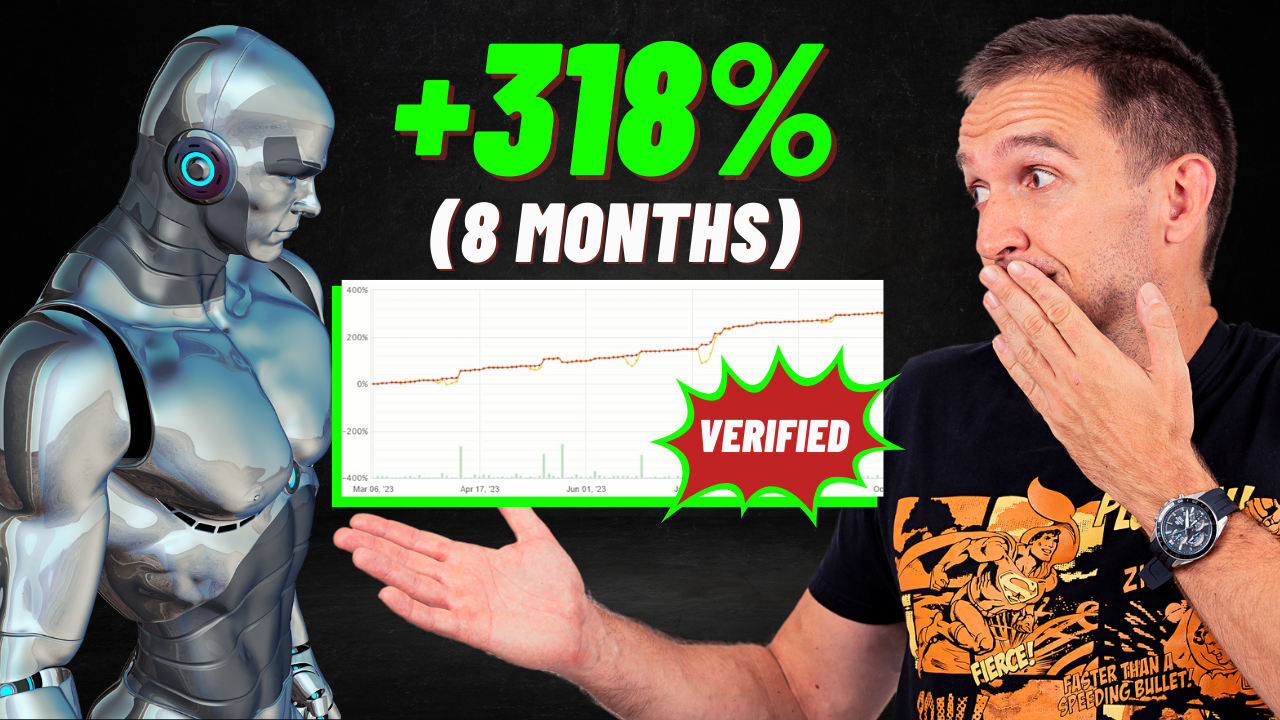
To begin this review, I want to ask you: Have you ever heard of a trading robot that works like magic? Let me introduce you to Automic Trader, a robot that has shown remarkable results. In just eight months, it achieved a stunning 318% profit! This caught my attention, and I knew I had to try it out. In this post, I’ll share everything about my experience with Automic Trader.
[partner_banner id=”244891″]
| Specification | Details |
| Developer | LeapFX |
| Platform Compatibility | MetaTrader 4 (MT4) only |
| Strategy Type | Trend-following (momentum + volatility-based) |
| Trading Pairs | AUDNZD, AUDUSD, EURGBP, EURUSD, GBPUSD, USDCAD (6 pairs) |
| Primary Timeframe | M15 (15-minute chart) |
| Average Trade Duration | 2 days (D2) |
| Technical Indicators | Fast MA, Slow MA, MACD, Overbought/Oversold levels |
| Risk Management | Dynamic auto-adapting trade management system |
| Stop Loss | 100 pips (configurable) |
| Take Profit | 50 pips (configurable) |
| Pricing – 1 Year | $697 |
| Pricing – Lifetime | $997 |
| Money-Back Guarantee | 30 days, full refund |
| Free Trial | Not available |
| Customer Support | Full support included |
| Updates | Free lifetime updates |
| MyFXBook Verification | Yes (830%+ gain, 1082 days live) |
| Live Update Status | Not green (manual updates, costs $50-60/year extra) |
Impressive Performance Statistics
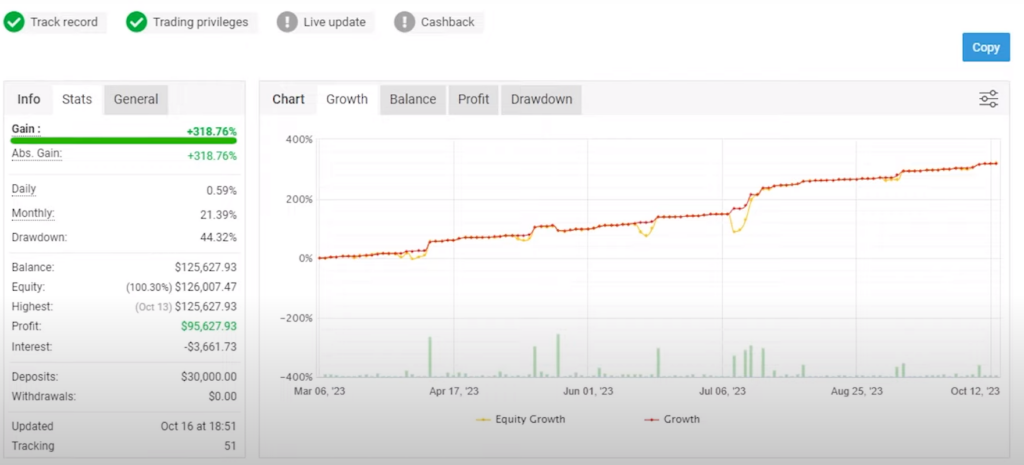
The Automic Trader robot is not just any ordinary tool. Since March 2023, it has consistently performed well. In fact, it averages a 21% monthly gain. However, it’s important to note that the drawdown, or the decline in account value, is 44.32%. This means while the gains are high, there is also a significant risk involved.
Testing the Automic Trader
Before using it in a real account, I decided to test Automic Trader in a demo setting. This way, I could see its performance without any real financial risk. The vendor’s account started with $30,000 and made about $95,000. These numbers are impressive, but remember, past performance doesn’t always predict future results.
Understanding the Updates and Licensing
As of my last check on November 3rd, the latest update from Automic Trader was on October 16th. There’s a gap of two weeks where I don’t have data. To get live updates, which are crucial for real-time decision-making, there’s a fee. It costs $50 per year for a single license or $60 for a flexible one. This fee is something to consider if you’re thinking about using Automic Trader.
The Reason Behind Non-Green Live Updates
I noticed that the live update feature wasn’t always green, indicating real-time data. There are two possible reasons for this. First, the vendor, LeapFX, might not want to pay the annual fee for each of their many accounts. Or, they might only update the account when it’s profitable. This is something to keep in mind when evaluating the robot’s performance.
The Data Gap Concern
Between October 16th (last update) and November 3rd (recording date), a two-week information gap exists. During these missing weeks, we cannot verify whether Automic Trader continued its profitable trajectory or experienced drawdowns. For transparency-conscious traders, this absence of real-time data creates uncertainty about current performance.
Delving Deeper: Advanced Statistics of Automic Trader
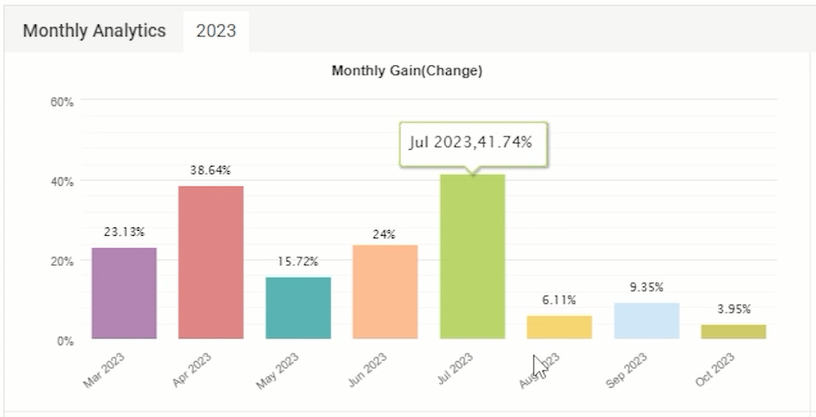
As we explore Automic Trader further, let’s look at some advanced statistics. This robot has achieved over 6,274 Pips, which is quite impressive. The Profit Factor stands at 2.80, indicating strong profitability. Monthly statistics reveal some fascinating trends. For instance, in July, the robot achieved a whopping 41.74% profit, and April was also strong with a 38.64% gain.
Understanding Recent Performance Trends
However, it’s interesting to note that recent months have shown profits below 10%. This suggests that the risk strategy might have been adjusted. Possibly, the trading amounts were reduced, leading to lower profits but also potentially lower risks.
Risk Management Strategies
The Automic Trader manual offers insights into risk management. For high risk, it recommends 0.1 for every $1,000 in the account. Medium risk is set at 0.01 for every $3,000 to $5,000, and low risk is advised at 0.01 for every $5,000 to $10,000. These guidelines help in balancing the potential gains against the risks involved.
| Risk Level | Lot Size | Account Balance | Expected Monthly Return | Drawdown Risk |
| High Risk | 0.1 lot | Per $1,000 | 50-100% | Very High (>40%) |
| Medium Risk | 0.01 lot | Per $3,000-$5,000 | 20-30% | Moderate (20-30%) |
| Low Risk | 0.01 lot | Per $5,000-$10,000 | 10-20% | Lower (10-20%) |
Interpreting the Guidelines
High Risk Configuration: Targets aggressive profit generation but exposes accounts to substantial drawdowns approaching or exceeding 40%. Suitable only for traders comfortable with significant equity fluctuations and possessing adequate capital reserves to survive extended losing periods. The verified MyFXBook account showing 44.32% maximum drawdown likely operated at high-risk settings during certain periods.
Medium Risk Balance: Provides respectable monthly returns while maintaining more manageable drawdown levels. This middle ground suits traders seeking steady account growth without excessive volatility. Capital requirements of $3,000-$5,000 per 0.01 lot ensure sufficient margin during unfavorable market conditions.
Low Risk Approach: Prioritizes capital preservation over explosive growth. Monthly returns of 10-20% still significantly exceed traditional investment vehicles while keeping drawdowns within psychologically tolerable ranges. Requiring $5,000-$10,000 per 0.01 lot creates substantial safety buffers during adverse moves.
Customizing for Your Situation
These recommendations serve as starting points, not rigid requirements. Your optimal configuration depends on multiple factors: account size, risk tolerance, trading goals, broker leverage, and whether trading personal capital versus prop firm challenges. Prop firm traders should default to low-risk settings given strict daily loss limits that high-risk configurations would violate quickly.
Always backtest your chosen settings across multiple years of historical data before risking real capital. Market conditions evolve, and past performance under specific risk parameters doesn’t guarantee future results remain consistent.
Setting Up the Robot for Trading
Now, let’s talk about how to set up Automic Trader. I’ve prepared a new demo account with FXview on one of my Virtual Private Servers (VPS). I plan to use this account to test the Automic Trader expert advisor. This setup will give us a clear idea of how the robot performs under different market conditions.
Choosing Currency Pairs and Risk Levels
In my testing, I will select specific currency pairs to trade with Automic Trader. The choice of pairs can significantly impact the robot’s performance. Also, I will be deciding on the level of risk I’m willing to take. This decision is crucial as it will define both the potential profit and the level of risk involved.
Tracking Performance on MyFXbook
For transparency and real-time tracking, I will link my demo account to MyFXbook. This way, you can follow the robot’s performance live. Whether you’re watching this video today or months from now, you’ll have access to up-to-date information about how Automic Trader is performing in my demo account.
Setting Up Automic Trader: Currency Pairs and Risk Management
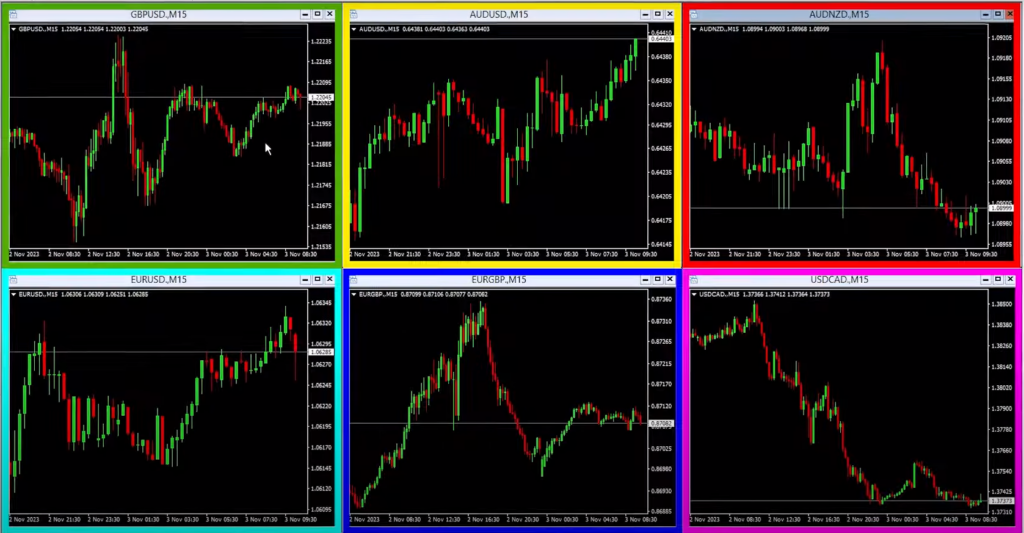
In my journey with Automic Trader, I’ve decided to focus on six major currency pairs, all traded on the M15 timeframe. Setting up is straightforward – I simply drag and drop the robot onto the GBP/USD (Pound Dollar) chart. In the settings, I can control various aspects like the starting lot, which I’ve set at 0.1. However, aiming for low risk, I adjust this to 0.01 in my 10K account.
Configuring the Robot with Vendor Settings
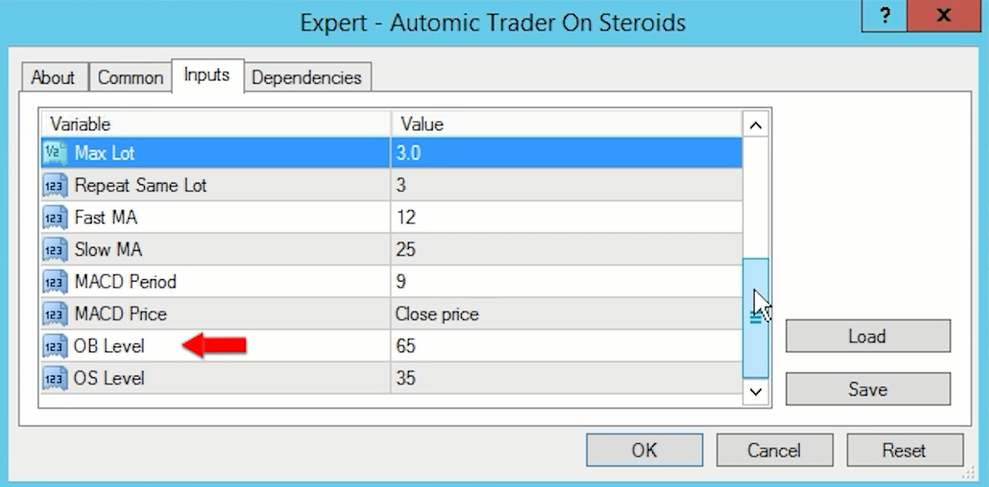
Next, I load the set files provided by the vendor, specifically selecting the GBP/USD pair. Scrolling through the settings, there are options like a lot multiplier, a stop loss of 100, and a take profit of 50. The robot also uses technical indicators like fast and slow moving averages, MACD, OB level, and OS level. Before finalizing, I ensure to allow DLL Imports in the common settings.
Critical Settings Breakdown
- Lot Sizing Configuration: Starting lot determines your initial position size. For my 10K demo account using low-risk parameters, I configured 0.01 as the base lot. The lot multiplier governs how position sizing scales when adding to positions. Keeping vendor defaults here ensures the dynamic management system functions as designed without creating excessive exposure.
- Risk Management Parameters: Stop loss sits at 100 pips, providing reasonable protection against adverse moves while allowing trends sufficient room to develop. Take profit targets 50 pips, capturing momentum moves before potential reversals. These asymmetric values (2:1 risk-to-reward) align with trend-following principles where you accept larger stops for smaller, frequent profits.
Maximum lot settings cap total position size regardless of market conditions. Vendor defaults incorporate years of backtesting to balance profit potential against catastrophic loss prevention. Modifying these limits without extensive testing could either constrain profits unnecessarily or expose accounts to blowout risk.
Technical Indicator Framework
Automic Trader employs multiple technical indicators working in concert:
- Fast Moving Average: Responds quickly to price changes, identifying short-term momentum shifts. Specific period settings remain proprietary but function within the typical 5-20 range for M15 timeframes.
- Slow Moving Average: Filters market noise by smoothing price action over longer periods. The crossover relationship between fast and slow MAs helps confirm trend direction before entry.
- MACD (Moving Average Convergence Divergence): Validates momentum through histogram patterns and signal line crossovers. This indicator adds confirmation layers, reducing false signals during choppy markets.
- OB (Overbought) and OS (Oversold) Levels: Define extreme price zones where reversals become probable. These thresholds help the EA avoid chasing trends at exhaustion points, protecting capital during late-stage moves.
Essential DLL Import Authorization
Before finalizing the configuration, navigate to the “Common” settings tab within your EA properties. Locate the checkbox labeled “Allow DLL Imports” and enable it. This critical step permits Automic Trader to access necessary system libraries for executing trades, managing positions, and interfacing with MetaTrader’s trading functions.
Without DLL authorization, the EA loads onto charts but cannot place trades, a common setup error causing frustration when traders wonder why their robot remains inactive despite proper installation. The DLL permission grants necessary system access while MetaTrader’s built-in security features prevent malicious code execution.
Demo vs. Live Spread Verification
Before committing real capital, conduct a vital comparison test. Open identical charts, one connected to your demo account, another to your live account. Monitor spreads simultaneously across major pairs during active trading hours. Quotes and spreads should align closely between environments.
Significant discrepancies reveal broker manipulation, where attractive demo conditions lure traders before subjecting live accounts to wider spreads and inferior execution. If your broker shows EUR/USD at 0.2 pips on demo but 1.5 pips on live, testing becomes meaningless, demo profits won’t replicate in real trading.
This verification protects against wasting weeks testing an EA under favorable demo conditions only to discover live execution destroys profitability through hidden costs. Quality brokers maintain consistent spread policies across account types, demonstrating operational integrity worth your trading capital.
Importance of Broker Selection for Expert Advisors
Choosing the right broker is crucial when trading with expert advisors like Automic Trader. A broker with low spreads is essential – anything below 10 points or one pip for major currency pairs is ideal. Good brokers where the spread for the Euro/Dollar starts from 1 point, and offer a commission starting at $1 for every lot traded is ideal. It’s important to use a regulated broker that offers tight spreads and low commissions for the best results.
Comparing Demo and Live Account Spreads
Before starting, I compared the spreads between my demo and live accounts. It’s vital to have similar quotes and spreads in both. If there’s a significant difference, testing any expert advisor on a demo account might not be useful. You could see positive results in demo, but face different outcomes in a live account, leading to frustration.
Monitoring Spread Fluctuations
Just before recording, there was news from Germany causing a slight increase in spreads. This is a reminder of how external factors can impact trading conditions. It’s important to monitor such changes, especially when trading with expert advisors.
Exploring Automic Trader on the Vendor’s Website
Let’s take a closer look at Automic Trader on the vendor’s website. There, you’ll find extensive information about this trading robot. One key feature that stands out is the 30-day money-back guarantee. This guarantee is crucial for me, and I generally don’t consider purchasing a robot without it. It offers a safety net, allowing you to test the robot and decide if it meets your needs without financial risk.
Understanding the Purchase Options
However, there’s a catch with Automic Trader. LeapFX, the vendor, doesn’t offer free trials. To try the robot, you need to opt for either a one-year membership or a lifetime license. The good part is that you still have those 30 days to test the robot and make a decision.
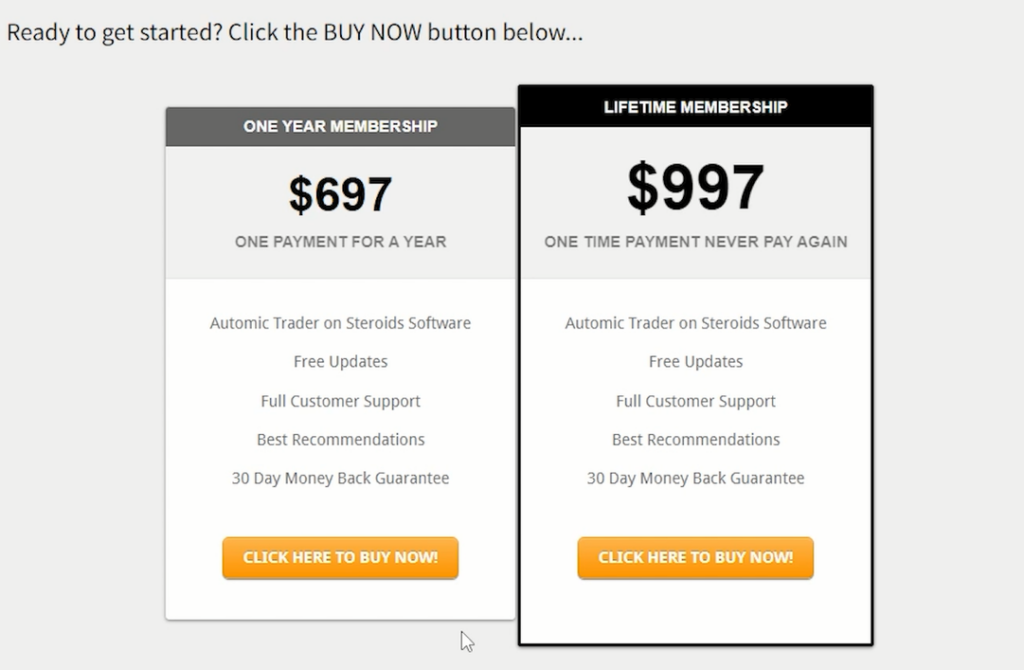
| Package | Price | Best For |
| 1-Year License | $697 | Traders wanting to evaluate long-term performance before lifetime commitment |
| Lifetime License | $997 | Serious algorithmic traders planning extended automated trading |
Complete Package Inclusions
Regardless of the selected license duration, every purchase includes:
- Full Software Access: Complete Automic Trader EA with all features unlocked. No tiered restrictions or hidden premium features requiring additional payments.
- Vendor-Optimized Set Files: Pre-configured parameter files for all six supported currency pairs. These settings incorporate years of backtesting and live trading experience, eliminating guesswork in initial configuration.
- Detailed Setup Guide: Step-by-step manual covering installation, configuration, broker selection, risk management, and troubleshooting. Follow instructions precisely to ensure optimal performance from day one.
- Comprehensive Customer Support: Direct access to the LeapFX support team for technical assistance, configuration questions, and performance optimization guidance. Response times typically within 24-48 hours.
- Free Lifetime Updates: All future software versions, bug fixes, and strategy enhancements download automatically at no additional cost. As market conditions evolve, the development team continuously refines algorithms to maintain edge.
- 30-Day Money-Back Guarantee: Test Automic Trader on demo or live accounts for a full month. If results don’t meet expectations for any reason, request a complete refund. This policy demonstrates developer confidence while protecting buyer interests.
No Free Trial Availability
Unlike some competitors offering 7-14 day trial periods, LeapFX requires purchasing a license before testing. This policy reflects their confidence in verified performance results while relying on the 30-day refund guarantee to protect customers. The absence of free trials means you must commit $697 minimum to evaluate the software, though the money-back guarantee mitigates risk.
MyFXBook Live Update Costs
Important note: maintaining green “live update” status on MyFXBook costs an additional $50 per year (single license) or $60 (flexible license). This fee is separate from your EA purchase and pays MyFXBook directly for real-time monitoring services. LeapFX’s demonstration account currently lacks green status, showing manual updates instead of continuous verification.
My Experience with Other Robots from the Same Vendor
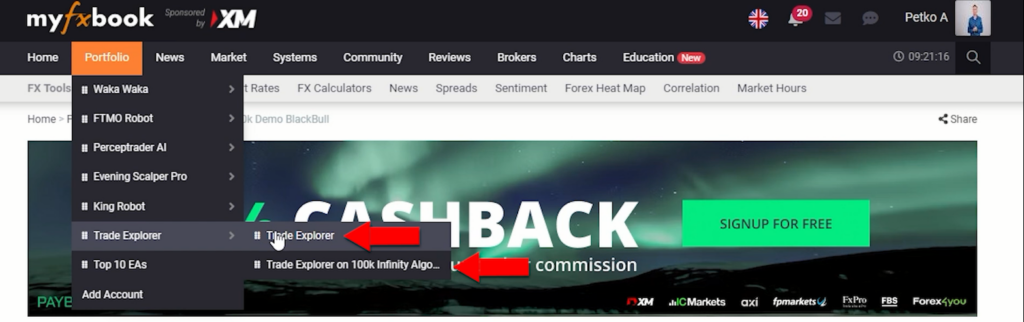
I have experience with two other robots from LeapFX. The first one is King Robot, which I’m currently testing on a demo account and planning to connect to MyFXbook soon. The second is Trade Explorer, which I’m using on two different accounts. One is a 100K challenge account I recently started, and the other is a funded account where Trade Explorer has been performing well in recent months.
Connecting Automic Trader to MyFXbook
As mentioned above, I plan to connect the demo account for Automic Trader to MyFXbook. This will allow me, and anyone interested, to track its performance transparently. I’ll leave the link below, so you can check its progress on my account whenever you watch the video.
Keeping Track of Performance
Monitoring the performance of trading robots like Automic Trader is essential. By connecting to MyFXbook, I can keep an eye on how the robot performs under different market conditions. This real-time tracking is invaluable for making informed decisions about whether to continue using the robot or not. This is the reason I have connected all robots I am trading with on my live accounts.
Final Insights on Automic Trader
As we wrap up our exploration of Automic Trader, a few key points stand out. This trading robot has shown impressive statistics, with significant gains in certain months. However, its performance also reflects the inherent risks and volatility in trading. The setup process, involving the selection of currency pairs and risk management, is straightforward yet crucial for optimal performance.
The vendor’s 30-day money-back guarantee offers a safety net for testing the robot, although the absence of a free trial might be a drawback for some. My experience with other robots from LeapFX, like King Robot and Trade Explorer, has been a mix of ongoing tests and successful runs, which adds context to my expectations with Automic Trader.
Connecting the robot to MyFXbook for real-time performance tracking is a step I highly recommend. It provides transparency and helps in making informed decisions based on the robot’s performance in live market conditions.
Advantages & Limitations
Key Advantages
✅ Trend-Following Foundation: Strategy based on momentum and volatility indicators, capitalizing on sustained directional moves rather than range-bound chop.
✅ Multi-Pair Diversification: Trades six major currency pairs simultaneously, spreading risk across instruments with different correlation profiles.
✅ Dynamic Trade Management: Auto-adapting system adjusts exits based on real-time price action, maximizing pip capture before trend exhaustion.
✅ Verified Long-Term Performance: MyFXBook tracking shows 830%+ cumulative gain over 1,082 days live trading, proving sustained profitability beyond brief lucky streaks.
✅ 30-Day Money-Back Protection: Full refund guarantee eliminates purchase risk, allowing thorough evaluation before final commitment.
✅ Lifetime Update Access: All future improvements and optimizations included permanently without recurring subscription fees (beyond initial license).
✅ Flexible Risk Configurations: Three preset risk levels (low/medium/high) accommodate different account sizes and risk tolerances.
✅ Established Developer Reputation: LeapFX’s portfolio includes multiple proven robots (Trade Explorer, King Robot), demonstrating serious development capability.
Important Limitations
⚠️ No Free Trial Period: Must purchase a $697 minimum license before testing, relying solely on money-back guarantee for risk mitigation.
⚠️ Substantial Maximum Drawdown: 44.32% equity decline during the worst period requires psychological fortitude and adequate capitalization to survive.
⚠️ Non-Green MyFXBook Status: Manual updates create data gaps (2+ weeks missing in example), reducing real-time transparency versus continuously verified accounts.
⚠️ Premium Pricing: $697-$997 investment represents a higher entry barrier compared to budget alternatives in the $200-$400 range.
⚠️ Separate Live Update Fees: Maintaining green MyFXBook verification costs an additional $50-60 annually if you want real-time monitoring for your own accounts.
⚠️ Declining Recent Profits: Monthly returns dropped from 40%+ peaks to under 10% in recent periods, suggesting either risk reduction or less favorable market conditions.
⚠️ Broker Quality Requirements: Demands tight spreads under 10 points and reliable execution; poor brokers will degrade performance significantly.
⚠️ Trend-Dependent Strategy: Struggles during ranging, choppy markets when directional moves lack conviction and generate false signals.
Conclusion
Automic Trader presents as a potentially powerful tool for traders seeking to leverage automated trading strategies. While it comes with its set of challenges and risks, proper setup, risk management, and continuous performance monitoring can make it a valuable asset in a trader’s arsenal.
As always, remember that past performance is not indicative of future results, and it’s essential to trade responsibly. Stay tuned for more updates and insights as I continue exploring the capabilities of Automic Trader.
Frequently Asked Questions
Does Automic Trader work on both MT4 and MT5, or is it platform-specific?
Automic Trader operates exclusively on the MetaTrader 4 platform. If your broker only offers MT5, you’ll need to either open an MT4 account with a different broker or use trade copying software to replicate signals from MT4 to MT5.
However, trade copiers introduce execution delays that could impact performance, particularly on the M15 timeframe, where timing is critical for trend-following entries.
Why isn’t the LeapFX MyFXBook account showing a green “live update” status?
MyFXBook charges $50 per year for a single license or $60 for a flexible license to maintain a green live update status. LeapFX manages dozens of accounts and may choose not to pay this annual fee for each one. Alternatively, some traders suspect vendors only update accounts when profitable.
The account was last updated on October 16th, leaving a two-week gap in recent data. This doesn’t necessarily indicate problems, but it reduces real-time transparency for potential buyers evaluating current performance.
Can I use Automic Trader for prop firm challenges, or is it designed for personal accounts?
Automic Trader works on both personal and prop firm challenge accounts. However, the 44.32% maximum drawdown presents significant challenges for most prop firms with 10% daily loss limits. The high-risk setting (0.1 lot per $1,000) would almost certainly violate challenge rules.
Use only low-risk or medium-risk configurations for challenges, and expect slower profit generation (10-20% monthly) rather than the advertised 50-100%. The lack of prop-firm-specific features means you’ll need manual monitoring during volatile periods.
What’s the difference between Automic Trader and LeapFX’s other robots, like Trade Explorer or King Robot?
Automic Trader focuses specifically on trend-following across six major pairs using momentum and volatility indicators. Trade Explorer (another LeapFX product) uses different entry logic and has shown consistent performance on funded accounts. King Robot represents a third strategy approach.
LeapFX develops multiple robots targeting different market conditions and trading styles, allowing traders to diversify strategies. However, specific strategy differences aren’t publicly disclosed. Testing multiple LeapFX products simultaneously could provide portfolio diversification but increases capital requirements and management complexity.
Why did monthly profits drop from 40%+ in early months to below 10% recently?
The dramatic profit decline from 41.74% (July) and 38.64% (April) to under 10% in recent months likely reflects deliberate risk reduction by LeapFX. The vendor probably decreased trading lot sizes from higher risk settings (0.1 lot per $1,000) to lower risk configurations (0.01 lot per $5,000-$10,000).
This adjustment reduces both profit potential and drawdown risk. Market conditions also affect trend-following strategies; fewer strong trends mean fewer profitable opportunities. The change demonstrates conservative risk management but sets more realistic performance expectations for new users.