 Petko Aleksandrov
Welcome to my blog, where I share my experiences and insights into various trading tools and strategies. Today, I’ll be reviewing the Trade Explorer Expert Advisor from LeapFX. This EA has garnered quite a bit of attention, with numerous accounts showcased on MyFXBook. In this blog post, we’ll dive into the details, discussing its features, performance, and whether it’s a good investment.
Exploring the Trade Explorer EA
As someone who’s been in the trading game for a decade, I’ve come across my fair share of expert advisors and trading robots. LeapFX has an array of EAs available on their website, but what caught my eye was the Trade Explorer, primarily because it claims to trade on 27 different currency pairs. However, it’s important to note that some traders have raised concerns about its risk profile, with reports of blown accounts.
| Specification | Details |
| Developer | LeapFX |
| Platform Compatibility | MetaTrader 4 (MT4) only |
| Strategy Type | Martingale grid recovery system |
| Total Currency Pairs | 27 pairs supported |
| Active Pairs (Low Risk) | 10 pairs (AUD/USD, EUR/USD, GBP/USD, etc.) |
| Primary Timeframe | M5 (5-minute chart) |
| Recovery Method | Martingale grid (adds positions during drawdowns) |
| Recommended Lot Sizing | 0.01 per $5,000 account balance |
| My Conservative Test Size | 0.01 on $92,000 account (ultra-conservative) |
| Maximum Verified Drawdown | ~70% (MyFXBook verified) |
| Best Month Performance | +120% (March, per MyFXBook) |
| Pricing – 1 Year | Approximately $600 |
| Pricing – Lifetime | Approximately $900 |
| Money-Back Guarantee | 30 days, full refund |
| VPS Requirement | Highly recommended (24/7 operation mandatory) |
| Test Account Leverage | 1:10 (Darwinex account) |
| DLL Imports Required | Yes (must enable in MT4 settings) |
Addressing the “High Risk” Reputation: What You Need to Know
Before investing in Trade Explorer, it’s important to address concerns raised by other traders and reviewers. Multiple YouTube reviews and forums mention that this EA has “blown accounts,” and it’s frequently labeled as a “really risky expert advisor.”
The data supports these concerns. The verified MyFXBook account shows a maximum drawdown of nearly 70%, meaning the account lost 70% of its value at its worst point. While the account eventually recovered, this level of drawdown would have wiped out most traders psychologically and financially.
Why Does This Happen?
Trade Explorer uses a Martingale grid system, a recovery strategy that adds positions when trades go against you. While this can recover losses in ranging markets, it creates exponential risk during strong trends. When multiple currency pairs trend against your positions simultaneously, the EA opens cascading positions that can drain accounts rapidly.
The MyFXBook history reveals specific periods where recovery sequences spiraled dangerously. During March’s 120%+ profit month, the account simultaneously experienced substantial equity drops before recovery. This pattern—explosive gains followed by near-catastrophic drawdowns—characterizes Martingale systems operating at aggressive risk levels.
Real Trader Experiences
Beyond my own testing, numerous traders have documented their experiences with Trade Explorer across forums and review sites. Common themes emerge: impressive initial profits lasting weeks or months, followed by sudden drawdowns exceeding 50-70% during volatile market conditions. Some accounts recovered; others did not.
The blown account phenomenon typically occurs when traders:
- Use recommended lot sizes without adequate capital reserves
- Operate during high-correlation market events (central bank announcements, geopolitical crises)
- Fail to monitor and intervene during extended drawdown sequences
- Run the EA on accounts with insufficient margin to survive recovery periods
Making an Informed Decision
I’m not dismissing Trade Explorer, the verified profits demonstrate its potential when conditions align favorably. However, transparency about worst-case scenarios matters more than highlighting best-case returns. Understanding that 70% drawdowns represent realistic possibilities, not theoretical extremes, fundamentally changes how you approach position sizing and capital allocation.
Test on demo accounts first. Start with minimal lot sizes. Never risk capital you cannot afford to lose completely. The 30-day money-back guarantee provides a testing window, but real evaluation requires monitoring through both favorable and adverse market cycles lasting several months.
Risk Management
To assess the EA’s performance, I decided to deploy it on one of my Darwinex accounts, a platform known for its low leverage options. I started with a $90,000 account and opted for conservative risk settings. According to the EA’s manual, it recommends trading at 0.01 lots for every $5,000 traded. This would mean 0.18 lots for my $92,000 account. However, I chose to stick with 0.01 lots to play it safe.
Setting Up
Before I delve into the actual trading, let me provide you with an overview of the Trade Explorer expert advisor. There’s a wealth of information available on LeapFX’s website, including MyFXBook accounts and reviews. While I won’t go through all of that, I want to highlight some performance statistics I found on MyFXBook.
Performance Analysis
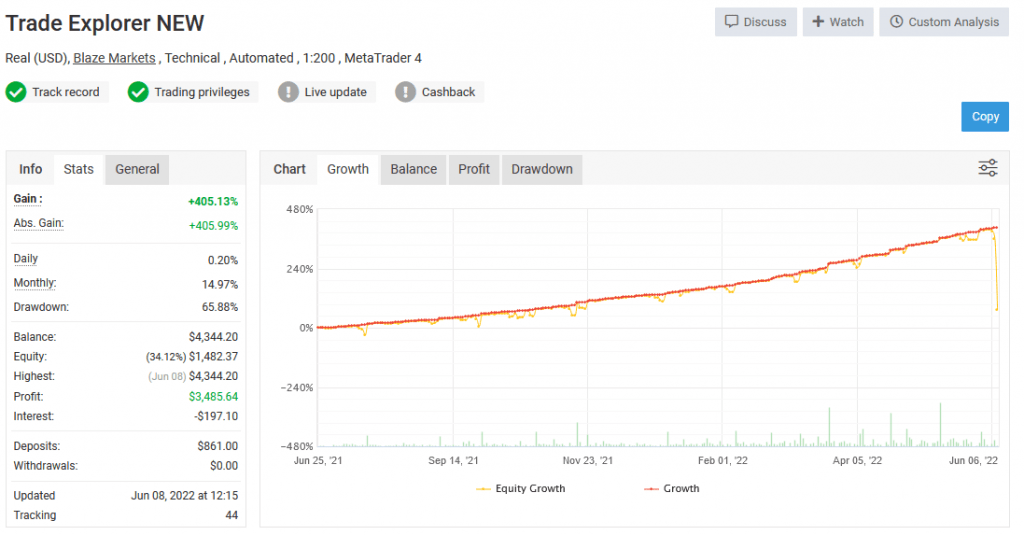
One account that caught my attention began in 2021. Initially, it seemed like the developer was using conservative settings, resulting in steady growth. However, there was a significant performance spike accompanied by a substantial drawdown. The drawdown nearly reached 70%, which is undeniably risky. But what’s intriguing is the recovery that followed.
The Numbers
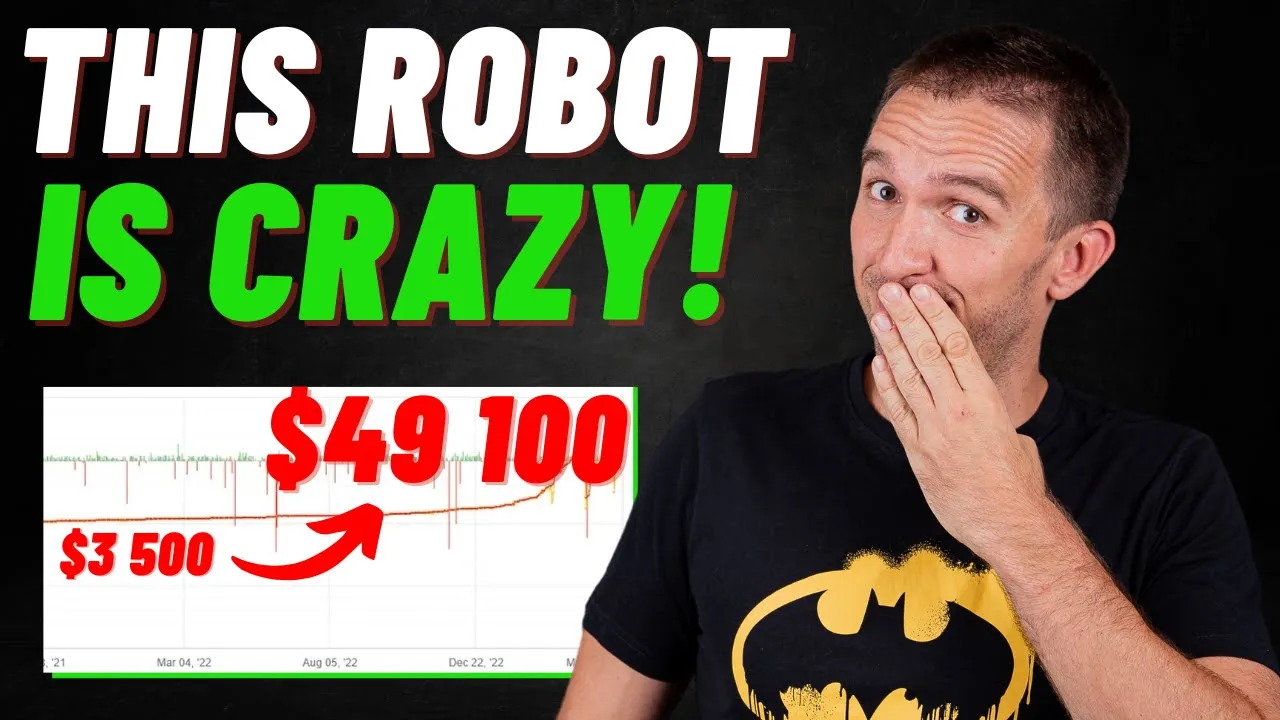
Let’s look at the numbers. The account started with $3,500 and eventually generated close to $50,000 in profit. The monthly performance figures are equally striking, with gains exceeding 120% in March. This paints a picture of a high-risk expert advisor.
My Approach
Given the risk associated with the Trade Explorer EA, I’ve chosen to tread cautiously. I’ve set it up with minimal risk settings and a low drawdown configuration. Now, let’s see how it performs in real-time.
Uncovering Trade Explorer’s Performance
Before we get into the nitty-gritty of setting up the Trade Explorer on our trading account, let’s take a look at its performance in recent years. To do this, I delved into its track record, particularly focusing on the best-performing months.
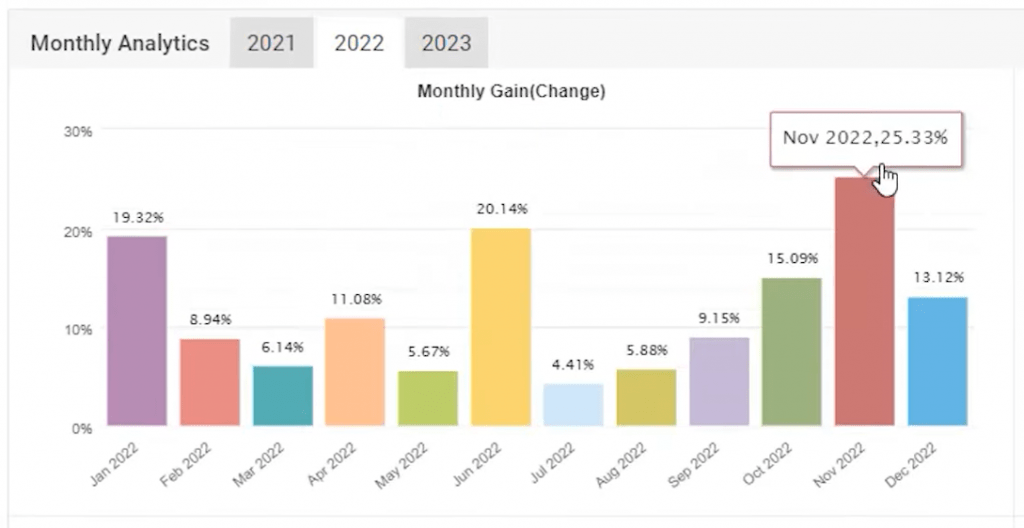
In 2022, Trade Explorer showcased an impressive 25% gain, indicating its potential for profitability. Looking back to 2021, the EA boasted close to a 26% return in November. These figures paint a promising picture, but it’s crucial to remember that past performance doesn’t guarantee future results.
For a comprehensive understanding of Trade Explorer’s capabilities, there are numerous accounts and track records available. You can explore these further through this link.
The Importance of a VPS for Trading
Now, let’s address a crucial aspect that can significantly impact your trading experience – a Virtual Private Server (VPS). For those new to trading jargon, a VPS is a virtual machine that allows you to run your trading software, such as MetaTrader, remotely.
One of the primary advantages of using a VPS is that it ensures uninterrupted trading. Unlike your PC or laptop, which might need to be powered on continuously, a VPS remains online 24/7. This is vital because if you switch off your computer, your EA will stop working as it disconnects from your broker’s server.
Choosing the Right VPS Plan
To get started with a VPS, I opted for a plan from ForexVPS. They offer different packages, each catering to varying needs. I selected the basic plan, which allows me to run three MetaTrader platforms. However, I decided to push the limits a bit and installed four platforms on it.
Here are the key specs of the basic plan I chose:
- Two core CPU
- 80 GB SSD
- 2.5 GB RAM
This configuration should be more than capable of handling four trading accounts simultaneously. When you’re selecting a VPS plan, consider the number of accounts you intend to trade, as this will help you determine the most suitable plan for your needs.
Setting Up Trade Explorer on My VPS
With my VPS up and running, I installed the Trade Explorer on it. In addition to Trade Explorer, I also have other trading accounts, including an FTMO account, a Blackbull Markets account where I’m testing the King Robot, and another where I’m experimenting with the XAUBOT. However, for today’s review, we’ll be focusing on the Trade Explorer, which I’m deploying on my Darwinex account.
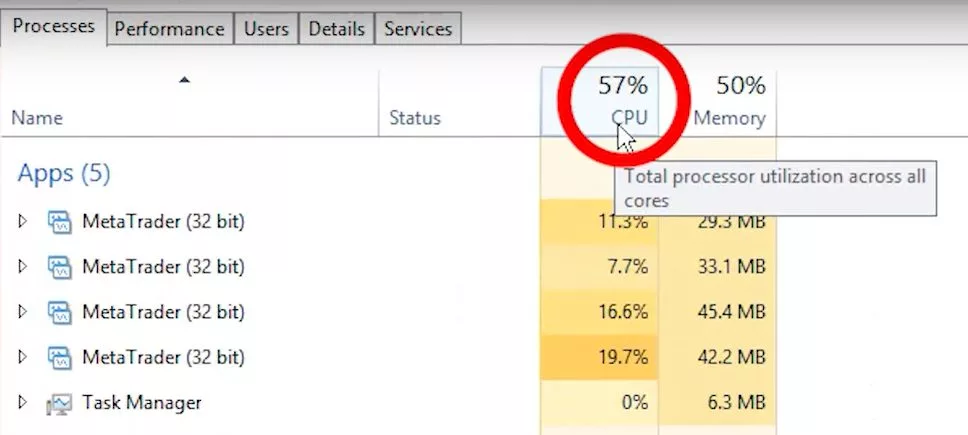
I wanted to ensure that my VPS could handle the load, so I checked the system resource usage. With four trading platforms running simultaneously, I’m utilizing approximately 60% of the CPU and about 49-50% of the memory. This assures me that my VPS is well-equipped to manage multiple trading accounts effectively without any hiccups.
Getting Started with Trade Explorer
To kick things off, I’ve acquired the Trade Explorer expert advisor along with an indicator that complements its functionality. Now, let’s get right into the action by setting up the expert advisor. It’s a straightforward process that begins with copying the EA to the correct directory.
- Copying the Expert Advisor: Open your MetaTrader platform, navigate to “File,” and select “Open Data Folder.” In this folder, you’ll find the “MQL4” directory. Inside “MQL4,” locate the “Experts” folder and paste the expert advisor here.
- Adding the Indicator: Similarly, copy the indicator, but this time, head to the “Indicators” folder within the “MQL4” directory and paste it there.
With these steps, you’ve successfully added the Trade Explorer expert advisor and its corresponding indicator to your MetaTrader platform.
Configuring Trade Explorer for Multiple Assets
Now that we have the expert advisor in place, let’s move on to configuring it for multiple assets. I’ve opened ten different charts representing various assets where the Trade Explorer will be actively trading.
According to the manual, you can adjust the risk level by selecting specific currency pairs and utilizing lower risk set files. To begin, I’ve chosen the AUD/USD pair and switched to the M5 time frame. Here’s what you need to do:
- Drag and Drop the Expert Advisor: Drag the Trade Explorer expert advisor onto the chart.
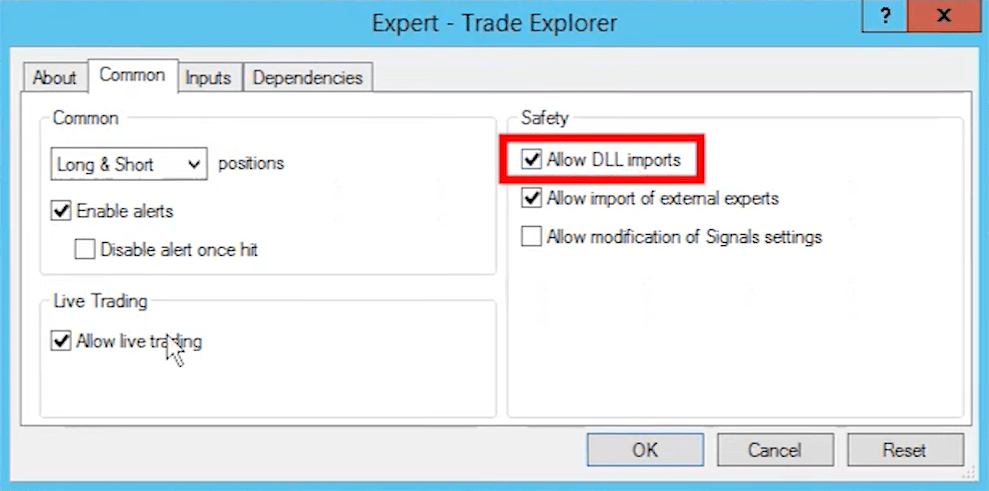
- Adjust Comment Settings: In the expert advisor’s settings, ensure that you allow DLL imports and enable live trading.
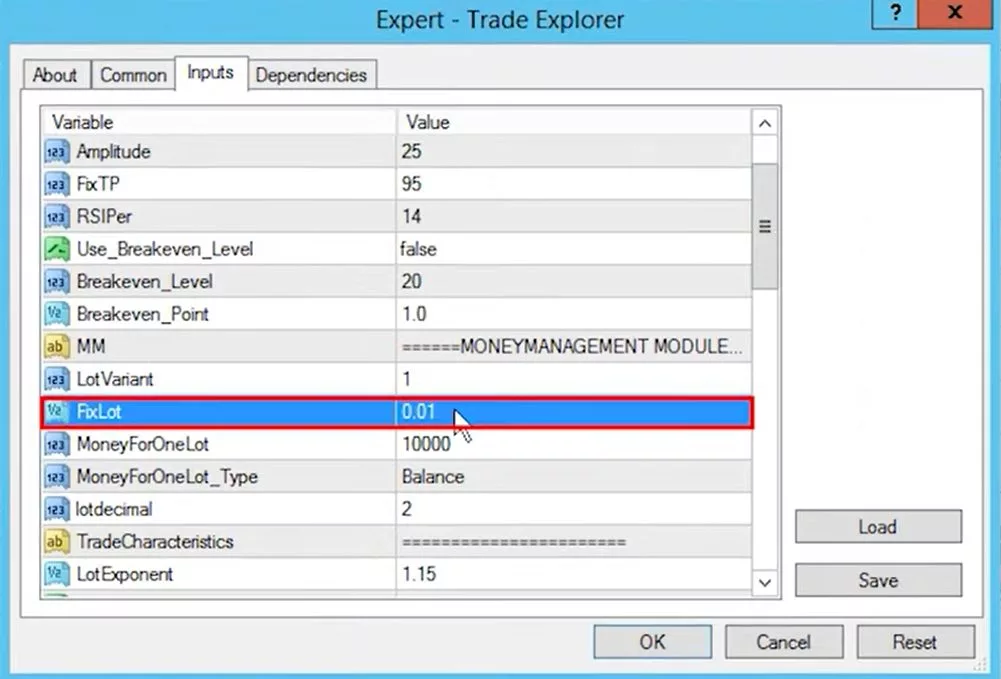
Now, you’ll notice a plethora of input settings, each with its own significance. While they may seem overwhelming at first, it’s essential to understand key options, such as “Break Even,” “Money Management,” “Magic Number,” “Basket Stop Loss,” “Account Maximum Trades,” and “Total Equity Risk.”
Using Set Files for Lower Drawdown
Trade Explorer provides pre-configured set files that cater to different risk preferences. To implement a lower drawdown strategy, I’ve chosen the “low drawdown set file” for the AUD/USD pair. This file automatically adjusts the settings to align with a lower risk approach.
For my Darwinex account, which operates with a leverage of 1:10, I’ve decided to start with a conservative lot size of 0.01. However, as I gain more experience with the EA and assess its performance, I may consider increasing it to 0.05. It’s crucial to evaluate risks meticulously, especially when dealing with an EA like Trade Explorer, known for its Martingale system.
Real-Time Monitoring and the Role of a VPS
With the expert advisor configured and set files in place, I’ve attached it to multiple charts representing various currency pairs. The smiley face icon on each chart indicates that the EA is actively monitoring and looking for trade opportunities.
Now, here’s a game-changer in the world of automated trading: a Virtual Private Server (VPS). I’ve recently acquired a VPS from ForexVPS to ensure uninterrupted trading. A VPS is like having a dedicated virtual machine that runs your trading software 24/7. It’s especially valuable for traders because it eliminates the need to keep your PC or laptop running at all times.
Considering the Risks
As I progress with Trade Explorer, I’m well aware of the risks associated with its Martingale system. While I don’t shy away from Martingale strategies and have successfully used them in the past, it’s crucial to exercise caution and avoid over-leveraging.
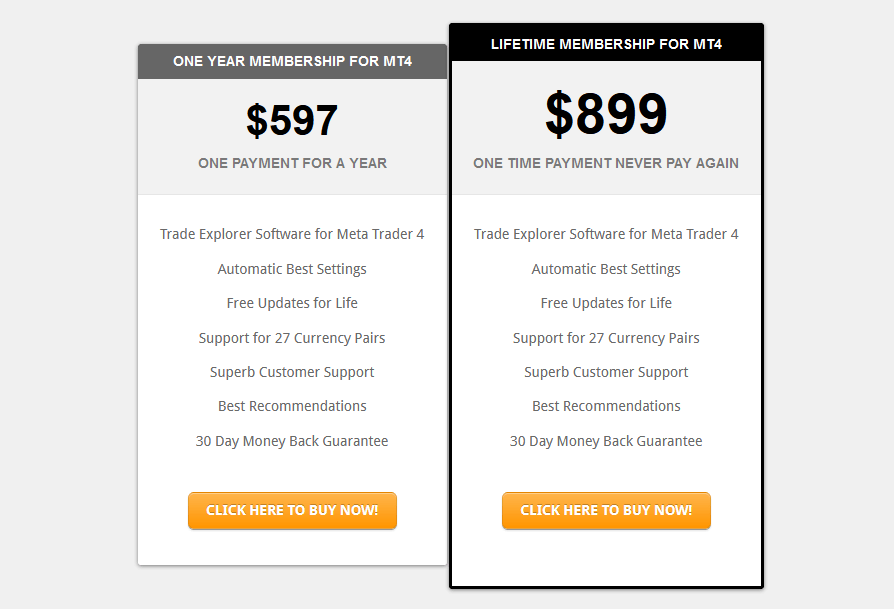
Trade Explorer offers a 30-day money-back guarantee, providing a safety net for those who want to explore its potential. The pricing options include a one-year subscription for approximately $600 and a lifetime membership for $900.
Trade Explorer: Quick Reference Summary
Key Advantages
✅ 27 Currency Pair Support: Maximum diversification across major, minor, and exotic pairs reduces single-pair dependency.
✅ Multiple Pre-Configured Risk Levels: Low/medium/high drawdown set files provided, eliminating manual parameter configuration.
✅ Strong Recovery Capability: Martingale system can recover from temporary losses when ranging markets eventually reverse.
✅ Verified MyFXBook Performance: Real accounts show $3,500 → $50,000 growth, proving profit potential under favorable conditions.
✅ 30-Day Money-Back Guarantee: Risk-free testing period allows thorough evaluation before final commitment.
✅ Lifetime Updates Included: Strategy adjustments as markets evolve without recurring subscription fees.
✅ 24/7 Automated Trading: Requires no manual intervention once configured, operating continuously across all timeframes.
✅ Established Developer: LeapFX has multiple proven EAs (King Robot, XAUBOT) demonstrating serious development capability.
Critical Limitations
⚠️ Extreme Drawdown Risk: 70% maximum drawdown verified on live accounts; most traders cannot psychologically survive such declines.
⚠️ “Blown Accounts” Reputation: Multiple traders report account wipeouts; YouTube reviews specifically warn about catastrophic losses.
⚠️ Martingale Grid System: Exponentially increasing risk during adverse trends; when markets move against positions, exposure multiplies rapidly.
⚠️ High Capital Requirements: Safe operation requires $10,000+ per 0.01 lot; recommended sizing demands substantial reserves.
⚠️ MT4 Only: No MT5 support limits broker options and prevents usage with modern trading platforms.
⚠️ VPS Mandatory: Cannot run reliably from home computer; adds monthly infrastructure costs.
⚠️ Psychological Challenge: Watching 40-70% drawdowns requires extreme discipline; most traders panic and close positions prematurely.
⚠️ Multi-Pair Correlation Risk: When markets trend globally (risk-on/risk-off scenarios), all pairs lose simultaneously, compounding drawdowns.
Final Thoughts On Trade Explorer
In the world of trading, preparation is key to success. Setting up a VPS for your trading activities not only ensures uninterrupted operation but also offers peace of mind. The Trade Explorer EA, with its impressive historical performance, shows promise, but always remember to trade responsibly and be prepared for market volatility.
As I continue to test and evaluate the EA, I’ll keep you updated on its performance and share real-world trading results. Trading is an ever-evolving journey, and having the right tools and knowledge is crucial.
Frequently Asked Questions
Can Trade Explorer work on MT5, or must I use MT4 exclusively?
Trade Explorer operates solely on MetaTrader 4 platform. If your broker offers only MT5 accounts, you’ll need opening an MT4 account with a different broker or employing trade copying software replicating signals between platforms.
However, copiers introduce execution delays potentially impacting performance on the M5 timeframe where precise entry timing matters significantly. The developer has not announced MT5 version availability, so MT4 compatibility remains mandatory for foreseeable future.
How much capital do I realistically need to run Trade Explorer safely without account blowout risk?
Minimum capital depends entirely on chosen risk settings and personal drawdown tolerance. The EA recommends 0.01 lots per $5,000 balance, suggesting $50,000 minimum for conservative 0.10 lot operation.
However, given verified 70% drawdowns, I’d recommend doubling that—$10,000 per 0.01 lot provides adequate reserves surviving extended recovery sequences. Anything less risks forced liquidation before recovery completes, transforming temporary drawdowns into permanent losses.
Why does Trade Explorer have such extreme drawdowns compared to other EAs using similar strategies?
Trade Explorer’s 27-pair coverage means significantly more simultaneous positions during adverse market conditions. When global risk-off events occur (geopolitical crises, central bank surprises, pandemic fears), correlations across currency pairs spike dramatically.
The EA’s Martingale recovery system then adds positions across multiple failing pairs simultaneously rather than sequentially, creating compounding drawdown effects. Single-pair Martingale EAs experience lower drawdowns because they concentrate risk, while multi-pair systems distribute positions but amplify exposure during correlated moves.
Should I use the pre-configured set files or customize Trade Explorer’s settings myself?
Strongly recommend starting with vendor-provided set files, particularly the low drawdown configuration. LeapFX has extensively backtested these parameters across multiple market cycles, adjusting entry logic, recovery distances, and position sizing for optimal risk-reward balance.
Custom modifications without thorough historical testing typically degrade performance or increase risk unexpectedly. After several months observing behavior under your specific broker conditions, consider minor adjustments. Never increase lot sizes or tighten grid distances without comprehensive backtesting across volatile periods.
Can Trade Explorer pass prop firm challenges, or is the drawdown risk too high for evaluation accounts?
Trade Explorer’s 70% maximum drawdown makes it fundamentally unsuitable for most prop firm challenges, with 10% daily loss limits and 5-10% maximum trailing drawdowns. Even with ultra-conservative settings, temporary equity declines of 20-30% can occur during recovery sequences, instantly violating challenge rules.
The Martingale system’s nature—accepting large temporary losses to achieve eventual recovery—directly contradicts prop firm risk parameters designed preventing catastrophic drawdowns. Use Trade Explorer exclusively on personal capital where you control risk tolerance and drawdown acceptance completely.