 Petko Aleksandrov
Forex data import – the first important step is algorithmic trading
Forex data import is the most important first step that every trader takes when starting with Expert Advisor Studio. Many traders made the mistake to trade with expert advisors that are created over different historical data. This leads to misleading backtest results which slip the trader to trade with expert advisors that are not suitable for his broker.
Hello, dear traders!
My name is Petko Aleksandrov from EA Forex Academy, and in this article, I will talk about some of the recent updates that we have with EA Studio strategy builder.
So there are some changes in the interface, for example, we have the first page and now says home and it’s not EA Studio as it was before.
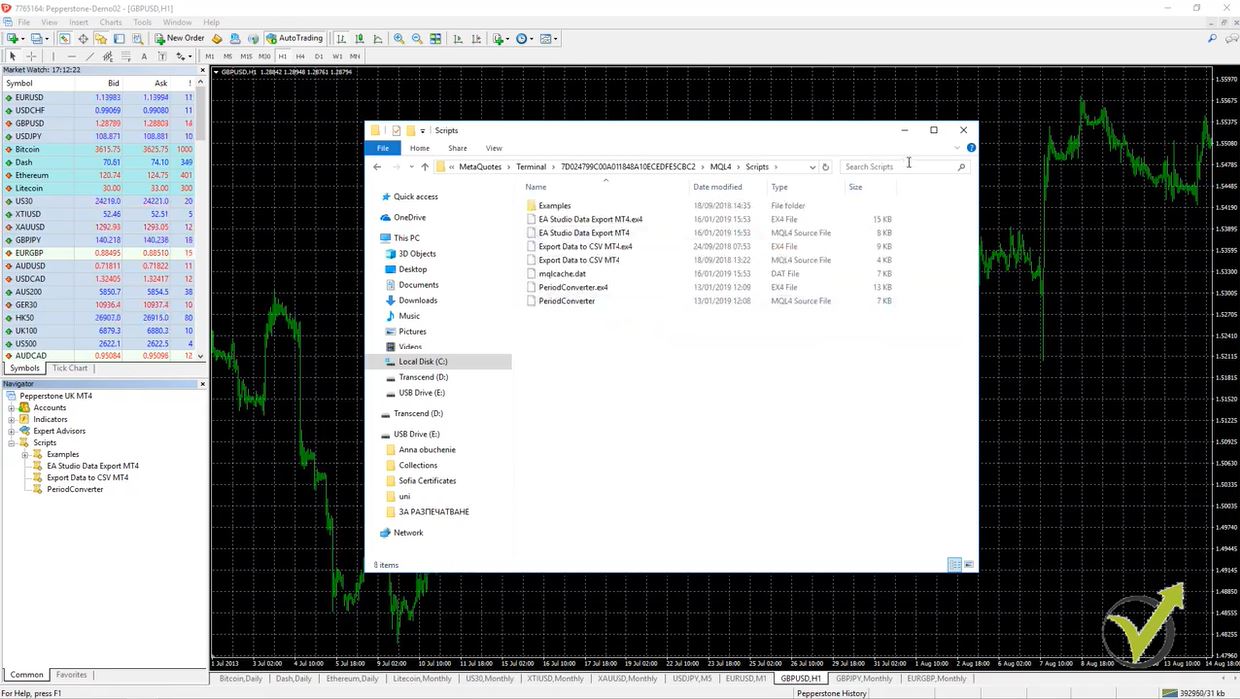
Now if we look at this blue bar on the top we have the Forex data. So before the data was in tools, right over here in the menu, now it is on the top and it is much easier to find it right over here. Because it’s very important when you create your own strategies using EA Studio to create it with the Forex data from your broker. So it’s very easy to access to it just click over it and you’ll see it right in front of you:
What is the newest about the Forex data import?
- you can notice all the Forex data on the right side that you have imported from the brokers, that you have been using
- we have the data horizon, and the data horizon looks just the same and there is a slight difference here
- the maximum data bars, but this is only for the licensed users, is up to 500,000 bars
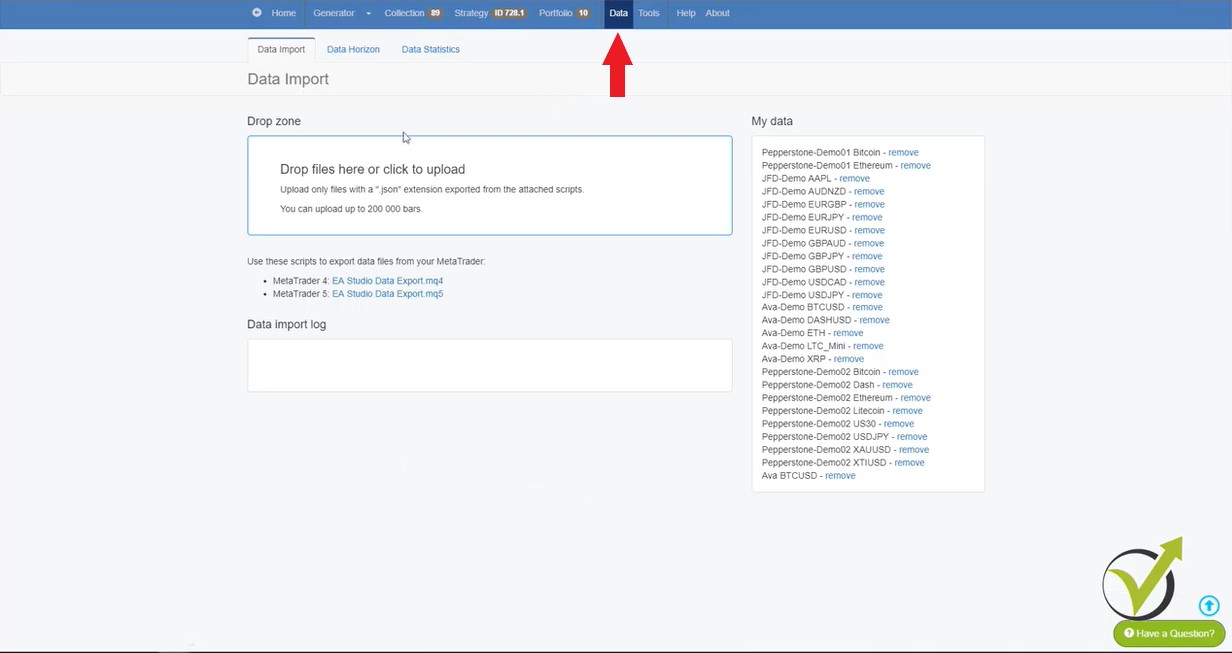
I don’t know if this will last but before the maximum was 200,000 and now it is 500,000, but once again this is for the licensed users only. And if you wish to try that, if you are already licensed user of EA Studio you will need as well to modify the script for exporting the Forex data. If I go to the data import, right here are the scripts. And once you download one of them, depending on if you use MetaTrader4 or you use MetaTrader5, you need to drop it on your platform right over here:
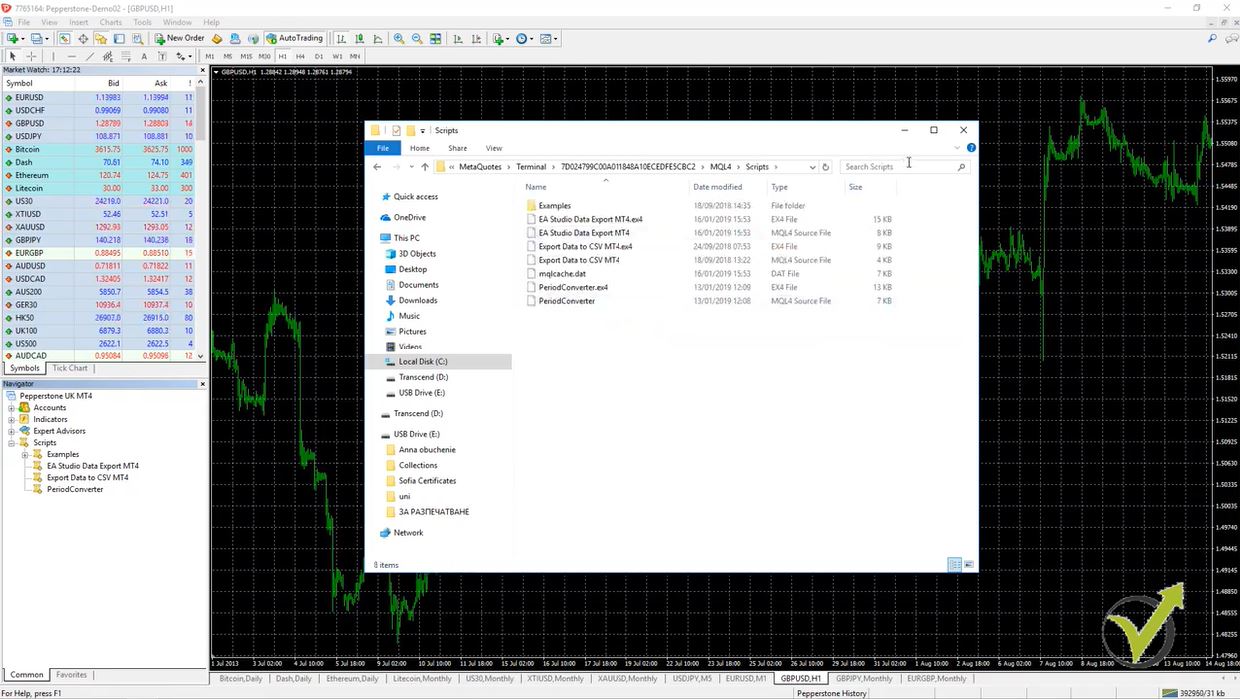
For the people who didn’t do it so far, you need to go to file- open data folder and then you go to MQL4 and you go to scripts. So this is where you need to paste it. After that, you need to refresh the scripts and you will see it below over here.
What you will need to do if you want to increase the number of bars that you will be exporting?
Right-mouse and you go to modify. This way you will open the Meta Editor and here are the maximum bars. So you will need to enter 500,000 and you compile it and it will be saved. So if I close the Meta Editor and I drop the script over the chart you will see actually there will be 500,000 bars to export. And this is quite a lot of data.
Not all the brokers will provide you with such Forex data. You will probably need to collect it a long time and with the higher time frames, you will actually never get this data. But with the lower time frames, you might have such huge Forex data, if you are interested to try it out. Once again I’m not sure how long it will last if they will keep it from the Forex software company.
Then what we have is the data statistics.
This is something new over here. We have statistics for the data. Now let’s load some Forex data, meaning that I will go to the strategy and I will just change a couple of time frames. For example, let’s go down to M15 and let’s choose some of the data that I have, for example, from the Pepperstone demo server.
Absolutely this strategy started to lose because it was for the EURUSD and I just changed it to Bitcoin and Ethereum. So let’s have at some Forex data that I have. With Pepperstone, demo zero two has some Forex pair. And as well I will go to JFD demo data and I will go to EURUSD. So here on M15 you see the strategies losing I will go to M30 and I will go to H1. This is where originally this strategy was created, so you can see better results.
Now if I go back to data you will see in data statistics that I have already many loaded files. So all the servers that I have switched in the strategy, they are shown now in the data statistics.
What is most important about Forex data import?
- to have the market information about this broker
- about the asset we want to trade
- about a timeframe we have selected to use
So you can see the specifications that we see normally in MetaTrader.
And then we have statistics for the Forex data this is something very very useful:
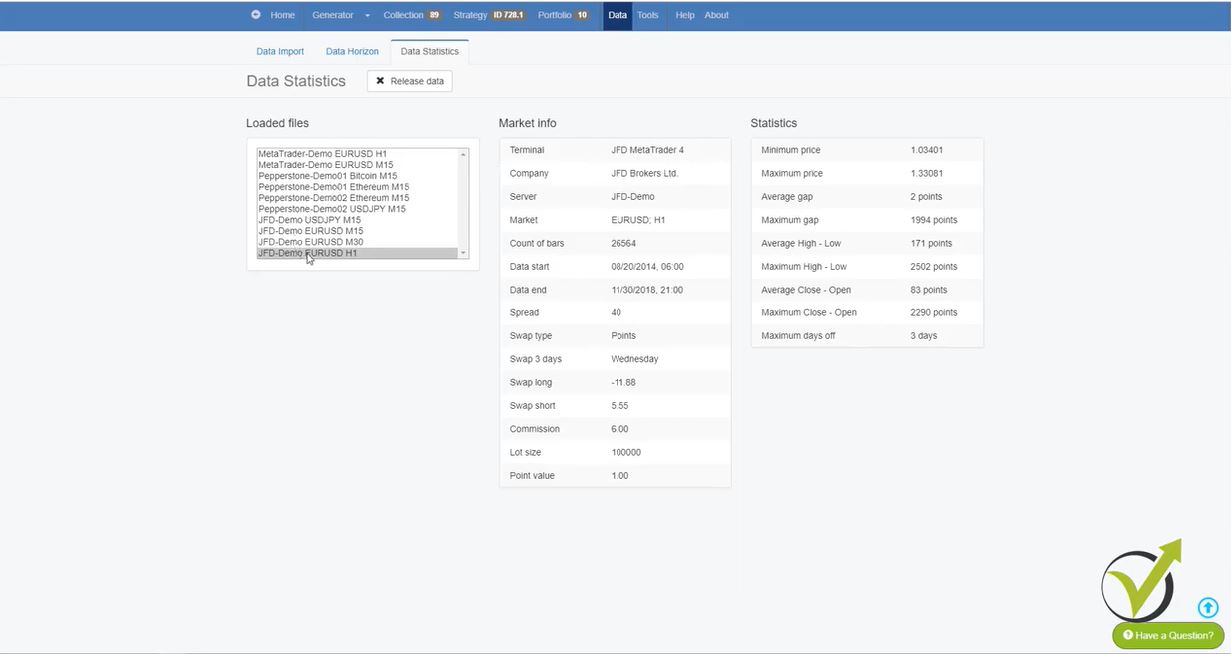
At first, we have the minimum price and then we have the maximum price. For this period that we have for EURUSD on H1. Then we have average gap 2 points, which is pretty normal for Forex data. Then we have a maximum gap, which you can see here is 200 pips nearly 2000 points, which is 200 pips. Well, I cannot really say what’s going on here. Because for H1 it’s not really normal to have such a gap. Maybe it is something between Friday and Monday but 200 pips is really a lot.
Here is some more Forex data statistic that we see for this strategy:
- average high-low we have here 17.1 pips
- maximum high-low we have 250 pips
- average close-open 8 pips
- maximum close open 229 pips or 2290 points
Now here is very interesting: maximum days off.
Meaning that the market was not open for some reason. And as you know the market is opened from Monday to Friday with some of the brokers on Sunday. And there are some exceptional cases around the holidays but you should normally not see more than three days. Two, three, four days. If there are more you will probably need to recheck your data and see. Because probably there is some missing information or some missing period and I noticed such a thing I will just check around the loaded files that I have.
So let’s go to the USDJPY on JFD on M15, yeah, you can see maximum days off 41 days. There is something here with the Forex data. On M15 there is some missing period with 41 days. This is more than one month. And from these statistics, I can see that there is some data actually missing for this period of time. Now you can see the average gap here is one point, which is just great and then you can see the average high-low, the maximum high-low, and the other statistics. So this way you can check your Forex data once you upload it.
Once you export it, first from the MetaTrader. And then you drop the files here and you can check if your data is alright. Because till now we didn’t have this statistic and there was no way to understand if there is something wrong with our data. For example, what I have shown on USDJPY on M15 that there are 41 days off. One more time this is a missing period in the Forex data, so I need to recheck it or to re-export it one more time.
So this statistic is really really great update.
We can check if our data is proper and we can use it. But here as well I noticed that the maximum gap is 5936 points which is 593 pips as well very unusual especially for M15. And I guess this is from the missing period in the data.
So imagine there is Forex data from one day to another then there are 41 days missing data. And then these data continues, which will form a gap. Let me demonstrate it to you very quickly. Let’s say this is the historical data or the price chart, I will just go randomly. And then we have Forex data for this period of time and then we have some missing data, in this case, is 41 days. So the program will recognize it like this:
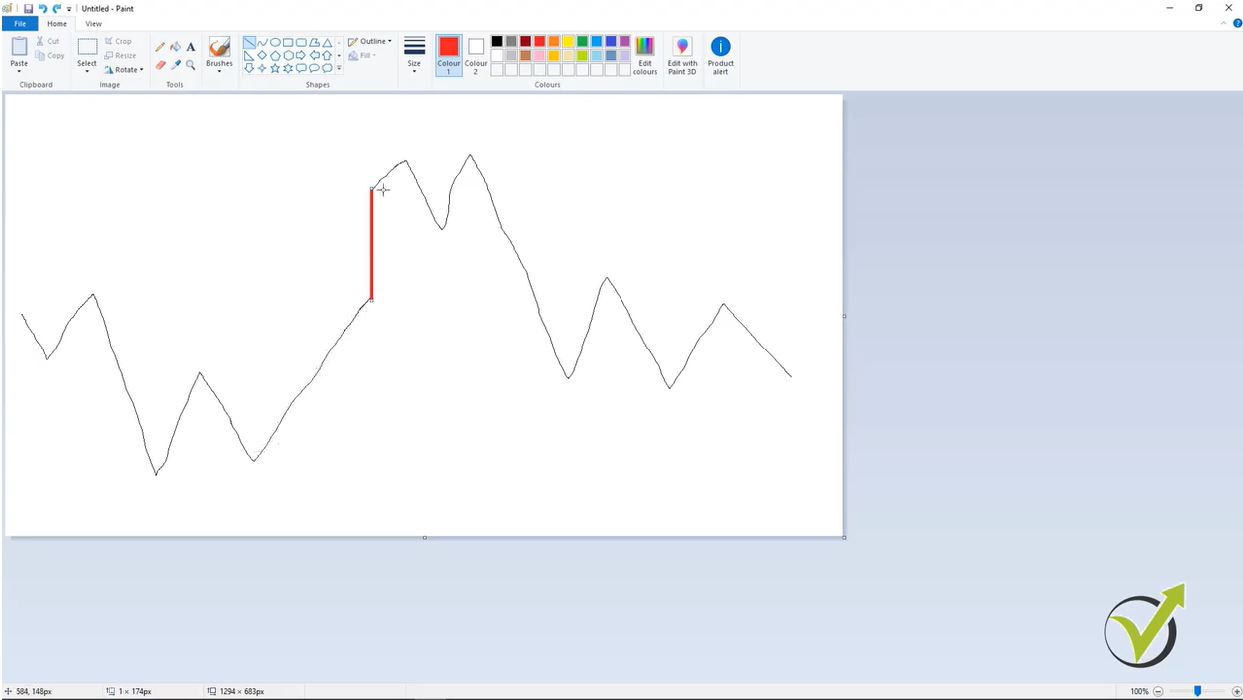
The program will continue on different price and it will continue. So this thing here the program will recognize it as missing period and it will consider it as a gap. Because simply there is no information for this period, in this case, is for these 41 days.
Alright, I really hope that it makes it clearer. So once you drop your Forex data make sure to check the maximum days off. Very very important and as well the maximum gap and average gap. But if you have missing days in your data most probably you will have a huge maximum gap. Because one more time this is a data that is missing and the program, the EA Studio, recognize it as a gap.
One thing more here…
We have this “release data” button. So if I click on it you will see I will clear all these Forex data because it was saved on the computer and I would just want to remove it. Or what you can do as well, is to reload the page, which will remove this loaded files.
So how they come here once again?
If you go to your strategy, no matter which strategy, and you just switch between any of the servers, that you have, or the historical data, that you have, from the different brokers. And you switch between different assets and timeframes:
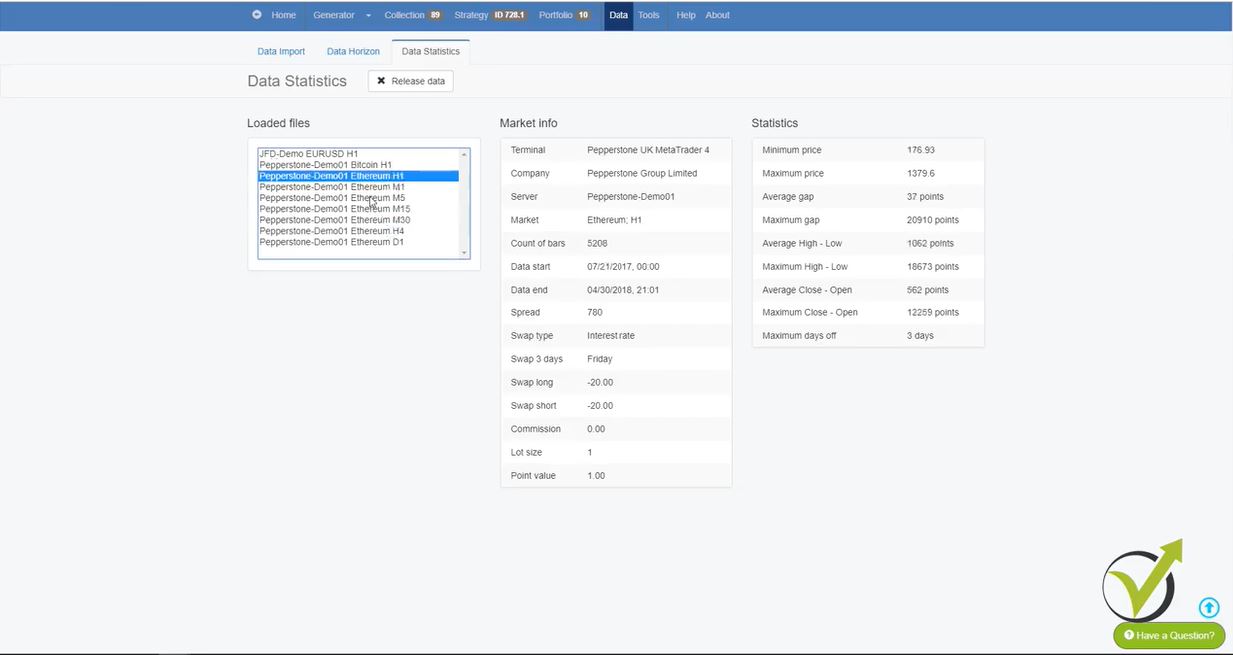
So let’s go for the Etherium. I will go to all timeframes and you will see that it will show in data statistics all these timeframes over here. And by clicking on each one I can see the statistics. And here you can see pretty good data for the Etherium because it has three days on M5, it has these nine days on M1, something is missing there about one month. But on the higher timeframes, it is just fine.
So with this quick check, I know that there is no missing Forex data with this broker with all timeframes. Except on M1, which is nearly one month and with Etherium. And on M5, which is about nine days. But anyway I don’t trade the cryptocurrencies on such low timeframe as M1 and M5. But one more time I wouldn’t know that if the statistic is not here.
Very useful and it’s the only way, actually you can understand if your historical data, that you have exported from your broker, is working fine.
This is about the Forex data update in EA Studio.
And one more thing here, we have the language bar moved to the home page right over here. So if you wish to actually edit the software somewhere between these languages or you can translate it in a totally different language, drop an email and we will explain you more. Actually, there are some benefits if you want to translate or help to edit the language in EA Studio.
And, just to know you can test the EA Studio from our website. There is 15-days free trial which you can use from any device with an internet connection.
Also, you can use EA studio without the 15 days free trial but you will need a trial if you want to export expert advisors so basically the trial version 15 days license which you can use to export an unlimited number of expert advisors. All the Forex data statistics and features in EA Studio could be used without having a subscription or without having the license for it.
Thank you very much for reading! If you have any questions, don’t hesitate to write in our Trading Forum.
Cheers!