 Petko Aleksandrov
Strategy for Forex is what everyone wants to use. And this is the right approach.
Strategy for Forex it will be then. Hello dear traders, it`s Petko Aleksandrov from EA Forex Academy. And now, I will answer the most frequently asked questions that I receive for the Forex Strategy course portfolio trading with 12 Expert Advisors.
So, the first question that I will be answering is:
1. “Why don’t you use tick data to create a strategy for Forex?”
Well, the answer is straightforward; there is no tick data in Meta Trader.
What information do we get from the Candlesticks?
- open price
- close price
- the lowest point
- the highest point
And this is the only information that we have on all time frames:
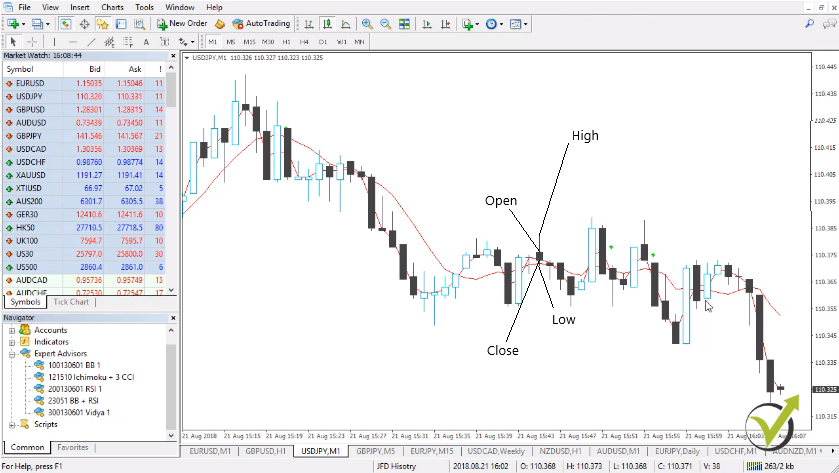
We don’t have the tick data. We don’t see what happens inside the bar. Yes, we know what happens in the current bar, but we don’t have this information what happened with every tick in the last bars. Or in all historical bars that we have in the past. So, tick data is pretty much an illusion in Meta Trader.
So, don’t waste money to buy it from anywhere if any companies offered you tick data for Meta Trader. Probably, they have something but anyway you will not be able to use it because you cannot import it really into Meta Trader.
Now, there is an update coming with EA Studio that will convert tick data to bars, and I hope this will be ready by mid-2020.
2. “What is the difference between EA Studio and Forex Strategy Builder Professional, I see that you use both to create a strategy for Forex?”
Well, this is a huge question, and I will answer it very directly. EA Studio is a web-based Strategy Builder that we use. It uses only the custom indicators for Meta Trader. But it has some different tools that are not available at Forex Strategy Builder. Such as the Reactor, and the Validator, tools that save a lot of time to us.
The Forex Strategy Builder Professional needs to be installed on the computer. It works a little bit slower, but still, very fast, I can say. But it works a little bit slower than EA Studio, but this is just because it uses many custom indicators. And we can use a longer time frame. So, if we are trading, for example, on the M1 chart, we can add entry conditions on the higher time frames or on the more extended time frames.
Such as M15, M30, H1, or any other time frame. So, the two Strategy Builders are pretty much different. They have just different capabilities, and you have a lot of possibilities with both of them. So, it’s a personal choice which one you want to use. Anyway, I will show most of the software in this Forex Strategy course. So if you ask your self the following question:
How to create a strategy for Forex with the strategy builders?
- export the Historical data from the broker
- generate strategies with predefined criteria
- use portfolio trading strategies to diversify the risk
- select the best ones for the current market conditions
- test on a virtual account and make your choice which EAs to trade
3. “Do I need to keep opened all time frames for all pairs to collect bars?”
Now, you need to keep only one chart open. And if you one time press the Home Key for all time frames and you keep this one chart, it will collect you the data with the time. But you don’t need to follow different tables on M1, on M5, on M15. And obviously, you cannot keep all the charts opened for all the assets that your broker offers.
You’re not going to trade all the assets. Just keep open and collect the data for the assets that you’re going to trade for the currencies that you are planning to trade.
4. “From where to download the scripts for EA Studio and that you show in the Forex strategy course?”
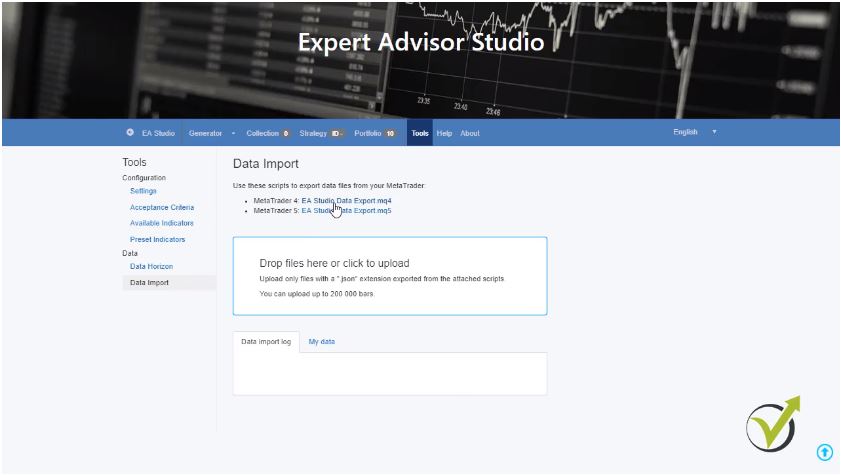
Even I showed this in the course. I will make it clear one more time. If you click on EA Studio on our website and you go to tools right into the Data import, you will see the two scripts for EA Studio. There is one for Meta Trader 4 and one for Meta Trader 5. If you click on it you will be able to download it:
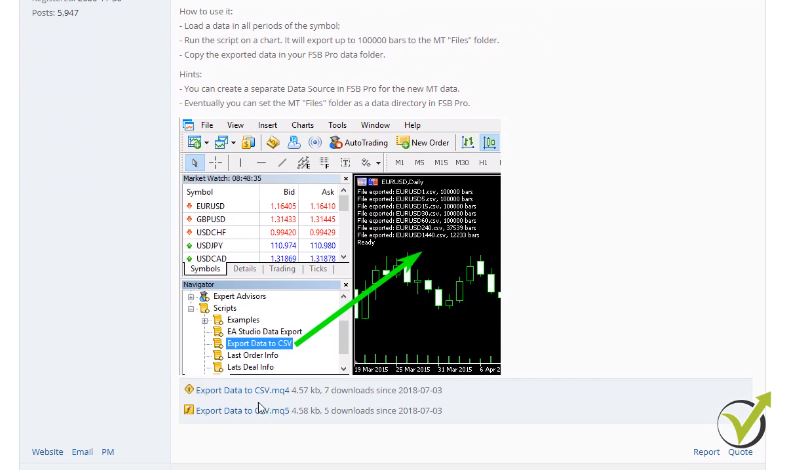
However, for the Forex Strategy Builder Pro, you need to go to the website of the company forexsb.com. If you click on the forum and then you go to the Premium Club and then you will need to go to Export symbols and settings from Meta Trader. The first one Meta Trader to FSB data export. If I click on this subject you will see right here the two scripts and instructions on how to use it:
5. “Is it better to wait for ten trades to be opened or to wait for one week?”
This is an personal choice again. The methods that I show in the Forex strategy course on how I’m testing the strategies are very useful for me. And if you find them useful for you, it will be great. But if you find your methods of how you want to test the strategy for Forex trading, you are very welcome to do it. And you should have your methods because this way you will build your trading style.
6. “Why do we need different magic numbers for the Experts?”
The magic numbers – this is the unique number for each Expert. When you place the trading strategy for Forex on the Meta Trader, no matter it is a demo or a real account, and you want to follow statistics after that. Because obviously, statistics are vital to see which Experts are making a profit and which not. You need to identify them with something.
Because if you place 99 Expert Advisors, which is possible as I show in some of my courses into your Meta Trader, there is no chance that you will understand after that from the Account History which one made a profit and which one made losses. What you need is the magic number.
Don’t think it’s a waste of time. Just enter some magic number. You can have your system of magic numbers. In the Forex strategy course, I show how I am building my strategies with the magic numbers. So, I can easily understand after that which one makes a profit and which one loses.
7. “Can I pay to the broker to send me historical data so I can build a better strategy for Forex?”
I do believe some brokers are offering that or you can download it free from their websites. However, I’m not sure that this is a proper historical data that you can use. And if this historical data matches with the server of your account. Keep in mind that the brokers have different servers.
So, if you are trading with server number one, for example but you download historical data from server number two. Or maybe you will not be able to understand from where you download this data well. This data will not work for you. Just keep it simple. I know it’s a little bit more work to download and to collect the historical data. But this is the only way that you will know this is the historical data from your server of your broker.
8. “Are the Strategy Builders being updated?”
Especially the EA Studio during the last year had so many updates that I tried to catch it up with the Forex strategy course. It improved a lot the methods that I showed in the course on how to create a strategy for Forex trading and how to use Expert Advisors. Because there are too many new features into this Strategy Builder. In the beginning, it was a simple online. I can say application where it was possible to generate some strategies. Now the trader can do so many things with the Expert Advisor Studio.
Such as using the Reactor and going through the perform robustness testing:
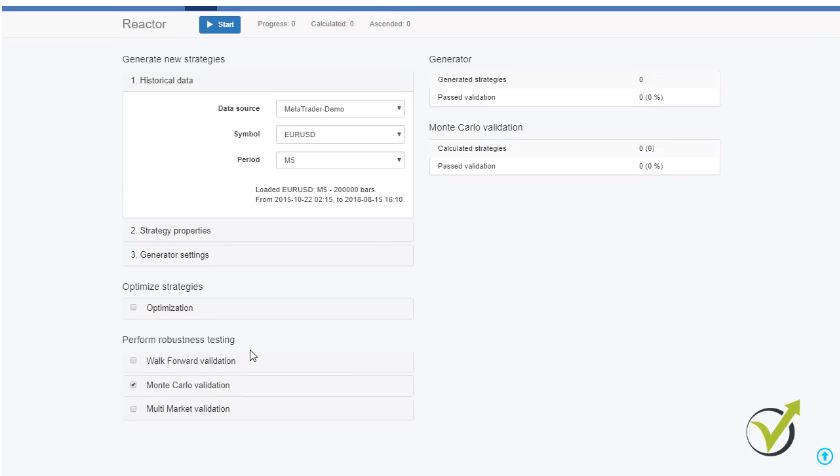
These are the Walk Forward validation – one of the latest updates that we had, the Monte Carlo validation, the Multi Market validation as well. If you look at tools, there is correlation analysis, which is also a recent update. As well, the trading session hours and there are the Preset Indicators.
If you want to generate strategies only with specific indicators, you can add them here, and the Reactor or the Generator will work only with these strategies. There is as well the Validator, which is very useful when you have already many collections, portfolio Experts, Expert Advisors. So, you can drop them here and recalculate with recent historical data.
9. “Do I need the practical activity to create a strategy for Forex market?”
It’s a practical activity, and the idea is to practice. So, if you are an advanced trader, you don’t need to practice because you have already done that. But you can take advantage of the 12 Expert Advisors that I upload to the Forex strategy course every new month. I am sure you will find some profitable strategies in those 12.
And the last question that I will answer too is:
10. “How to manage the 12 EAs when new ones come?”
Every month I update the Forex Strategy course with new 12 Expert Advisors, and it’s up to you how you want to manage it:
What you can do, is making a combined account where every month you add the new Expert Advisors that you will receive with the actual activity of this course. But what you can do is filter them all the time.
What I mean is you can test the 12 and select the best performers for you. And then you check the new 12 that are coming up, and you add them to the other ones. This way, you will be filtering all the time the Expert Advisors, and you will build an excellent portfolio trading strategy. You will choose which ones you want to trade and which ones you want to leave at the end of the live account. Also, you will not need to create your strategy for Forex because you will receive a new 12 EAs every month.
Thank you very much for reading. These were the ten most frequently asked questions that I receive in this Forex Strategy course.
If you have any questions about the course, don’t hesitate to contact us in our SUPPORT FORUM. I’m always there to answer. Have safe trading!