 Petko Aleksandrov
.
Trading screen – the importance of what the trader sees.
Trading screen and its set up is the very first step a trader should take before start trading with a particular system for trading. In this article, you will learn how Petko Aleksandrov, the Head Trader and Mentor at EA Forex Academy sets up one of his trading screens.
He uses the platform Meta Trader. It is one of the most common and most reliable platforms for algorithmic trading. It comes for free. The brokers pay to the Meta Quote company, and this way provide the platform for free to their clients. Also, this platform is suitable for manual trading, and now you will learn how the trader uses this platform to set up his trading screen.
This lecture is part of one of Petko’s courses about manual Forex trading. Some of the lectures are free, so the students can decide if this course is for them. In this course, he will provide you with a unique indicator to recognize the best currency pair to trade at every moment. Enjoy the lecture!
Hello traders, I will begin the Forex trading course – London, NY & Tokyo trading system with a setup that you need to have on your screen, how you need to prepare your trading screen.
Actually, I always have in this way one of my trading screens. Because I always want to know which currency is strong and which currency is weak at the moment. And I will show you how I do that.
How to make a trading screen with the major currencies?
- we have the EURUSD;
- I will add as well the Cable;
- I will add as well the AUDUSD;
- lest have the USDCAD;
- I will need as well the NZDUSD;
- the JPY, so I would look for USDJPY.
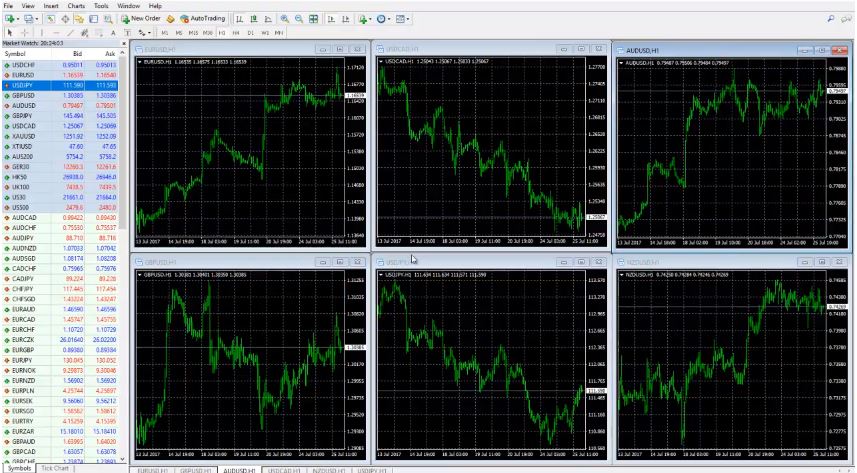
As you can see I am having 6 currencies on my trading screen.
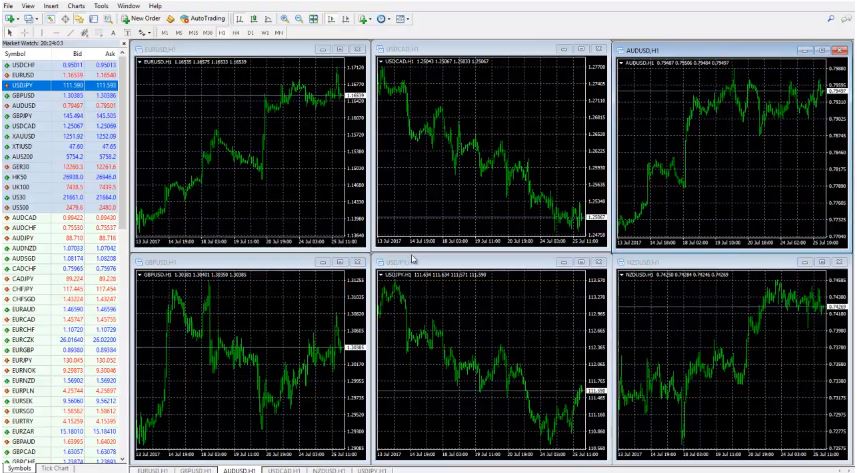
Basically, these are the 6 major currencies. Of course, there is some debates about USDCHF. But after what happened with the CHF and the EUR we don’t consider the CHF as a major currency, not so far. Because actually after it was unleashed I can say from the EUR, it’s not any more historical data behind.
What I mean, is it’s like building its own historical data right now. And there is no huge amount of historical data from this time. We just avoid it and it’s not only us in the Academy but most of the traders are not looking the same way at USDCHF. It’s considered not certain, not sure currency anymore. That is the way I do not place it on my trading screen.
There are many other currencies we can trade. Like:
- EURUSD;
- GBPUSD;
- AUDUSD;
- USDCAD;
- NZDUSD;
- USDJPY.
After that what I do?
I just separate them in 6 windows. And how I actually ordered them, is my own way. Of course, you can change it or you can do it anything convenient to you. But basically, I leave the AUD and the NZD on the right side on my trading screen.
USDCAD I put up in the middle. USDJPY I put down in the middle. AUD is up and NZD is down. I have my reasons probably, I don’t know. I just got used with that. This is how I organize it. EUR is first up, then is the GBP. Basically, this is the European market over here.
We have the USDCAD over here which is basically connected more to the New York opening. And as well the USDJPY, which is USDJPY we can trade it all the time. I love USDJPY. And all the currencies are connected with the JPY. Here is the AUD and the NZD. Basically, this is the Asian market.
Again I say, you can change it as you wish, it doesn’t matter. The idea is that on one of my trading screen I always have these 6 pairs to know which one is strong and which one is weak at the moment.
In the Forex trading course – London, NY & Tokyo trading system I will show you a great indicator for that. But first of all I want you to catch the idea.
What I will do now on my trading screen?
I will put 1 indicator and simply this is the 21 EMA.
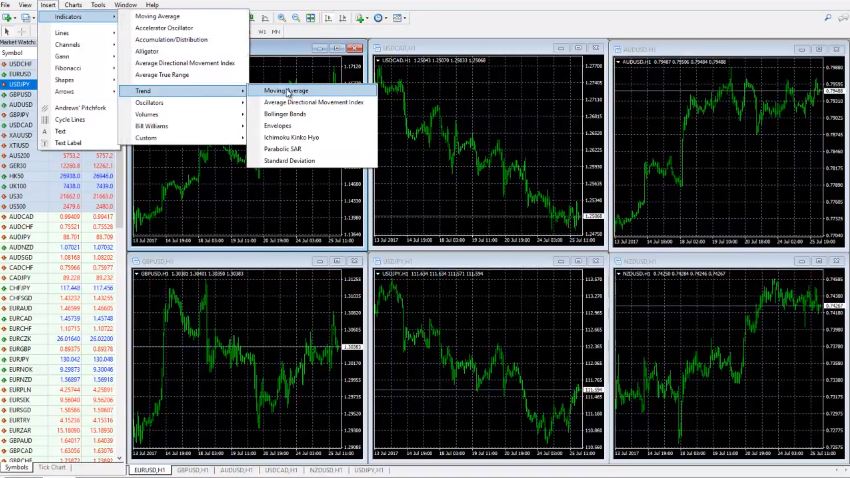
We go to Insert, Indicators, go to Trend and go to Moving averages and 21. And as MA method is the exponential moving average. I click OK and then I would like to zoom in a little bit. And I would like to see the bars. Basically, this is my template. I think I already have it actually. It’s the EMA 21. This way I build the trading screen easier.
If you don’t know how to do it click right button, then you go to templates, save a template and then you write the name of the template. In this case, I wrote it the EMA 21. And then when I click the right button again and I go to the template, and I choose the EMA 21 it will be the same way. It’s much easier you don’t need to do it all over again.
Of course, in this case, is just 1 indicator. But if you have 4, 5, 6 or more indicators it will take you a long time to prepare all the screens. And especially when you choose another currency, you need to act fast. And to enter into the trade you need to have the template to set up the trading screen faster. I will add as well on the NZDUSD and I will explain to you what I’m doing after that.
What I do every morning on my trading screen?
I place the overnight range. Overnight range I consider from the closing of New York to the opening of London time.
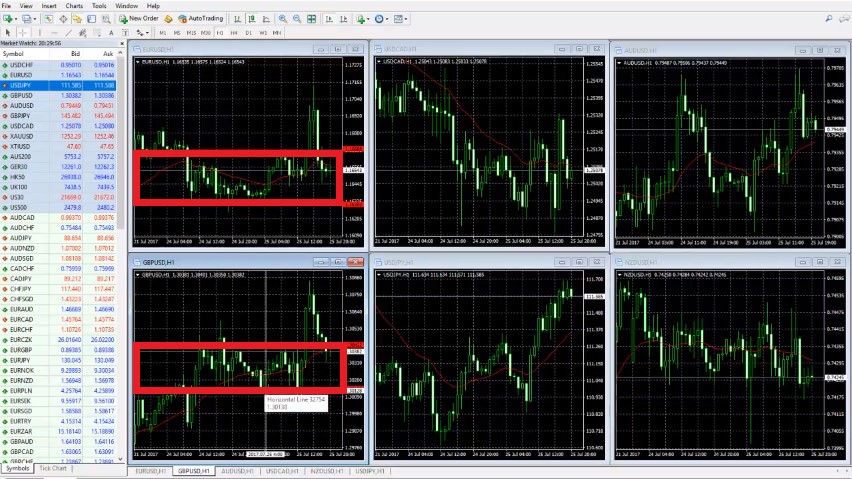
Basically, this is the Asian session. But since we’re in Europe we consider that to be the overnight range. As you can see here this is the hour at 9:00. London is opening at 10:00 o’clock our time, Bulgarian time. As you know we are located in Bulgaria.
So, 10:00 o’clock is the time when London opens with us. You need to check actually with your time zone when the London market is opening. Be careful as well with the summer, winter times that you won’t be mistaken. And I’ll go with 1 line above and 1 line below. Here is EURUSD at 9:00 o’clock and then here is a 3:00 o’clock midnight. Make sure to use the clear drawing on your trading screen to make it visual.
Basically, this is the overnight range visualized on the trading screen.
And then you can see EUR is breaking above and then it’s going back down. But right now we just place the lines. Every morning I just change them, just move them. Because it’s different from yesterday. But in this case, I will show you how to put it and after that what we do every day is just we move it. Basically, this is 9:00 o’clock and this is overnight range over here.
And now it’s New York time. This is the overnight range. I will show you from over here to from over here, to this point of 10:00 o’clock. This here is the overnight range. I put one line below, one line above. Try to put it exactly on the tails and the wicks. And then I will go to USDCAD. I will place the lines there as well.
One more time it’s different from every time zone. You need to check first when London is opening when the New York market is closing. No offenses to anyone from Asia, it’s a great market as well but especially for manual trading, we cannot afford to trade over the night. Because we need to sleep and to have some rest of course. That’s why we are trading manually during the London session and the trading screen is set up for London.
And as you know London is considered as the currency market center, I can say. And the market is most volatile during this time. Of course, it’s volatile during the Asian market. But again I say it’s night over here, we trade on the Asian market but only with the automated strategies and with the Expert Advisors.
Let’s see USDJPY where it is t my trading screen?
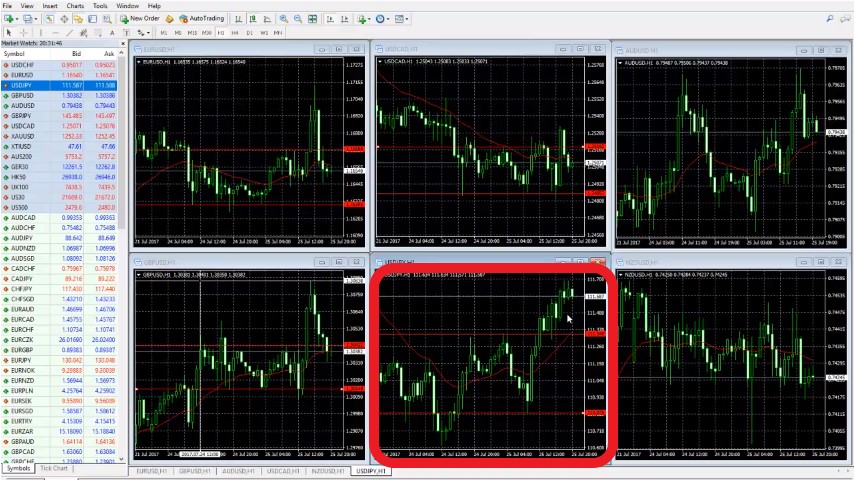
This is 10:00 o’clock. Basically, this is where London opened and USDJPY you can see reversed after London open. This is the lowest point it went and the JPY is actually pretty, pretty weak against the USD today. And then I will go as well for the AUD, pretty volatile AUD overnight. Let’s see this is the lowest point over here. I will recheck it one more time.
But that is 01:00, 02:00, 03:00, 4:00, 5:00 o’clock. Then London opens at 10:00 over here. We have the upper line over here on the top of this bar. And then the last one is NZDUSD and this volatility as well is over here. And I will have the line on the upper side I believe it’s on this bar. That’s 9:00 o’clock, so 10:00 o’clock is over here.
This is the overnight range that we used today on our trading screen…
Actually, I already recorded 2 of the trades that I had with the system today, and I will put it in the course. Because I want you to see how first we are setting up the trading screen, what is the system. And then I will do my best to record as many examples as possible. That’s all you need to have the 6 pairs on your trading screen.
Put the 21 EMA on your trading screen to fold the short-term direction on H1. 21 EMA is a fantastic indicator, it’s included a lot of strategies. If you’re a beginner you will need it very often to a lot of strategies. Because it’s just a fantastic indicator.
It shows you in a short-term direction. It just shows you where the market is going right now, where is the USDJPY right now.
It’s going up, 21 EMA is going up, the market is going up.
When it’s a sideways market like this case with NZD, this is just going sideways. Obviously, it’s not a very good time to enter and it is actually there are a lot of range strategies. But we are not going now on this side.
What we are following with these 6 pairs is I will show you how to catch the volatility, how to catch the strongest and the weakest currency and how to take advantage of that. We are using the volatility after the London market is open. And I will show you in the course how we identify which currency is strong and which currency is weak according to the trading screen with the major currency pairs.
This is possible since every currency has a direction at the current moment that we can easily detect with this set up on our trading screen. In the Forex trading course – London, NY & Tokyo trading system I describe exactly how to follow the movement of the major currency pairs and how to select the best one to trade.
Also, in this course, I have included a fantastic indicator that you can place on your trading screen and it will show you which currency is strongest and which is weakest. This way you will know at every moment the best pair to trade, which is a result of the strongest and the weakest currency.
In this course, we use the volatility that comes after the Stock Exchange market opens. The opening causes volatile movements on the currency pairs which we use to take quick profits. By using pending order on our trading screen, we enter and exit quickly. We do not hold positions overnight and tremble where the market will go.
With a particular and exact system, it is much easier to achieve stable results and to avoid emotions into trading.
Thank you for reading, guys, I wish you safe trading.
If you have some questions don`t hesitate to ask me in our SUPPORT FORUM.
For more Forex manual trading courses please click here: https://eatradingacademy.com/tracks/manual-trading/.
The Forex trading course – London, NY & Tokyo trading system is included in our Mega and Optimal pack.