
 Petko Aleksandrov
Are you tired of buying robots from the marketplace that don’t perform as expected? Have you ever wondered how developers create robots without revealing their secrets? If so, then this blog post on The Best Moving Average Robot is for you.
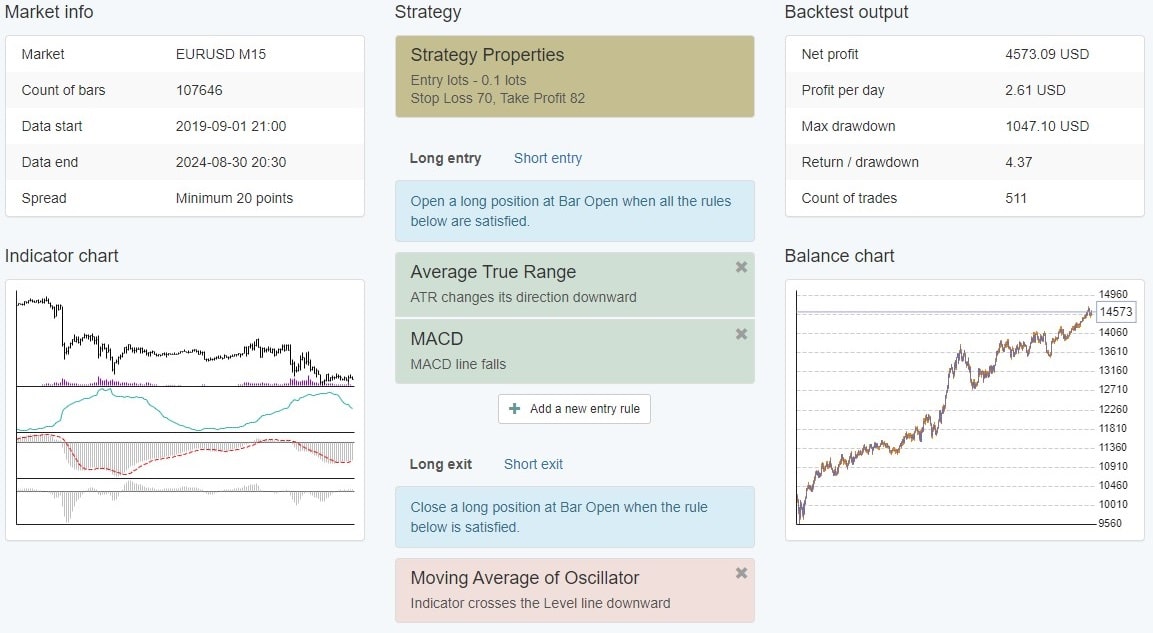
In this article, I will share with you the Best Moving Average Robot that I created using the EA Studio Strategy Builder. We built this Portfolio Robot by including many different strategies inside the code to create a more powerful and reliable system.
What is a Portfolio Robot?
A Portfolio Robot is a trading robot that combines many different strategies inside the code. It is designed to improve the performance of a single strategy by combining it with other strategies. This way, the combined strategies compensate for each other’s weaknesses while producing better results.
How to Create The Best Moving Average Portfolio Robot
Creating a Moving Average Portfolio Robot is not as complicated as it may seem. On the contrary, with the EA Studio Strategy Builder, you can easily create a portfolio of strategies that use the Moving Average indicator.
To begin, I set certain acceptance criteria. These include Stop Loss between 10 and 100 Pips and Take Profit between 10 and 100 Pips. I also set a Minimum Profit Factor of 1.1 and required all strategies to have at least 200 trades.
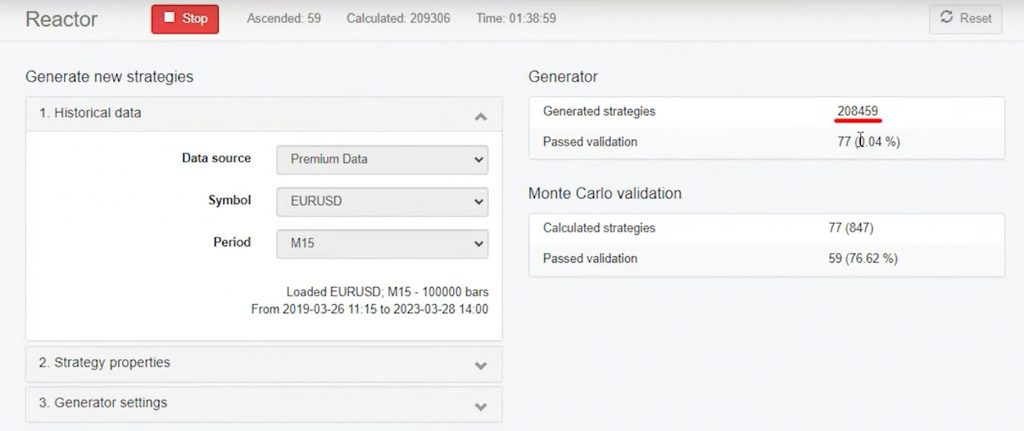
After setting these criteria, I generated over 200,000 strategies using historical data from the broker where I trade. Then, I used the Monte Carlo Validation to filter out the strategies that didn’t meet my criteria.
Overall, I had over 50 strategies in my collection. They all used the Moving Average indicator and additional indicators generated by the EA Studio Strategy Builder.
Filtering the Strategies
To filter the strategies, I used the Maximum Consecutive Losses criterion. For example, I decreased the Maximum Consecutive Losses from 10 to 7. I found that 32 out of 52 strategies remained in my collection. Then I lowered it to 5 and only had 14 strategies left.
I then manually removed the strategies that didn’t meet my requirements, such as those with recent losing periods or high drawdowns. This left me with the top 10 strategies that I added to my portfolio.
The Benefits of The Best Moving Average Portfolio Robot with the Right Broker
One of the most significant benefits of a Moving Average Portfolio Robot is that it compensates for individual strategies’ weaknesses. When one strategy loses, another strategy may be profiting, and they compensate for each other. This creates a smoother balance chart and helps to reduce drawdowns. But it is also essential to select a trustworthy, regulated Broker. We recommend Blackbull Markets, a well-established, transparent, and regulated broker, that offer many trading instruments with very competitive spreads. Moreover, signing up with them, also earns you a FREE TradingView Pro account.

Creating the Best Moving Average Robot with EA Studio
To create the best Moving Average Robot, we will use EA Studio’s powerful algorithmic trading software. With just a few clicks, we can easily create a robust trading strategy that incorporates multiple Moving Average indicators.
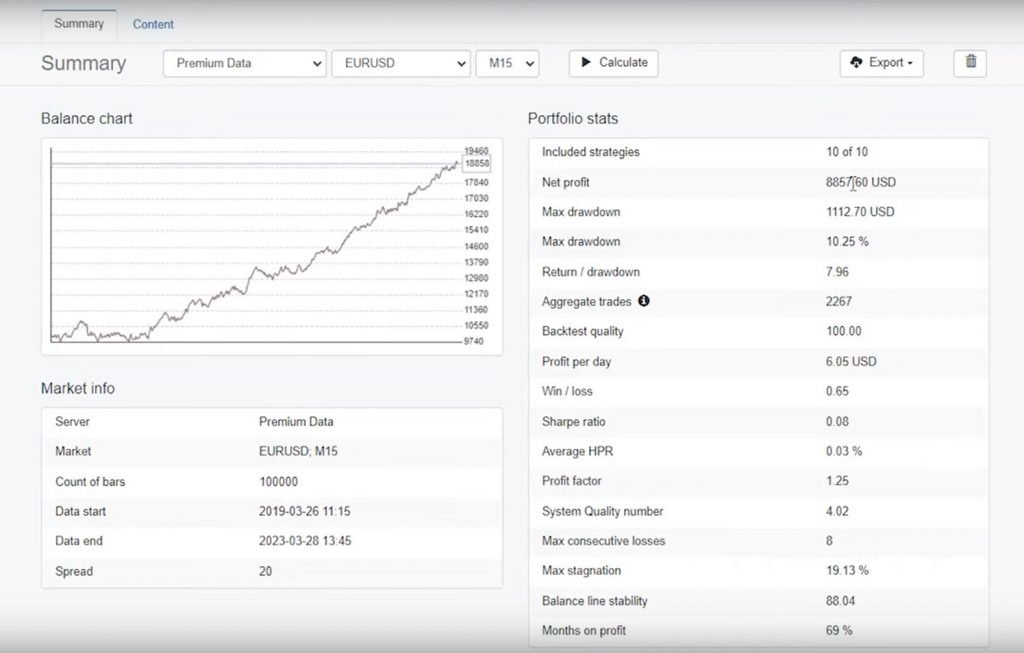
Moreover, after creating our strategy, we can view the portfolio statistics to evaluate our performance. In our example, we have a Profit Factor of 125 and a monthly profit of nearly 70, with an impressive Return to Drawdown ratio of 7.96. These statistics demonstrate the power of combining multiple Moving Average strategies into one portfolio robot.
Best Moving Average Robot: Exporting the Portfolio Expert Advisor for MetaTrader
Once we have created our portfolio robot, we can export it as a Portfolio Expert Advisor for MetaTrader 4 or MetaTrader 5. We provide a download link in the description, so you can test the portfolio robot for yourself.
But before you download and test the robot, stay with us to see how we manage the Expert Advisor after deployment.
Managing the Best Moving Average Robot
After we have exported the portfolio robot, we can deploy it on a small live account. Once we have deployed the robot, we can monitor its performance and adjust our trading strategy accordingly. EA Studio makes it easy to manage our Expert Advisor, with a user-friendly interface that allows us to easily modify our strategies and set up our trading parameters.
Best Moving Average Robot: Setting Up a Moving Average Robot on MT4
The first step in setting up a moving average robot on MT4 is to open the platform and go to File, Open Data Folder, Click on MQL4, go to Experts and paste over here. The Expert Advisor, then you just double-click on it and you will see the code of the Expert Advisor, along with all the inputs. If you scroll down, you will see the section with all the strategies. Here is where you can remove a strategy from the Portfolio Expert.
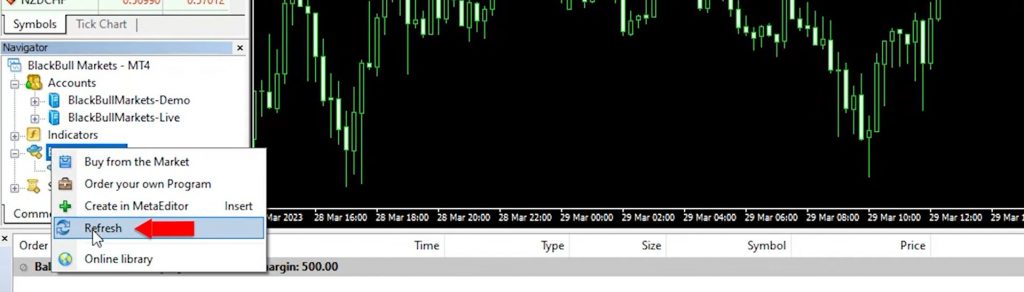
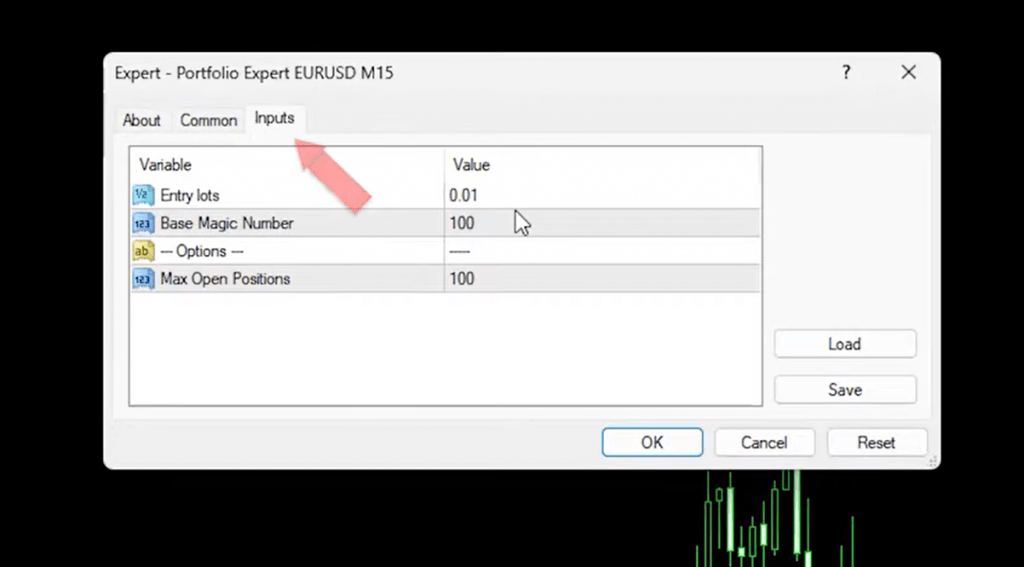
Once you click on Compile, you will see the Expert Advisor in the Navigator’s tab or you can click on the Refresh button. Then, enable the AutoTrading and drag and drop the Expert Advisor or the Portfolio Expert Advisor onto the chart. Here are the inputs where you can set the entry amount. If you’re trading with ten strategies in one Portfolio Expert Advisor, it’s recommended to trade with a smaller amount of 0.01.
The base Magic Number can be left at 100. The system will mark the first trade opened in the Portfolio with 100 at the end of the Magic Number.. The second one will be marked as 101, the third one would be 102 and so on. Click on OK, and the Expert Advisor is now attached to the chart. Whenever one of the ten strategies open trades, you will see them in the terminal.
Optimizing Your Trading Strategy with Moving Averages
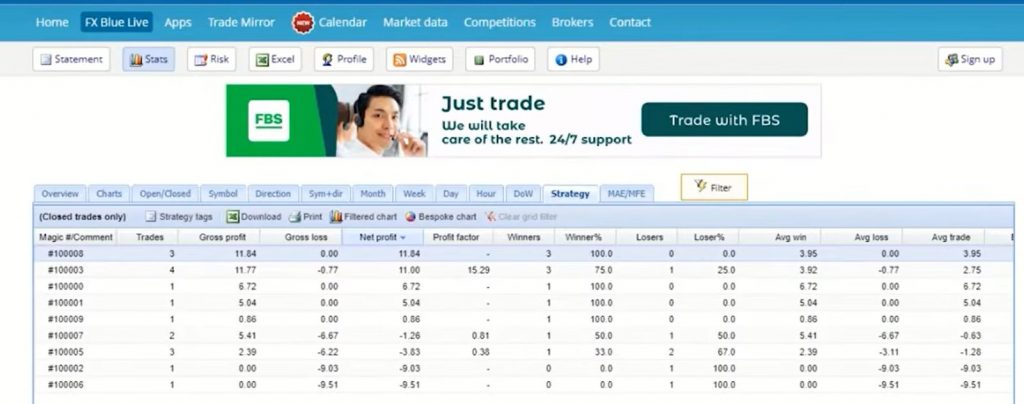
To optimize your trading strategy using moving averages, you need to keep track of your trades and analyze their performance. You can do this by connecting your account through the website FXBlue, where you can track your account and see which strategies are performing well and which ones are losing.
To do this, click on Account Synchronization, select MT4, and select the server of the broker, the account number, and the read-only password. Register your email and click register. Now, your MetaTrader platform is connected to the website, and it extracts all the trades or all the data.
With more results in the Account History, you will see the profitable strategies and the losing strategies. You can wait for a certain period of time, such as two weeks or a month, or a certain number of trades, for example, at least three trades to decide if you will keep the strategy in your Portfolio Expert Advisor.
When analyzing your trades, pay attention to the Net Profit, the Profit Factor, and the number of trades. Arrange your trades according to the Net Profit and look for strategies that have a minimum Profit Factor of 1.2.
Best Moving Average Robot: Conclusion
EA Studio is the ultimate trading software for automated trading success. With its powerful algorithmic trading capabilities, you can easily create the best Moving Average Robot and optimize your trading strategy for maximum profitability.
In this post, we have shown you how to use EA Studio to create and manage a portfolio Moving Average Robot. We have also provided a free download link, so you can test the robot for yourself. So what are you waiting for? Start automating your trades today with EA Studio.