 Petko Aleksandrov
Are you tired of relying on your emotions to make trading decisions? Do you want to take a more systematic approach to trading the NASDAQ? Look no further than the NASDAQ Expert Advisor!
Developed by myself, this robot has proven to perform exceptionally well in the NASDAQ market. In this blog post, I’ll explain what the NASDAQ Expert Advisor is and how to backtest it. And al always, the strategy behind it.
What is a NASDAQ Expert Advisor?
First things first – what exactly is a NASDAQ Expert Advisor? In simple terms, it’s a robot that is designed to buy and sell stocks in the NASDAQ market. The beauty of using a robot is that it takes emotions out of the equation – it doesn’t care if the market is crashing or if there’s an official recession. It simply follows its programmed strategy.
Understanding the NASDAQ Market
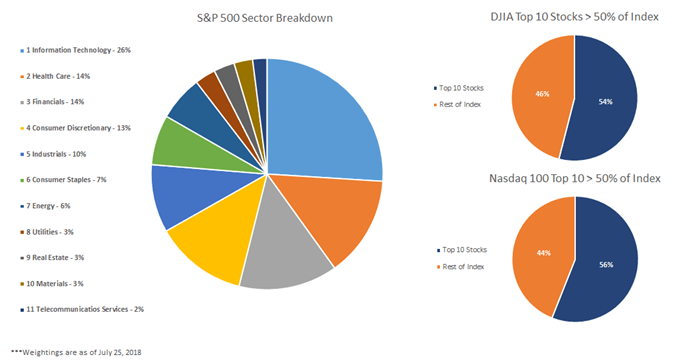
If you’re new to trading, you may not be familiar with the NASDAQ market. Essentially, the NASDAQ is an electronic marketplace. It lists stocks for companies in various industries, such as technology, healthcare, and finance. Unlike the Dow Jones Industrial Average (which tracks 30 large companies). Or the S&P 500 (which represents companies from different sectors). The NASDAQ includes stocks that are just traded on the NASDAQ market.
While it’s helpful to have a basic understanding of the market you’re trading in, the real key to success is having a solid trading strategy.
The Strategy Behind the NASDAQ Expert Advisor
Rather than focusing on technical theories, I prefer to focus on the trading strategies that I use with the NASDAQ Expert Advisor. After spending a lot of time developing Expert Advisors, I share the best ones with my followers.
When using the NASDAQ Expert Advisor, you can expect it to follow a systematic trading strategy. It is designed to take advantage of market trends. By analyzing historical market data, the robot is programmed to identify patterns. Then suggest a particular stock is likely to increase or decrease in value. Based on this analysis, it will buy or sell the stock accordingly.
Thanks to the systematic approach of the NASDAQ Expert Advisor, you can be confident that you’re not making trading decisions based on emotions. Instead, you’re relying on a tried-and-true strategy that has proven to be effective.
Entry Rule: Moving Averages Crossover
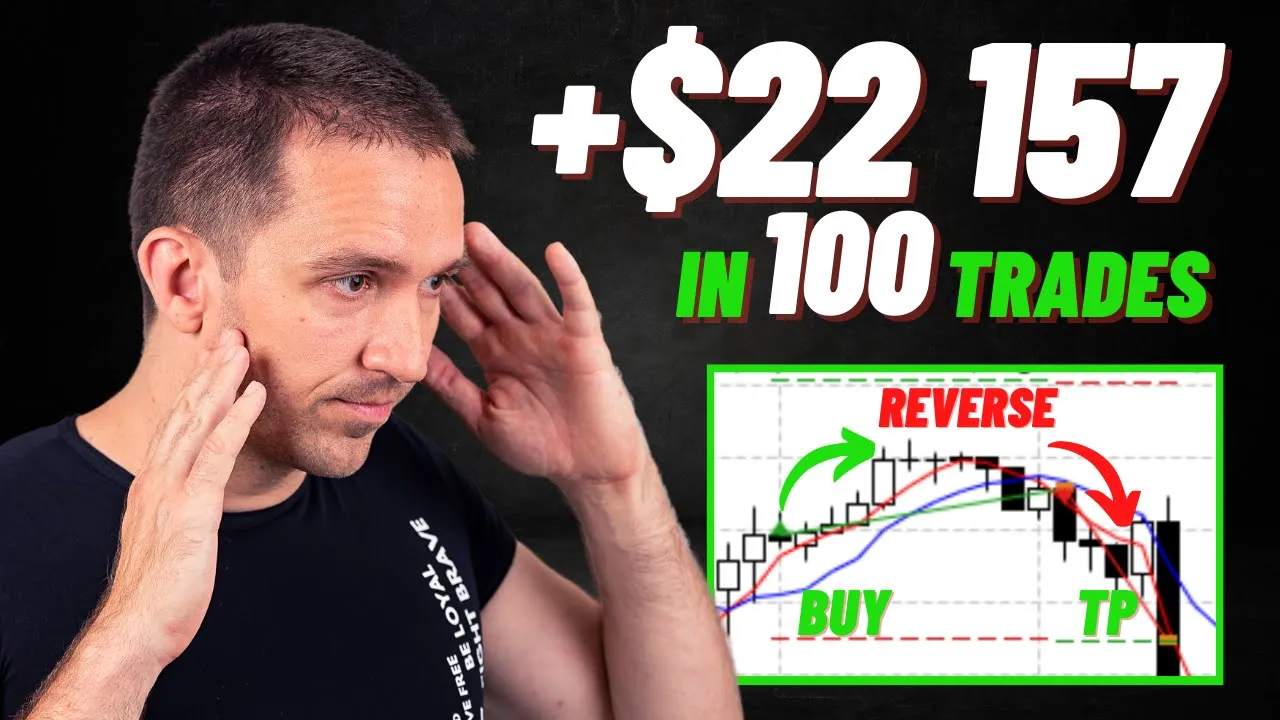
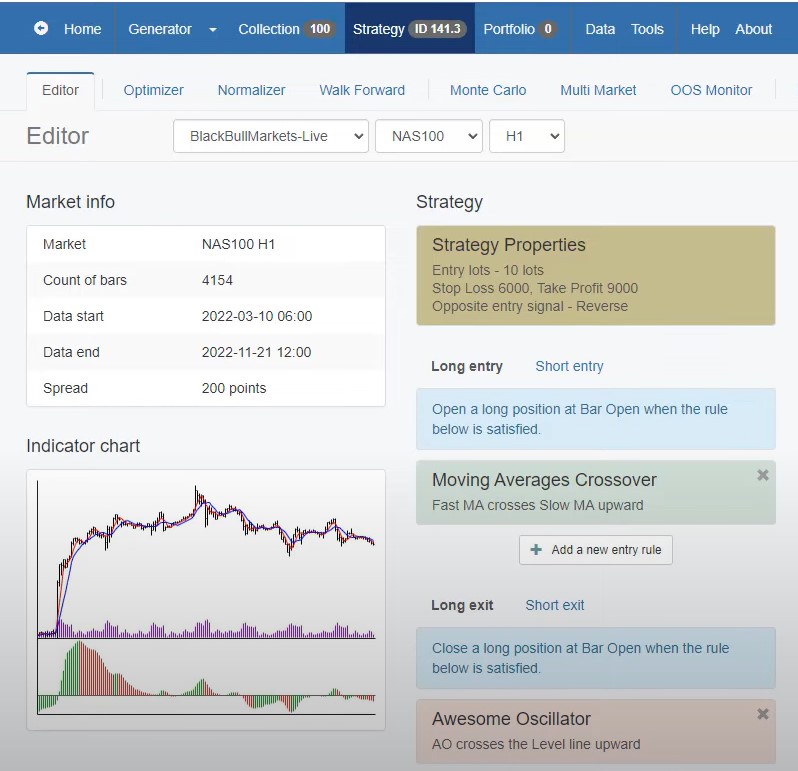
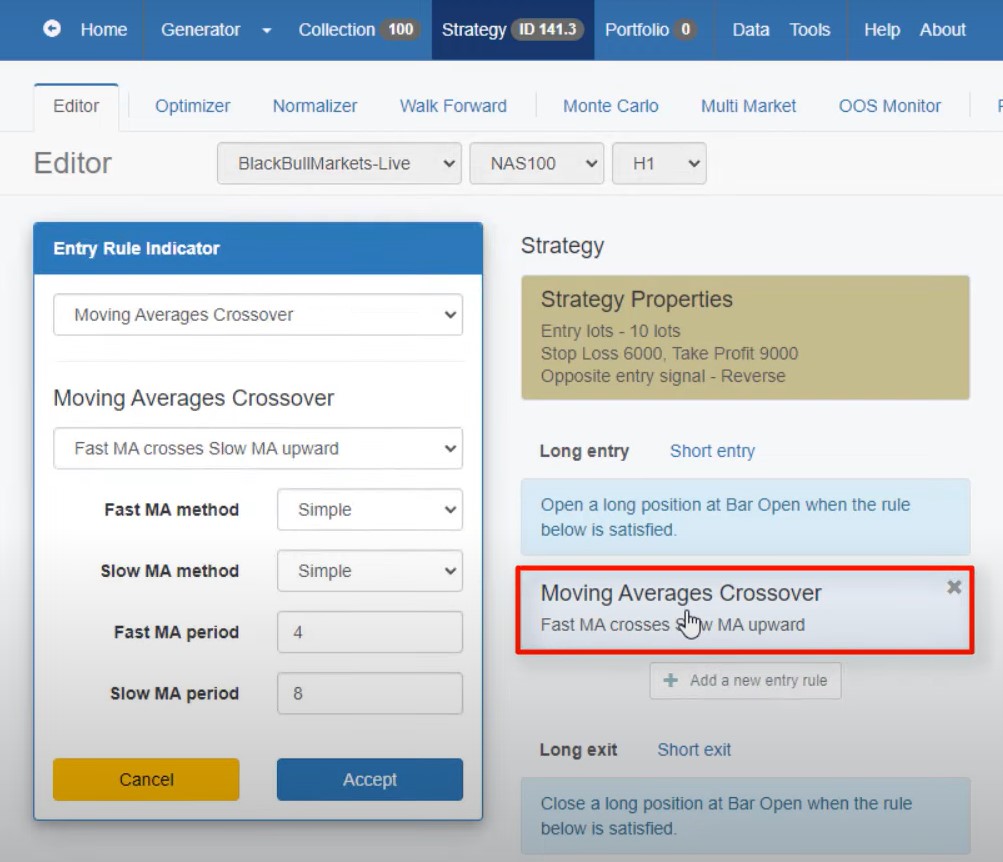
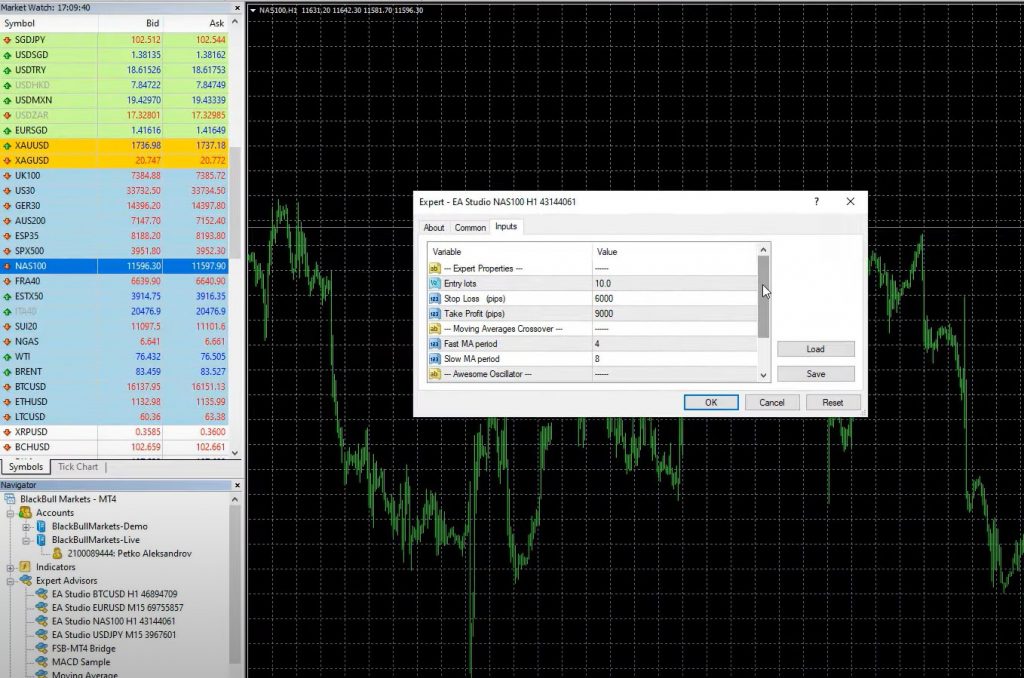
The first rule of the NASDAQ Expert Advisor is to use the fast Moving Average to cross the slow Moving Average upwards. Specifically, the strategy uses the 4 and 8 fast-Moving Averages. They use a period of 4 for the fast and a period of 8 for the slow Moving Average. Whenever the 4 crosses the 8 upwards, we have a buy signal. If it crosses downwards, we have a sell signal.
When the fast Moving Average crosses above the slow Moving Average, we have a long trade. We set the Stop Loss at 6000 Pips and Take Profit at 9000 Pips, which translates to $60 as a Stop Loss and $90 as a Take Profit, depending on the number of digits of your Broker.
Exit Rule: Awesome Oscillator
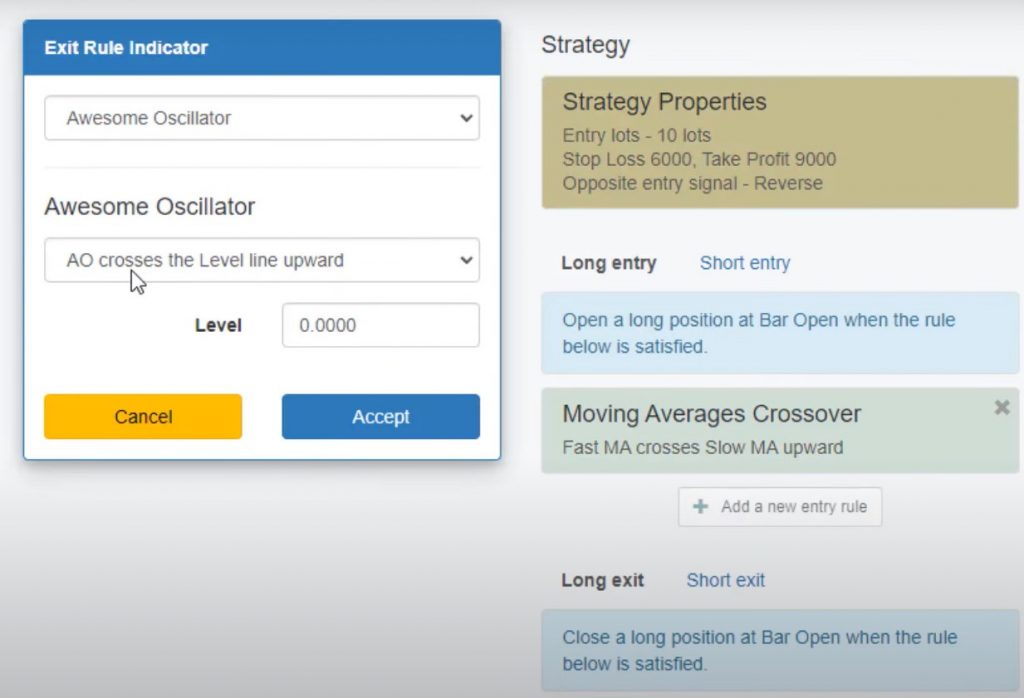
If the Take Profit and Stop Loss are not reached, the Awesome Oscillator comes into play. The exit rule for the NASDAQ Expert Advisor? Close the trade if the Awesome Oscillator crosses the level line upward.
Stability and Profitability of the Strategy
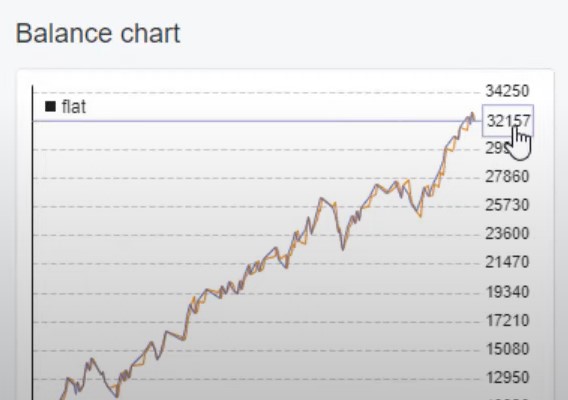
The NASDAQ Expert Advisor has proven to be a stable and profitable trading strategy. When we tested it on EA Studio, the balance chart was stable for the last 6 months. We had an open trade about 8 to 9% of the time. The maximum consecutive losses were 4. The maximum drawdown was 19%, based on trading on a 10K account using 10 Lots as a position.
Over the last 6-7 months, this strategy has generated a profit of $32,000. This is shown in the report and stats information.
Why Trade with a Robot?
Trading with an Expert Advisor like the NASDAQ Expert Advisor has many benefits, including:
- Removing Emotions from Trading: With a Robot, you don’t care about the emotions of the market or the latest news; you only trade based on the rules that you have set up.
- Consistency: A Robot trades consistently and executes trades based on the rules without deviation or hesitation.
- Time-Saving: Trading with a Robot saves time because it can monitor the markets 24/7, even while you sleep or are busy with other activities.
- Increased Precision: Robots can scan the markets more quickly and efficiently than humans, identifying and executing trades more precisely.
How to Backtest the NASDAQ Expert Advisor
If you’re new to trading or want to test the NASDAQ Expert Advisor before using it on a live account, you can backtest it using a trading platform like EA Studio or MetaTrader. Backtesting allows you to simulate trading the strategy with historical data to see how it performs and identify any issues that need to be addressed.
Steps 1 – 3: Downloading and Installing the NASDAQ Expert Advisor
Step 1: Download the Expert Advisor from the Description Once you download the Expert Advisor from the description, you need to find NASDAQ on the Market Watch, right-click, and go to the Chart window. This will open a new chart, and make sure you are on the H1 time frame because this Expert Advisor is designed for the H1 time frame.
Step 2: Open Data Folder and Paste the Expert Advisor Next, you need to go to File, Open data folder, click on MQL4, hit on Experts, and paste the Expert Advisor. Then you can double-click on it, and you will see the code for the Expert Advisor. If you are a developer, you are welcome to modify it. If you don’t know anything about programming, just like me, I’ll suggest you not touching it. However, if you want to transfer this code to TradingView script, for example, and trade it on that platform, you can do that.
Step 3: Hit Compile and Add the Expert Advisor to the Chart The only thing you need to do to backtest this Expert Advisor on MetaTrader is hit on Compile, and then you will see the Expert Advisor in your Navigator Tab. Hit on the plus icon in front of Expert Advisors, and you will see it right below. Then drag and drop it over the chart, and here will be the inputs, the desired Lot size, and the Magic Number on the bottom which allows us to track the performance if we trade many Expert Advisors in one account.
Steps 4 – 6: Backtesting and Analysis
Step 4: Backtest the Expert Advisor on MetaTrader Once you have added the Expert Advisor to the chart, hit OK, and then right-click on the chart. Go to Expert Advisors and hit on Strategy Tester. Stick to open prices as a model, which means that the Expert Advisor opens new positions at the opening of the bar if the rules are in place. Then hit Start, and the backtest is extremely fast.
Step 5: Analyze the Backtest Results Go to Results, and here are all the orders that executed with the Broker. You can see that the balance grows up until 32,348.98. This is the graph. So pretty much, the very same graph as we have on EA Studio, but here it is just white and in EA Studio, we have it in a small window.
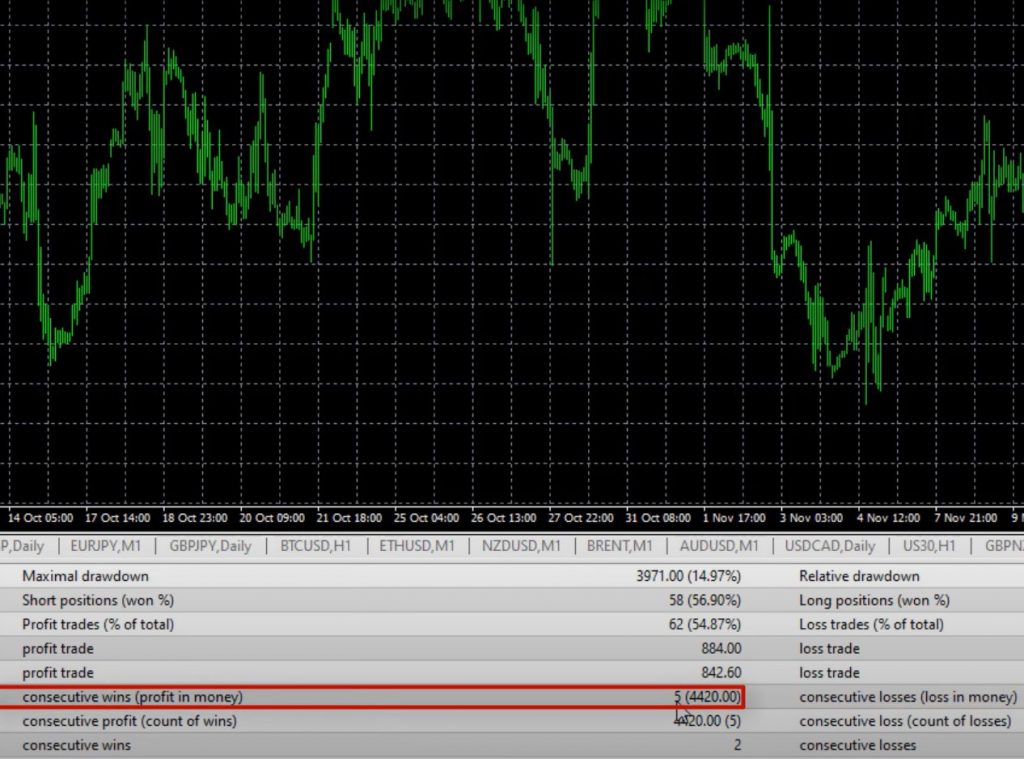
The MetaTrader backtester shows 113 trades, while EA Studio shows 115. However, it is very close, and you can see that the balance chart shows 32,157. Profit Factor is 1.75, which means that we have more profits than losses. Profit Factor above one is a good thing. We have a pretty balanced exposure between short positions and long positions, and the Maximum consecutive losses according to MetaTrader 4 backtester are 4 as well, and we have consecutive wins, 5.
Why Backtesting is Important
Whenever you’re watching a video and to download this NASDAQ Expert Advisor, make sure to backtest it. This way you’ll see how it does in the most recent period of time. Keep in mind that there is never a guarantee that the Expert Advisors will continue being profitable. Even if we have a great backtest. However, when you have over 100 trades for the last 6 months or so, and the strategy shows such a positive result, you can be confident that it will perform well in the future.
Other Platforms You Can Use The NASDAQ Expert Advisor On?
You can implement the NASDAQ Expert Advisor on any trading platform. This includes TradingView or any web-based platform you are using. Just insert the Moving Averages and the Awesome Oscillator indicator on your platform, and set the parameters as mentioned above. You can use a Stop Loss of $60 from the NASDAQ price and a Take Profit of $90 to secure quick profits and protect your capital from bigger losses. Blackbull Markets offers a free Pro Subscription when signing up through this link.
Why Use NASDAQ Expert Advisor?
The beauty of the NASDAQ Expert Advisor is its simplicity. You don’t need to spend a lot of time learning about the stock market or analyzing every stock on the NASDAQ. All you need is a strategy that performs well, and the NASDAQ Expert Advisor is one such strategy. You can easily trade it on a decent Broker, and you can improve your trading over time.
However, it is important to note that the markets change. One strategy may not work forever with the same parameters. This is why it is essential to keep an eye on the Expert Advisors, and constantly test them on Demo and Live accounts. Update their parameters whenever there is a drastic change in the market.
Why Use Expert Advisor Builders?
In the 21st Century, we use Expert Advisor Builders to create trading strategies. This is because it is impossible for a human to execute trades 24/7. Expert Advisors can execute trades super precisely and without a miss, meaning that you will not miss any trades during the day. If you want to learn more about how to use an Expert Advisor Builder, there are many resources available online.
NASDAQ Expert Advisor: Conclusion
The NASDAQ Expert Advisor is a simple yet effective trading strategy that can improve your trading performance. It uses two simple Moving Averages and the Awesome Oscillator indicator to generate buy and sell signals. You can implement it on any trading platform and use a Stop Loss of $60 and a Take Profit of $90 to secure quick profits and protect your capital from bigger losses.
It is essential to keep an eye on the Expert Advisors. Constantly test them on Demo and Live accounts. Update their parameters whenever there is a drastic change in the market. With the help of Expert Advisor Builders, you can create trading strategies that can execute trades super precisely and without a miss. So, don’t be afraid to grab the free Robot and test it on a Demo account.